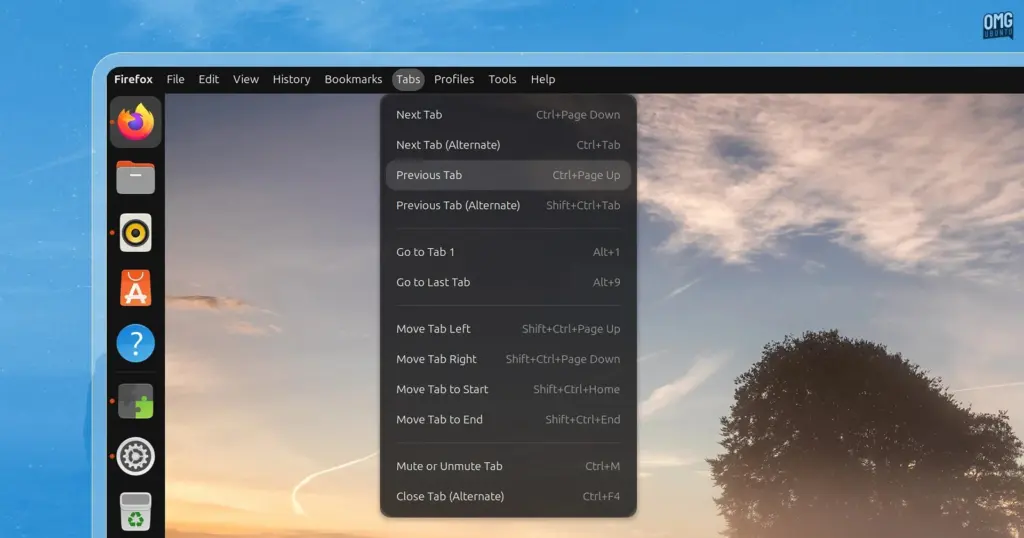
For more than a decade, the global menu bar has remained one of the most polarizing and sought-after interface paradigms in the Linux desktop ecosystem. First brought to widespread prominence on Linux during the early days of Ubuntu’s Unity desktop environment, the design relocates traditional application menu bars—such as File, Edit, View, and Help—away from individual application windows and consolidates them into the persistent panel running across the top of the display. While cherished by many users for saving vertical screen real estate on widescreen laptops and providing a clean, distraction-free window frame, the concept has spent the past several years largely in technical exile on modern Linux distributions.
A newly released GNOME Shell extension known as Orbit Global Menu is attempting to change that trajectory. Created by developer Unmade760, the extension aims to resolve the technical and architectural roadblocks that have caused virtually all previous global menu projects to falter on modern GNOME Shell installations. By introducing a pragmatic hybrid mechanism that blends traditional system communication protocols with a novel keyboard-shortcut mapping framework, the extension manages to restore functional, responsive application menus across hundreds of contemporary desktop programs running on recent versions of GNOME.
The release arrives at an opportune moment for desktop customization enthusiasts. Previous global menu implementations for GNOME Shell frequently suffered from instability, breakage across minor desktop environment updates, and an inability to interface with modern software. By confronting the realities of current application development standards directly, Orbit Global Menu offers a surprisingly resilient and polished user experience that functions reliably where its predecessors struggled.
The Lingering Challenges of Modern Linux Menus
To appreciate why a modern global menu extension is a notable technical feat, one must understand why earlier efforts broke down. Throughout the early 2010s, desktop environments like Unity relied heavily on a standardized architecture known as DBusMenu. Under this system, native graphical toolkits such as GTK and Qt would package an application’s internal menu hierarchy and export it over the system’s D-Bus message bus. The desktop shell’s top panel would then intercept these data packets, interpret the menu tree, and reconstruct the dropdown menus at the top of the screen while instructing the application window to hide its own in-window menubar.
Over the ensuing decade, this architecture progressively fractured under the weight of three fundamental shifts across the desktop landscape:
First, the Linux ecosystem transitioned rapidly toward the modern Wayland display server protocol. Unlike the legacy X11 windowing system, Wayland enforces strict security and isolation boundaries between running client applications and the compositor. Under Wayland, client applications are deliberately restricted from inspecting or manipulating other windows, and arbitrary global event synthesis is tightly constrained. These safeguards, while beneficial for system security and tearing-free rendering, frequently complicated the delicate synchronization required to strip menus from windows and hoist them into a system panel.
Second, graphical interface design trends shifted fundamentally away from traditional hierarchical menus. In GNOME, developers championed Client-Side Decorations (CSD) and integrated HeaderBars, replacing sprawling menu bars with consolidated "hamburger" menus and contextual header buttons. Across the broader software industry, the massive influx of cross-platform frameworks—most notably Electron—meant that thousands of desktop applications were effectively packaged web applications running inside an isolated Chromium wrapper. Many of these modern applications never bother to export their menus over standard Linux D-Bus interfaces at all.
As a consequence of these developments, users who installed legacy global menu extensions in recent years were routinely met with frustration. Even if an extension successfully loaded in GNOME Shell, the top panel remained completely barren whenever a user focused a modern application, an Electron utility, or a modernized GTK program. The global menu had become an empty shell, useful only for the shrinking minority of classic desktop utilities that still maintained intact DBusMenu export routines.
A Pragmatic Approach: Shortcuts as Application Menus
The core breakthrough in Orbit Global Menu lies in how it sidesteps these modern architectural hurdles. Rather than stubbornly waiting for upstream application developers to conform to aging Linux menu-exporting standards, the extension adopts a clever, pragmatic workaround: it synthesizes native-looking menus based on the documented keyboard shortcuts of popular desktop software.
The extension ships with out-of-the-box menu configurations for 292 well-known applications. When a supported program takes window focus, Orbit Global Menu inspects its internal database, maps the application’s documented shortcut structure into standard top-level categories such as File, Edit, View, and Window, and populates the GNOME Shell top panel accordingly.
When a user clicks on an item within these synthesized menus, the extension does not need to send an abstract toolkit-level invocation to the target window. Instead, it directly triggers the corresponding keyboard shortcut associated with that action.
 Linux & Open Source Solutions
Kagi Halts Development of Orion Browser for Linux and Windows, Plans to Open Source Codebase
Kagi has officially announced that it is ending the internal development of...
 Linux & Open Source Solutions
Ex-Microsoft dev builds a new task manager for Linux
For millions of personal computer users over the past three decades, Plummer’s...
 Linux & Open Source Solutions
Canonical Prototype Explores Deep AI Integration for Future Ubuntu Desktop
What would deeper, system-level artificial intelligence integration look like on the modern...