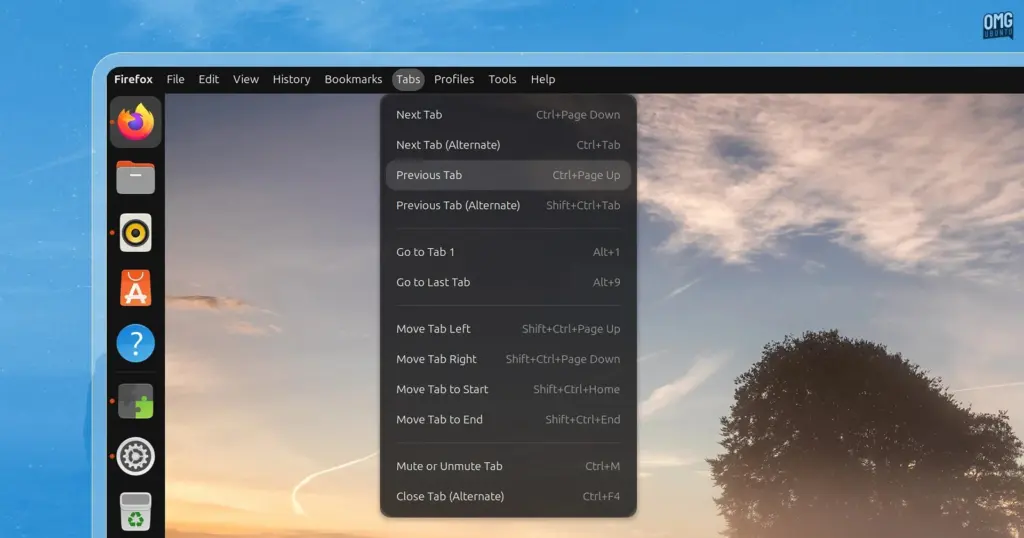
By default, the dropdown menus utilize solid, opaque backgrounds that align with GNOME Shell’s standard palette. For users who prefer a more translucent, modern aesthetic, the extension includes a background blur option, which integrates smoothly on systems where utility extensions like Blur My Shell are active.
The extension also addresses panel density and element collision. On standard GNOME installations, the top panel hosts the workspace indicator "pips" near the left edge. Because global menus require horizontal breathing room to display application categories without truncating text, the extension automatically hides these workspace pips while an application menu is active. However, users who value persistent workspace status can override this behavior in the extension preferences and force the indicators to remain visible.
Visual hierarchy can also be adjusted to individual taste. The title of the currently focused application sits adjacent to its menu entries, styled in a bold typeface by default to clearly delineate the active context. Through the settings panel, users can toggle this label to a standard font weight or suppress the application title entirely, yielding a minimalist presentation focused purely on menu navigation.
Install Global Menu on Ubuntu
Orbit Global Menu officially targets GNOME versions 48 through 51, making it compatible with modern Linux distributions, including Ubuntu 26.04 LTS and subsequent releases such as Ubuntu 26.10.
The primary extension can be fetched and enabled through the official GNOME Extensions directory or managed via the standard Extension Manager utility. However, to unlock the full potential of live menus for traditional software like GIMP and Shotwell, users must build and install the optional companion daemon package from source.
On an Ubuntu system, assembling the companion package involves cloning the project repository, building the package tooling, and installing the resulting Debian package. The process can be executed through a standard terminal session by issuing the following commands:
sudo apt install git make python3-setuptools
git clone https://github.com/Unmade760/orbit-global-menu.git
cd orbit-global-menu
make build
sudo apt install ./global-menu_*.deb
Once the Debian package installation concludes, users must log out of their desktop session and log back in to ensure that the background daemon initializes properly and hooks into the desktop message bus. Following the session restart, the companion daemon will automatically interface with the GNOME Shell extension whenever a compatible application is launched.
Rekindling the Unity Legacy
For longtime Linux desktop users, the arrival of a competent, stable global menu inescapably evokes memories of the Unity desktop environment, which Canonical first deployed to mainstream Ubuntu desktops with the release of Ubuntu 11.04 in 2011. Unity’s aggressive focus on vertical space conservation—combining the window title, application menus, system indicators, and window controls into a unified top bar—was pioneering for its era, even if it initially provoked debate among desktop purists.
While Unity eventually ceased to be Ubuntu’s default interface when Canonical transitioned back to an upstream GNOME Shell foundation, specific elements of that design philosophy have maintained a loyal following. The global menu was often paired with Unity’s celebrated Heads-Up Display (HUD), an innovative feature introduced in 2012 that allowed users to press a key and instantly search through every nested command in an application’s menu bar using fuzzy text matching.
While Orbit Global Menu does not attempt to reconstruct the HUD, its success in re-establishing a reliable, multi-application menu bar in the GNOME top panel represents the most significant step forward for this desktop workflow in years. By accepting that modern software architecture has changed, and by meeting both legacy toolkits and modern sandboxed frameworks on their own terms, the project bridges a persistent divide in desktop Linux customization. For users seeking to streamline their application real estate or recapture the fluid navigation of classic Linux desktop environments, Orbit Global Menu proves that the global menu concept still has a viable place on the modern desktop.
 Linux & Open Source Solutions
Calibre 9.17 Arrives with Accelerated Conversion Speeds, JPEG XL Support, and Accessibility Enhancements
The open-source digital library and e-book management suite Calibre has officially rolled...
 Linux & Open Source Solutions
BleachBit 6.0.6 Arrives with Ubuntu 26.10 Compatibility, Performance Overhauls, and Expanded AI Application Cleaners
The developers behind BleachBit, the longstanding free and open-source system maintenance and...
 Linux & Open Source Solutions
Ubuntu 26.10 Flavours Arrive: Community Editions Update Desktops, Graphics, and Core Tooling
Alongside the rollout of the flagship operating system, the official Ubuntu 26.10...