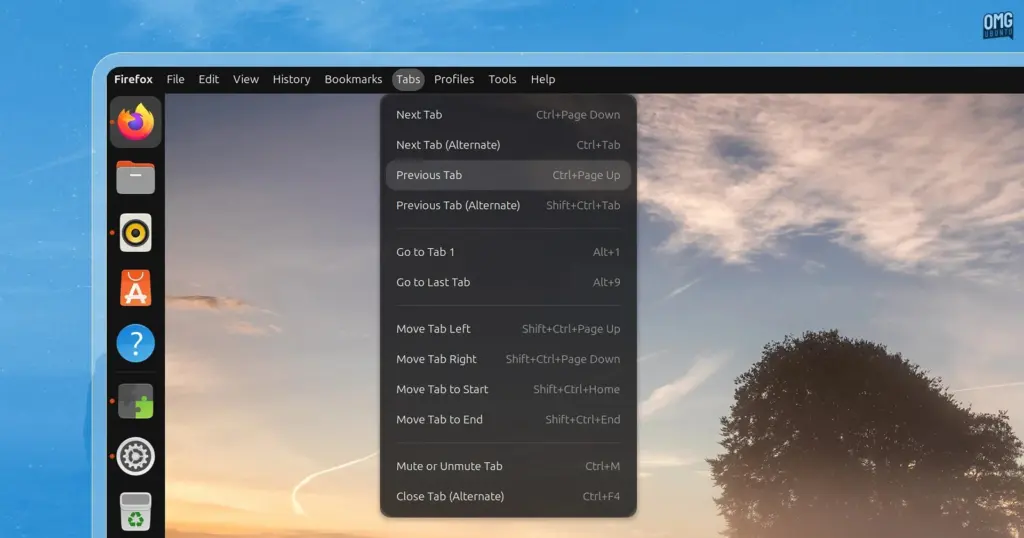
This approach completely neutralizes the toolkit barrier. Because virtually every modern desktop program—from terminal emulators like Ghostty to heavyweight Electron-based suites like text editors, chat clients, and developer tools—maintains an extensive suite of keyboard shortcuts for common operations, Orbit Global Menu can expose those operations cleanly in the top bar. The application does not need to understand what a global menu is, nor does it need to support legacy desktop APIs. So long as a function can be triggered via a key combination, it can be seamlessly embedded into a desktop menu and activated with a standard mouse click.
For applications not included in the pre-configured database of 292 programs, users are not locked out of the feature. Orbit Global Menu provides access to its menu definitions directly through its settings interface. Users can inspect, modify, or extend the existing configurations, or define entirely new shortcut maps for bespoke and unlisted utilities.
Native Menu Handling via the Companion Daemon
While the shortcut-mapping method solves the problem for modern and cross-platform software, it represents only half of Orbit Global Menu’s dual-engine architecture. For complex, traditional productivity software—such as the image editor GIMP, the digital photo manager Shotwell, or office suites—shortcut emulation alone cannot capture the full depth of the program’s interface.
Such specialized tools frequently contain nested submenus hundreds of items deep, alongside dynamic actions that must be enabled or disabled in real time. For instance, an image editor needs to dynamically gray out the "Deselect" or "Invert Selection" actions whenever no active pixel selection exists on the canvas.
To cater to these complex legacy environments, Orbit Global Menu offers an optional companion daemon. This companion service acts as a native system bridge, running in the background to monitor traditional D-Bus menu streams.
When the companion daemon is active, the extension shifts into a full-fidelity native menu mode for applications that properly export their menus. Instead of rendering a synthetic shortcut menu, it renders the genuine, live application menu directly inside the GNOME Shell panel. Crucially, the companion daemon handles the real-time state synchronization required for advanced productivity work: menu entries dynamically turn insensitive (grayed out and non-clickable) in direct alignment with whatever the user is doing inside the application viewport. Wherever the underlying toolkit supports it, the daemon also commands the application window to conceal its internal menubar, freeing up the vertical workspace inside the window frame.
The functional difference between running the extension with or without the companion daemon is particularly stark in software like GIMP. Without the daemon, the user receives a streamlined menu populated by mapped shortcut triggers. With the daemon installed and running, the user receives the full, granular GIMP menu tree, complete with dynamic state changes and identical behavior to a native toolkit menubar.
Certain specialized environments do require minor adjustments to export their menus properly. Web browsers like Mozilla Firefox, for example, maintain native menu-export capabilities but require small internal configuration tweaks before they broadcast their menus across the desktop bus. The project maintains dedicated setup documentation outlining these specific application configurations for users seeking an exhaustive, unified desktop setup.
To ensure that the desktop never feels inconsistent or broken, the extension also incorporates a resilient fallback mechanism. If a user switches focus to a window that is neither supported by the 292 built-in shortcut profiles nor configured to export its menus over D-Bus, the top panel does not simply go blank. Instead, Orbit Global Menu populates the panel with a clean set of standard window, workspace, and session controls. As a result, the top panel maintains an active, balanced visual presence across the entire desktop session, avoiding the awkward visual gaps that historically undermined earlier global menu designs.
Desktop Customization and Interface Refinements
Beyond its core menu engines, Orbit Global Menu introduces an array of aesthetic and functional configuration options designed to help the extension blend naturally into modern GNOME aesthetics.
 Linux & Open Source Solutions
Ubuntu 26.10 Flavours Arrive: Community Editions Update Desktops, Graphics, and Core Tooling
Alongside the rollout of the flagship operating system, the official Ubuntu 26.10...
 Linux & Open Source Solutions
ONLYOFFICE Desktop Editors 10.0 Released as Fully Rebuilt App With Decoupled AI Tools and Over 1,000 Bug Fixes
The developers behind ONLYOFFICE have officially released version 10.0 of ONLYOFFICE Desktop...
 Linux & Open Source Solutions
OpenShot Video Editor Arrives on the Canonical Snap Store, Bringing Version 4.0 to Ubuntu Users
In a major milestone for open-source desktop multimedia production, the popular Qt-based...