What would deeper, native artificial intelligence integration look like on the modern Ubuntu desktop? While the broader technology industry races to integrate generative assistants into consumer operating systems, often with mixed reception, the open-source ecosystem has largely approached the trend with a mix of caution, curiosity, and technical skepticism. Now, a new experimental project from within Canonical provides a concrete glimpse into how system-level intelligence could function on Linux without upending the fundamental desktop experience.
Didier Roche-Tolomelli, a longtime Canonical desktop engineer widely known in the community as "didrocks," has published an experimental Snap package dubbed warty-prototype. Rather than serving as a production-ready system component, the software functions as an interactive, automated mockup designed to simulate how an on-device language model could assist everyday desktop users with routine computing tasks.
Listed publicly in the Snap Store as a "design-discussion prototype of the next Ubuntu launcher," the package represents an exploratory design artifact rather than a formal roadmap commitment. The phrasing itself is deliberate: it frames the software not as an impending default replacement for GNOME Shell’s application dashboard or search overview, but as a dynamic sounding board for Canonical’s internal design teams and the wider community to evaluate workflows, user interfaces, and the practical utility of local AI models.
A launcher and a prompt box
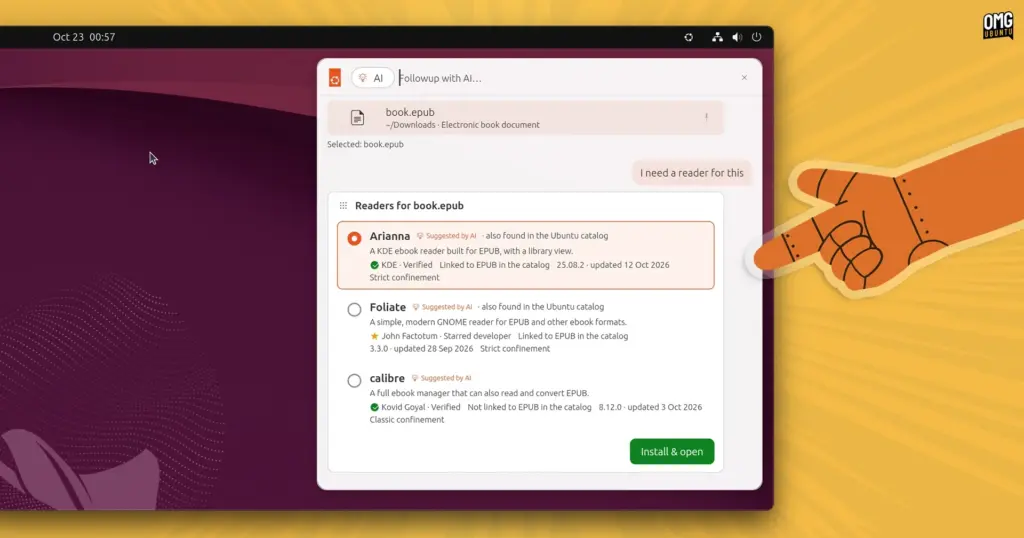
At first glance, the prototype presents an evolutionary extension of familiar Linux application launchers, combining quick-launch mechanisms, file indexing, and system navigation into a centralized interface. Accessible via a small Ubuntu logo positioned in the desktop’s top panel, the interface expands into a combined command palette and search bar.
Unlike conventional search bars that operate primarily through static keyword indexing, this concept pairs traditional system search with an active, natural-language prompt field. The resulting interface does not treat artificial intelligence as an isolated chatbot floating in an external window. Instead, it positions a theoretical local model as an underlying system orchestration layer capable of chaining together distinct desktop components, native utilities, and application repositories.
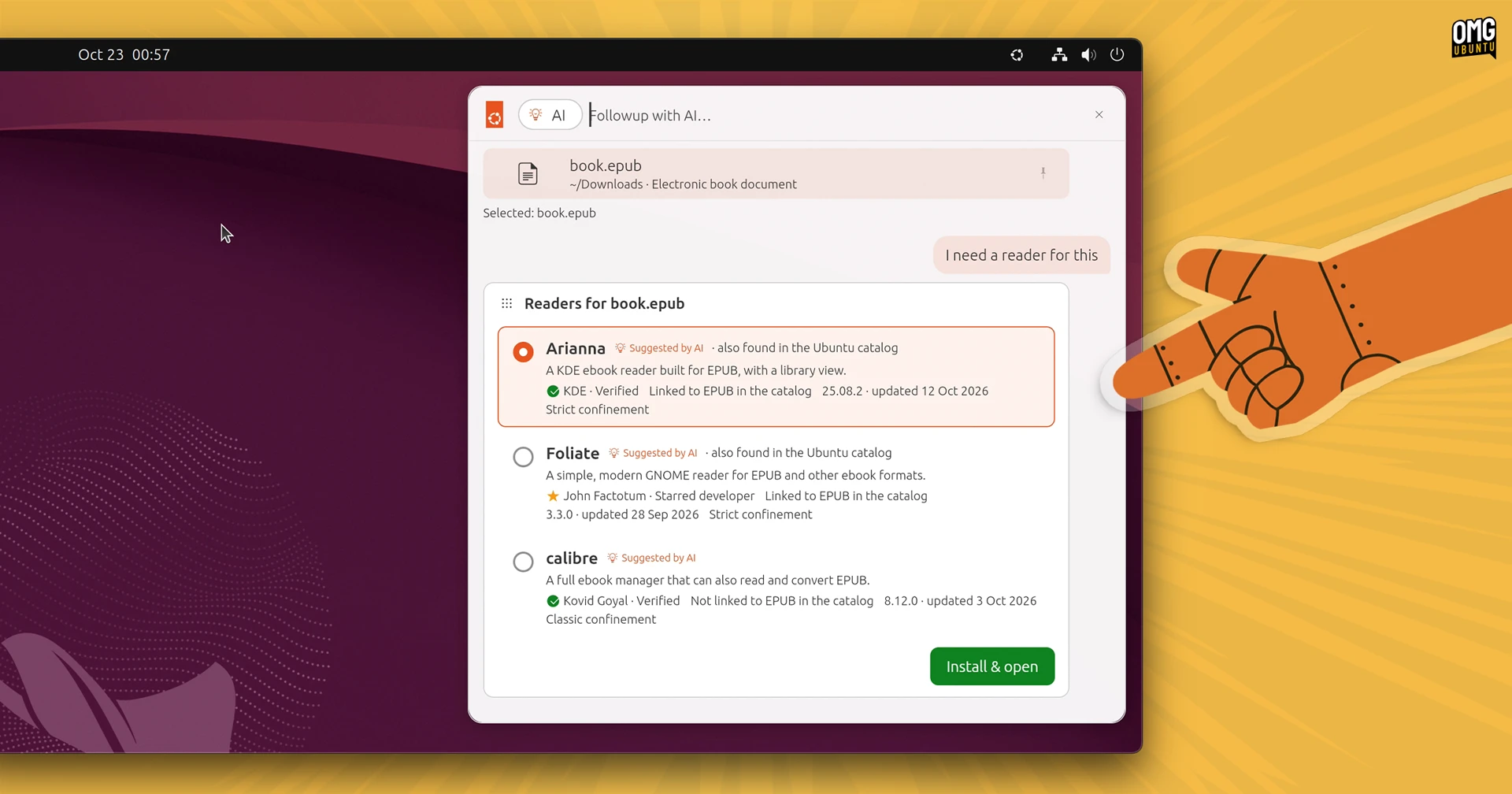
Running the automated simulation demonstrates several coordinated scenarios designed to illustrate how intent-driven computing might solve common desktop friction points.
One primary use case focuses on desktop personalization and system settings automation. In this simulated workflow, a user relies on standard file filters to locate an image stored on the local drive. Rather than manually opening the system settings panel, navigating to the background preferences, applying the wallpaper, and searching through accent palettes, the user addresses the launcher’s input box. The simulated model is instructed to set the selected image as the current desktop background and immediately recalculate the system’s accent color to complement the tones of the image. The launcher executes the chain of actions seamlessly, turning an aesthetic task that typically requires multiple application windows into a single, cohesive command.
 Linux & Open Source Solutions
Third-Party ‘Nautilus My Computer’ Extension Restores Drive Overview and Introduces Miller Columns to GNOME Files
The default GNOME desktop environment has long prioritized minimalism, streamlined interfaces, and...
 Linux & Open Source Solutions
Ubuntu 26.10 Flavours Arrive with Updated Desktops, System Modernization, and the Return of Ubuntu MATE
The launch of the Ubuntu 26.10 operating system cycle extends well beyond...
 Linux & Open Source Solutions
KDE Plasma 6.8 Released on Project’s 30th Anniversary, Dropping X11 Sessions and Expanding Core Features
The KDE community has officially released KDE Plasma 6.8, marking a historic...