
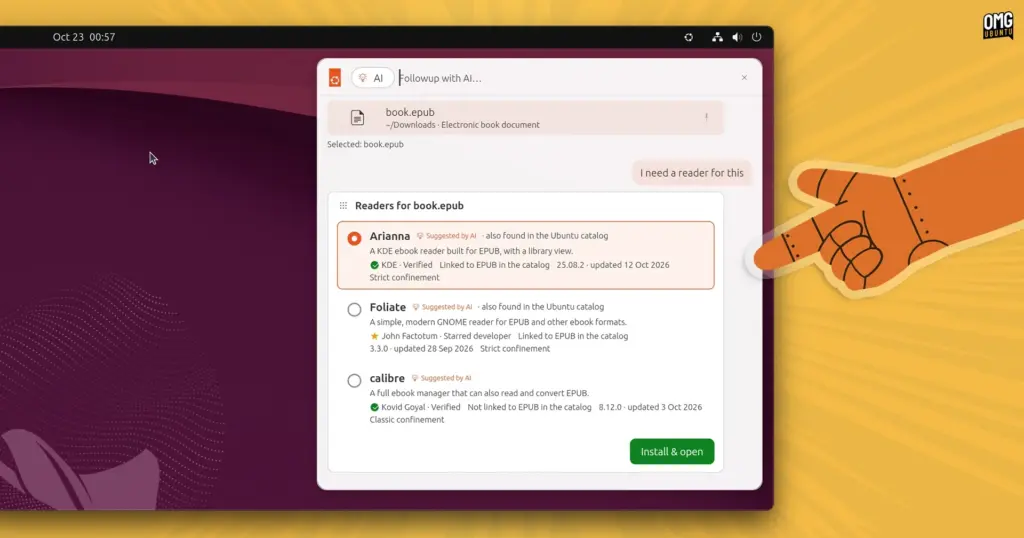
Another scenario explores software discovery and package management integration through contextual file handling. When a user attempts to interact with an unsupported file format—in this case, an ePub digital book—the launcher provides a direct "Followup with AI…" prompt. Instead of returning a generic error indicating that no compatible reader is installed, the launcher queries the Snap Store for relevant software packages capable of handling the format. Matching software options appear directly inside the launcher’s search interface, equipped with inline installation buttons. Activating an install button triggers package deployment without requiring the user to launch a standalone software center or execute command-line installation utilities.
A third and notably complex demonstration addresses clipboard history management and structured data extraction. Desktop users frequently copy disparate fragments of information—dates, addresses, meeting titles, or flight times—from emails, chat clients, and web pages. In the prototype’s simulation, a user selects several items from the clipboard history and tasks the integrated model with synthesizing the unstructured text into a coherent itinerary. The launcher processes the combined clipboard fragments, formats them into a structured calendar entry, and presents an interactive prompt to add the event directly to the system calendar.
Beyond these automated, prompt-driven demonstrations, the prototype outlines a wide range of conventional launcher capabilities. It models standard desktop behaviors such as indexing installed applications, browsing local documents, selecting emoji, inspecting clipboard histories, navigating across open browser tabs, and reviewing chronological task histories.

Throughout the interface, search results and model suggestions are accompanied by actionable icons, toggles, and contextual menus. Rather than functioning as a passive information-retrieval mechanism—the traditional role filled by desktop indexers—the interface acts as an operational hub designed to manipulate system state.
This functional paradigm shares notable philosophical similarities with recent iterations of macOS Spotlight, which has progressively evolved from a simple file search tool into an extensible, action-oriented system overlay. By combining application execution, direct actions, and conversational context into a singular workspace, the prototype suggests a future where users spend significantly less time navigating deep directory structures, settings trees, and fragmented configuration menus.
The demonstration reflects Canonical’s growing focus on pragmatic artificial intelligence implementations. The company has publicly signaled its intention to expand the presence of AI features across the Ubuntu ecosystem, provided those features deliver measurable user utility. Earlier this month, Canonical introduced the Myna AI dictation tool as an open tech preview, showcasing local speech-to-text processing on the Linux desktop. Internally, Canonical’s engineering teams have also incorporated large language models and agentic coding frameworks to assist with infrastructure management, automated testing, and development pipelines.
Importantly, Canonical has maintained that its interest in modern AI is governed by functional pragmatism rather than decorative deployment. The company has repeatedly emphasized that it will not introduce machine learning features simply for the sake of following broader industry hype. For desktop environments, this philosophy places strict emphasis on local, on-device inference models capable of running directly on consumer hardware.
 Linux & Open Source Solutions
Ubuntu 26.10 Flavour Lineup Arrives with Updated Desktops, Wayland Advances, and the Return of Ubuntu MATE
Alongside the debut of the primary distribution, the wider Ubuntu ecosystem has...
 Linux & Open Source Solutions
Ubuntu 26.10 Introduces Restricted Media Codec Installation to App Center’s Add-Ons Hub
Ubuntu 26.10 has expanded the functionality of its modern App Center by...
 Linux & Open Source Solutions
Canonical Unveils Official Ubuntu Desktop Images for RISC-V Ahead of Ubuntu 26.10
Installing a complete graphical Ubuntu desktop on 64-bit RISC-V hardware is poised...







