
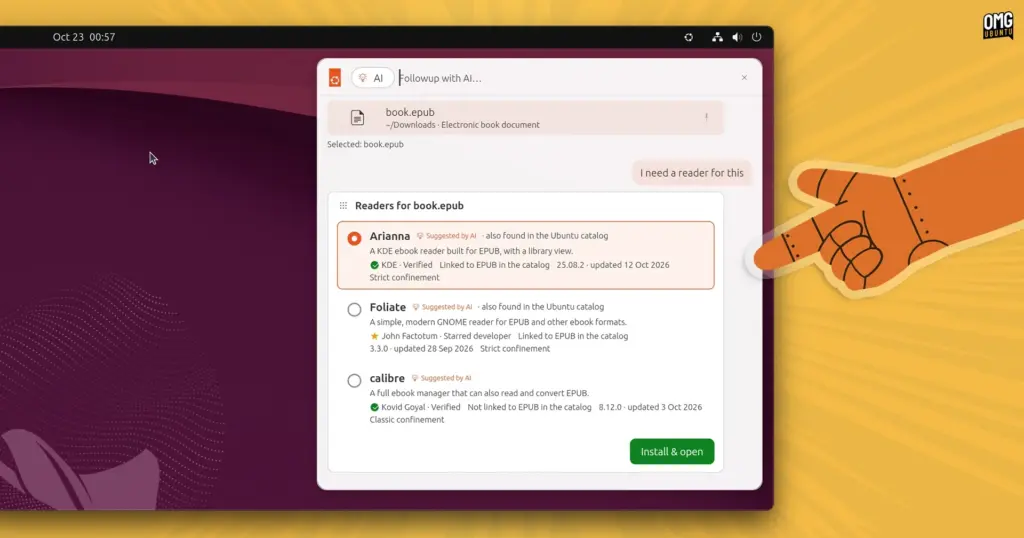
Prioritizing on-device execution avoids the significant privacy, data-handling, and latency concerns associated with proprietary cloud-based services. In an operating system environment prized by developers, system administrators, and privacy-conscious users, sending desktop queries, clipboard contents, or local file metadata to external remote servers presents serious security and ethical concerns. By modeling interactions around hypothetical on-device models, the prototype explores how system-level assistance might operate while ensuring user data remains strictly confined to the local machine.
Try the demo (remember it’s a demo)
For developers, designers, and Linux enthusiasts curious to examine the conceptual interface firsthand, Canonical has made the prototype easily accessible. The software is distributed as a Snap package and can be installed across most actively supported Ubuntu releases via the experimental edge tracking channel:
sudo snap install warty-prototype --edge
Once the installation completes, the prototype can be launched directly from the command line. Upon execution, the utility places a small Ubuntu logo within the desktop’s top system panel. Clicking this icon reveals the experimental launcher overlay alongside a comprehensive menu of automated simulation routines illustrating the various assisted workflows.
Prospective testers should bear in mind that the package is strictly a non-functional interactive mockup. It does not contain an active local language model, nor does it interface with real system components, manipulate user configurations, index local files, or alter operating system behavior. The interactions are scripted animations designed exclusively to demonstrate visual hierarchy, interface flow, and potential user experiences.
The naming of the package itself carries historical significance for longtime Linux users: warty-prototype pays playful homage to Ubuntu 4.10, codenamed "Warty Warthog," the distribution’s inaugural public release distributed more than two decades ago. While the homage serves as a reminder of the desktop’s long-standing foundations, the interface inside attempts to map out where user interaction on Linux could head in the years to come.
 Linux & Open Source Solutions
Canonical Prototype Explores Deep AI Integration for Future Ubuntu Desktop
What would deeper, system-level artificial intelligence integration look like on the modern...
 Linux & Open Source Solutions
Ubuntu 26.10 Introduces Top-Screen Layout Picker to Streamline Window Tiling
Ubuntu 26.10 is introducing a new way for users to organize their...
 Linux & Open Source Solutions
Ubuntu 26.10 Releases Across Official Community Flavours: Desktop Refinements, Wayland Transitions, and the Return of MATE
Alongside the general availability of the primary distribution, the release of Ubuntu...







