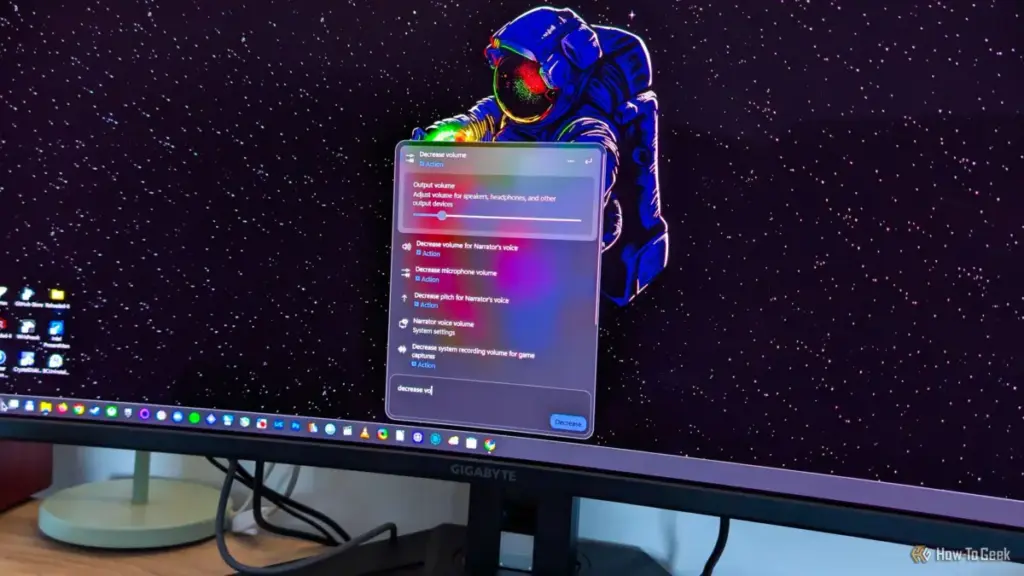
For years, the search functionality within Windows has been a point of contention for both power users and casual enthusiasts. What was once a simple tool for finding local files and launching applications gradually transformed into a cluttered interface, often prioritizing web results and storefront suggestions over the data actually stored on a user’s hard drive. However, following a series of updates culminating in late 2026, Microsoft appears to be steering Windows 11 Search back toward its roots as a high-performance, local-first utility.
Through a combination of structural redesigns, a shift to native UI frameworks, and the introduction of long-requested customization toggles, the Windows Search experience has seen its most significant improvement since the operating system’s launch. Yet, as the platform becomes faster and more reliable, a familiar shadow looms on the horizon: the impending integration of Copilot, Microsoft’s ubiquitous AI assistant.
Microsoft Finally Empowers Users to Remove Web and Store Results
One of the most persistent frustrations for Windows 11 users has been the forced integration of Bing and the Microsoft Store into the Start menu’s search bar. For many, the act of searching for a local document or a specific system setting was frequently interrupted by suggested web queries or advertisements for apps in the Microsoft Store. While tech-savvy users often turned to complex workarounds—such as executing specific PowerShell commands or editing the Windows Registry—to reclaim their search bar, a native solution remained elusive for the general public.
Microsoft’s stance began to shift in early June 2026 during a Windows Insider meetup. Acknowledging the feedback from a vocal community of testers, the company promised to introduce a direct method for disabling these external results within the standard Windows Settings menu. This commitment marked a rare moment of Microsoft prioritizing user-requested "de-cluttering" over its own cross-platform service integration.

The rollout of this feature has been a gradual process. While Windows Insiders saw the changes first, the broader public began receiving the update in stages starting in late August. By late October 2026, the feature had reached a critical mass of global users. The implementation is remarkably straightforward, housed under the "Privacy & security" section of the Settings app. Within the Search sub-menu, users are now presented with two distinct toggles: "Web Searches" and "Microsoft Store."
By disabling these options, the search interface reverts to a localized indexing tool. The impact on the user experience is immediate; queries no longer hang while waiting for a server response from Bing, and the results list is no longer padded with irrelevant commercial suggestions. For those who use their PCs primarily for productivity, this change represents a significant "quality of life" improvement that restores the utility of the Start menu as a professional tool rather than a portal for web discovery.
A Native Redesign: The Shift to WinUI 3
Beyond the new customization options, the underlying architecture of Windows Search has undergone a fundamental transformation. For a significant portion of Windows 11’s lifecycle, the search interface was powered by WebView2, a framework that essentially ran a version of the Microsoft Edge web engine in the background to render the UI. While this allowed Microsoft to update the search experience dynamically without full OS patches, it came at a cost: resource consumption and a perceptible "lag" when opening the search window.
The latest update, included in the KB5132057 package, replaces the WebView2-based interface with a new UI built from the ground up on WinUI 3. As the native UI framework for Windows desktop applications, WinUI 3 allows for a much tighter integration with the operating system’s core resources. The results are palpable; the search window now appears almost instantaneously upon clicking the taskbar icon or pressing the Windows key.
 Tech Tutorials & How-To Guides
Bridging the Digital Divide: How Legacy Kindle Hardware Reclaims Modern Social Features Through Open-Source Innovation
In the rapidly evolving landscape of consumer electronics, the lifespan of a...
 Tech Tutorials & How-To Guides
Samsung One UI 9: Redefining the Galaxy Experience Through Integrated AI and User-Centric Design
For over a decade, Samsung has maintained its position at the forefront...
 Tech Tutorials & How-To Guides
Garmin’s vívoactive 5 Hits Record Low Price in Significant Amazon Discount Event
In a move that signals aggressive pricing within the wearable technology sector,...