The launch of the Ubuntu 26.10 operating system cycle extends well beyond Canonical’s flagship desktop edition. Alongside the primary distribution, the wider family of official community flavours has rolled out new releases, delivering targeted desktop environments tailored to specific workflows, hardware footprints, and user preferences. The milestone is highlighted by updated desktop packages for long-standing editions such as Kubuntu and Xubuntu, alongside the official return of Ubuntu MATE under a reconstituted maintenance team.
While each flavour presents a distinct graphical shell and default software suite, every official variant is built upon a shared architectural base. For the 26.10 cycle, this underlying foundation incorporates the Linux 7.3 kernel and Mesa 26.2 graphics drivers. The shared core guarantees hardware compatibility across newer graphics processing units and peripheral equipment, supplemented by modern toolchains, core libraries, and standard integration with Canonical’s Snap Store for containerized application deployment. For end users, this architecture ensures that whether one opts for a lightweight desktop or an expansive creative studio environment, the foundational stability, hardware initialization, and driver support remain uniform across the entire release portfolio.
Ubuntu 26.10 Flavour Recap
The interim 26.10 release window serves as a platform for official flavours to refine desktop experiences, introduce updated utility packages, and advance long-term migrations toward modern display servers and system management tools. From lightweight window managers adapting to Wayland to workstation environments incorporating refined multimedia stacks, the collective releases demonstrate steady iterative engineering.
Xubuntu 26.10
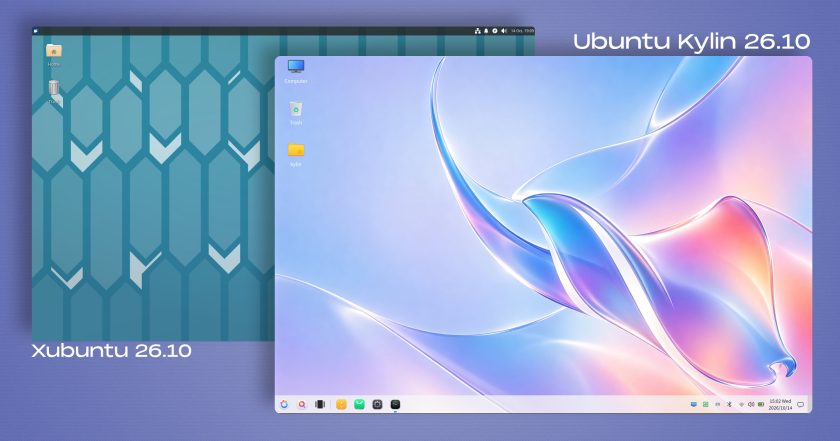
Xubuntu 26.10 continues to deliver a dependable, resource-efficient experience built on the classic Xfce desktop environment, shipping this cycle with Xfce 4.20. Upstream maintenance in this version focuses heavily on core stability improvements, code refactoring, and continued work on nascent Wayland display protocol support. The development team has characterized Wayland compatibility in this release as an ongoing initiative targeted primarily at adventurous users willing to evaluate the experimental session, while X11 remains the proven default for general production workloads.
Beneath the window manager level, several core Xfce applications and default utility tools have received targeted functional upgrades. Ristretto, the default image viewer, gains a new option to shuffle image sequences during playback, introduces improved local printing routines, and can now load images directly from web URLs. The standard Xfce Terminal emulator has undergone targeted optimizations to decrease ambient CPU consumption, alongside a user toggle to disable automatic URL highlighting in terminal buffers.
System-level interaction is similarly refined across several standard workflow tools. Screenshooter, Xubuntu’s native screen-capture utility, has been updated to support both region-based and full-screen capture workflows under Wayland environments, while deprecating and removing its legacy direct-to-Imgur upload integration. The desktop search utility Catfish now defaults to initiating search queries within the currently active folder rather than querying broader file paths from the start. For creative tasks and graphic production, the system’s preinstalled application inventory loops in the updated GIMP 3.2.6 graphics suite.
Ubuntu Kylin 26.10
Ubuntu Kylin 26.10 arrives primarily as a maintenance and package-bump milestone tailored for users seeking a conventional desktop paradigm. The distribution’s signature UKUI desktop environment, known for its traditional Windows 7-style taskbar and navigational layout, remains on the same generation deployed during the April release of Ubuntu 26.04. Upstream efforts for this release focus on stability, incremental package alignments, and low-level system synchronizations rather than extensive interface overhauls.
Visual identity serves as the primary external differentiator for the release, highlighted by an eye-catching, artificial-intelligence-generated desktop background. The default wallpaper reimagines Ubuntu’s official release mascot—the stingray—through a fluid glassmorphism aesthetic rendered with iridescent pastel colour gradients. This creative treatment follows a precedent established in the 26.04 cycle, which memorably reinterpreted the release mascot as an island shaped like a raccoon surrounded by water and flanked by upside-down seagulls. The continuation of this distinctive artistic styling appears to solidify a new release tradition for the flavour’s design language.

Lubuntu 26.10
Geared toward efficiency and minimal memory consumption, Lubuntu 26.10 ships with the upstream LXQt 2.4.0 desktop environment. Described by upstream maintainers as a cycle centered largely around bug fixes, internal housekeeping, and code cleanup, the release nonetheless introduces refined desktop ergonomics. Notable quality-of-life adjustments include a newly introduced horizontal layout option for the system tray volume applet, alongside fixes to the notification daemon to ensure transient notification bubbles dismiss cleanly without lingering on the display canvas.
On the display server front, Lubuntu retains X11 as its default desktop session to guarantee broad compatibility with legacy hardware configurations. However, the flavour continues to advance its evaluation of modern display protocols by including an optional Wayland session accessible directly from the system display manager at login. This secondary session relies on the Miriway compositor, allowing users to test Lubuntu’s lightweight software stack under a Wayland-native environment without disrupting the stability of the primary X11 foundation.
Ubuntu Unity 26.10
Ubuntu Unity 26.10 represents another focused maintenance cycle for the revived classic desktop. The release retains the Unity 7.7 interface, pairing the traditional shell with an updated round of bug fixes, structural maintenance, and dependency cleanups designed to decouple the desktop from unmaintained legacy packages across the archive.
The primary strategic role of Ubuntu Unity 26.10 is maintaining desktop continuity for dedicated users while developers coordinate the long-term migration toward Lomiri, the convergent user interface originally envisioned for mobile and desktop integration. To bridge the gap and prepare the broader application ecosystem for this eventual transition, Ubuntu Unity 26.10 now includes the Lomiri Calculator, Lomiri Files, and Lomiri Terminal applications directly out of the box, offering users an early view of the ecosystem’s planned direction.
Kubuntu 26.10
Kubuntu 26.10 delivers a significant visual and functional update for KDE enthusiasts, centered on the KDE Plasma 6.7 desktop environment. While the flavour’s announcement materials refer to the inclusion of the latest KDE Plasma software, the system actually deploys version 6.7 rather than the newly announced Plasma 6.8 upstream release. Despite not shipping the bleeding-edge release, Plasma 6.7 represents a direct generational advancement over the environment provided in the preceding 26.04 LTS milestone.
The desktop environment brings several substantial improvements to multi-monitor workflows and window management. Users working across multi-screen setups can now assign specific virtual desktops directly to individual physical displays, assisted by dedicated keyboard shortcuts designed to expedite cross-screen navigation. Additional visual polish includes refined glide animations for incoming system notifications, targeted fixes for desktop theme and dark-mode switching inconsistencies, and new timezone offset indicators embedded within the Digital Clock panel widget. The release also adds an option to enable type-ahead file searching directly across the active desktop view.
In continuity with the 26.04 release, Kubuntu 26.10 runs a Wayland session by default. A classic Plasma X11 session is not included in the standard installation image, though users who require it can still install it manually from the software repositories. This cycle marks the final opportunity for users to do so, as upstream KDE developers have completely removed the plasma-session-x11 package in Plasma 6.8, cementing Wayland as the sole supported display architecture going forward.
Ubuntu MATE 26.10
Ubuntu MATE 26.10 marks an important turning point for the long-standing traditional desktop flavour, representing its official return to the Ubuntu family following a hiatus during the 26.04 LTS cycle earlier this year. The release is the first to be published under the stewardship of a reconstituted development and maintenance team dedicated to revitalizing the project. While not every component of the MATE desktop stack has been updated to its newest upstream milestone, the software packages selected for inclusion have been curated to ensure day-to-day stability and deliver key bug fixes.
The renewed flavour integrates several deep platform changes implemented across the wider Ubuntu system architecture. This release represents the first edition of Ubuntu MATE to incorporate the distribution’s broader migration to Dracut for handling the initial ramdisk environment. In parallel, the packaging stack has been streamlined: the legacy gdebi graphical package installation utility has been dropped, and traditional network management via ifupdown has been officially deprecated in favour of Canonical’s standard Netplan network configuration framework.
Because rebuilding a maintainer infrastructure is an iterative process, the development team has acknowledged a variety of unresolved issues in this release, including broken RedShift display-tinting behaviour, localized missing system icons, and minor performance quirks when operating inside virtualized environments. Despite these early developmental rough edges, the 26.10 milestone establishes a stable, modern baseline for future releases.
Ubuntu Studio 26.10
Ubuntu Studio 26.10 expands its specialized workstation distribution for audio engineers, video editors, and digital visual artists. While continuing to cater to all digital creative disciplines, this release places specific emphasis on modernizing its audio production and sequencing toolkit. The platform introduces Sonic Pi, a live-coding music synthesis environment, alongside the SuperCollider audio synthesis platform designed for algorithmic composition and generative sound design.
For utility audio generation, the flavour now bundles jnoise, a command-line white-noise generator useful for acoustics testing and studio configuration. The wider creative suite benefits from broad version bumps across critical production software, including OBS Studio for broadcasting and screen capture, the GIMP graphics editor, the Ardour digital audio workstation, Krita for digital painting, and Kdenlive for non-linear video editing.
Beyond application updates, the installation process has been refined. The Ubuntu Studio installer now allows users to selectively pick individual software components from larger meta packages, granting greater authority over the initial disk footprint. Furthermore, the user interface for the system’s specialized audio configuration wizard has been streamlined to simplify low-latency kernel tuning and interface configuration.
Additional Community Flavours: Edubuntu, Budgie, and Cinnamon
The 26.10 cycle also brings functional updates to the remaining specialized and desktop-focused flavours across the ecosystem:
- Edubuntu 26.10: The education-focused remix refines its deployment options by allowing system administrators and teachers to select specific software packages from predefined age-tier bundles during initial setup. The distribution also updates Paperboy, its dedicated news-reading platform built specifically to support media literacy and current-events curricula across secondary and tertiary education environments.
- Ubuntu Budgie 26.10: Emphasizing visual elegance and panel-based desktop ergonomics, Ubuntu Budgie introduces an integrated desktop applet designed for finding, indexing, and streaming internet radio stations directly from the system panel. The distribution also integrates automated wallpaper scheduling, allowing background artwork to cycle seamlessly between day and night themes based on local solar times.
- Ubuntu Cinnamon 26.10: Bringing the Linux Mint-developed desktop environment to the Ubuntu base, this release updates its desktop shell to Cinnamon 6.6.9, providing a refined, traditional workspace alongside the modern system libraries of the 26.10 foundation.
 Linux & Open Source Solutions
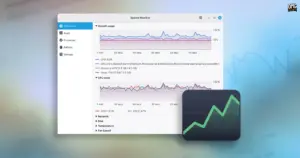
Linux Mint Unveils "Superlight," a Modern System Monitor Slated for Version 27
Linux Mint is preparing a major refresh of its core software lineup...
 Linux & Open Source Solutions
Linux Mint 27 to Introduce ‘Superlight’, a Modernized In-House System Monitor Built for the XApp Ecosystem
The upcoming release of Linux Mint 27, scheduled to make its public...
 Linux & Open Source Solutions
The Document Foundation Unveils New Visual Identity to Establish Distinct Institutional Profile Apart from LibreOffice
The Document Foundation, the charitable non-profit entity responsible for overseeing the development...