Following the official launch of the Ubuntu 26.10 operating system, Canonical’s family of official community flavours has rolled out synchronized releases. The new deployment spans long-standing distributions including Kubuntu, Xubuntu, Lubuntu, Ubuntu Studio, and Ubuntu Kylin, alongside the notable return of Ubuntu MATE, which resumes regular releases under a revamped leadership team after sitting out the previous Long-Term Support milestone.
While each flavour delivers a tailored desktop experience targeting distinct workflows, hardware profiles, and visual philosophies, the entire family continues to rest upon a shared core architecture. Underneath the interface differences, every official spin benefits from the Linux 7.3 kernel, the Mesa 26.2 graphics stack, refreshed system toolchains, and native support for sandboxed software delivery through the Snap Store ecosystem. For system administrators, enthusiasts, and everyday desktop users, the 26.10 release cycle provides a practical balance between iterative stability improvements and ongoing architectural transitions toward modern display protocols.
Ubuntu 26.10 Flavour Recap
The broader Ubuntu ecosystem relies heavily on its community spins to bring diversity to the Linux desktop. These distributions take Canonical’s core package archives, security updates, and kernel maintenance and pair them with alternative desktop shells ranging from lightweight options like Xfce and LXQt to feature-rich platforms such as KDE Plasma and Cinnamon.
With the 26.10 release cycle, several flavours have taken deliberate steps toward modernizing their foundational plumbing. While non-LTS releases typically serve as a testing ground for emerging technologies, this cycle showcases a pragmatic focus on refining day-to-day desktop usability, addressing long-standing technical debt, and preparing users for the wider adoption of Wayland-based display management.
Xubuntu 26.10
Xubuntu 26.10 arrives with the Xfce 4.20 desktop environment, bringing a package of stability fixes and targeted enhancements across its core software suite. A primary focus of the underlying desktop in this release is the ongoing development of Wayland display server support. The maintenance team notes that the Wayland session is steadily progressing, offering experimental usage for testers and early adopters willing to navigate its current developmental state, while the traditional X11 session remains the stable default.
Beyond desktop compositor work, several default utility applications have received functional upgrades. The Ristretto image viewer now includes a shuffle option for image collections, improved local printing integration, and the capability to open and render remote graphic files directly from web URLs. The default Xfce Terminal emulator has undergone performance optimizations that reduce background CPU utilization during intensive tasks, alongside a new setting allowing users to disable automatic URL highlighting when working with text-heavy terminal buffers.
System tooling has also been refined. The Screenshooter capture utility adds support for region and fullscreen grabs under active Wayland sessions, while shedding its legacy direct-upload integration with third-party hosting service Imgur. File navigation searches initiated through Catfish now default to querying within the currently active folder rather than searching broadly from the user’s home directory. On the creative side, Xubuntu’s standard software package repositories bring in GIMP 3.2.6, delivering an updated toolset for raster graphics manipulation and creative photo editing.
Ubuntu Kylin 26.10
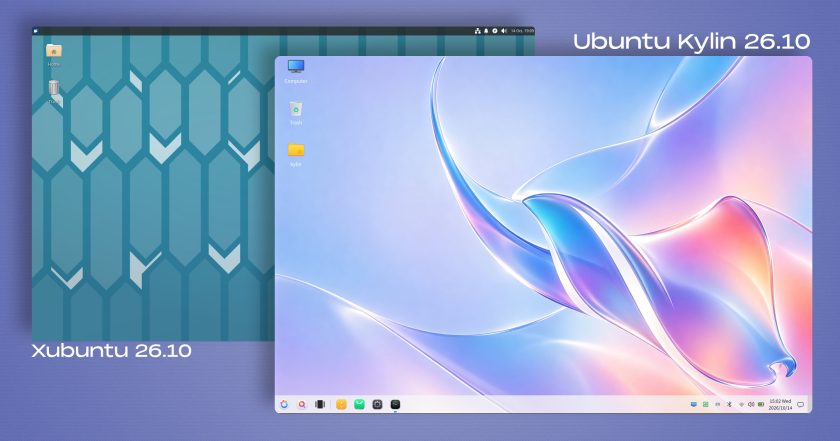
Targeting users who favor a traditional desktop layout alongside localized tooling for Chinese-speaking regions, Ubuntu Kylin 26.10 delivers a focused maintenance release centered primarily on platform stability and package maintenance. The distribution does not introduce sweeping structural changes to its user-facing components, opting instead to retain the Windows 7-style UKUI desktop environment version that debuted during the 26.04 release earlier in the year.
While backend code cleanups dominate the technical ledger, the release introduces a striking aesthetic shift via its new default desktop wallpaper. The artwork employs an AI-generated, fluid "glassmorphism" aesthetic characterized by translucent textures and soft pastel color gradients. The composition reworks Ubuntu’s official release mascot—a stingray—into a stylized graphic, continuing an artistic direction established in the previous release cycle. In Ubuntu Kylin 26.04, the team similarly departed from standard desktop branding by featuring an imaginative, raccoon-shaped island framed by ocean waters and inverted seagulls. The continuation of this visual theme suggests an emerging creative tradition within the flavour’s design team.

Lubuntu 26.10
Lubuntu 26.10 maintains its mission of lightweight resource efficiency, shipping with the LXQt 2.4.0 desktop environment. Upstream development on this iteration of LXQt prioritized extensive code refactoring, background cleanup, and targeted bug elimination, resulting in a lean footprint well-suited for constrained hardware environments and virtual instances.
Despite the focus on stability, users will notice several quality-of-life adjustments across the standard panel applets. The sound applet now features a horizontal orientation option, granting greater flexibility when organizing desktop panels across varying screen dimensions. Additionally, transient desktop notifications have been patched to ensure alert bubbles dismiss reliably rather than lingering indefinitely over active application windows.
Regarding display architecture, Lubuntu 26.10 retains an X11-powered environment as its out-of-the-box default session. However, the development team has included an alternative Wayland desktop session built around the Miriway compositor. Users wishing to evaluate the state of Wayland on LXQt can switch sessions directly from the login display manager screen.
Ubuntu Unity 26.10
Ubuntu Unity 26.10 serves as a bridge release that preserves the classic Unity 7 desktop paradigm while advancing broader modernization efforts behind the scenes. The distribution continues to rely on Unity 7.7, incorporating a targeted collection of bug fixes and library adjustments designed to remove obsolete system dependencies and keep the environment operational on modern underlying software stacks.
The team’s primary long-term objective remains the architectural shift toward the Lomiri desktop environment, the converged interface originally conceived for multi-form-factor devices. To prepare the groundwork and acclimate users to the evolving application stack, Ubuntu Unity 26.10 bundles several native Lomiri utilities out of the box, including the Lomiri Calculator, Lomiri Files file manager, and Lomiri Terminal. These modern components operate alongside traditional Unity desktop modules, providing an incremental path forward as upstream integration matures.
Kubuntu 26.10
Kubuntu 26.10 advances the KDE-based wing of the Ubuntu family by shipping with KDE Plasma 6.7. While the broader KDE community recently rolled out Plasma 6.8, the integration of Plasma 6.7 still represents a notable advancement over the desktop configuration provided in Kubuntu 26.04, offering substantial improvements to day-to-day workflow management.
A highlight of this release is enhanced multi-monitor productivity. Users managing multi-display setups can now explicitly assign distinct virtual desktops to individual physical monitors. This capability is paired with configurable keyboard shortcuts that make switching contexts across expansive workstation environments faster and more intuitive.
The update also resolves visual inconsistencies related to dynamic theme switching and dark mode toggling. The desktop notification daemon gains a subtle glide animation when displaying alerts, the digital clock panel widget can now display precise timezone offset indicators, and users can enable type-ahead search behaviors directly when focused on the desktop workspace.
On the architectural front, Kubuntu 26.10 continues to default strictly to Wayland. While the classic Plasma X11 session is omitted from the base installation image, users can still manually retrieve and install it from the official package archives. However, the maintainers indicate that 26.10 represents the final release where an X11 session will be achievable, as upstream Plasma 6.8 has permanently retired the legacy plasma-session-x11 package from its codebase.
Ubuntu MATE 26.10
Ubuntu MATE marks its formal return to the distribution lineup with version 26.10, representing the first milestone published under the supervision of a reconstituted maintenance team. The flavour, which preserves the traditional GNOME 2 workflow through the MATE desktop environment, was absent from the 26.04 LTS cycle while organizational transitions were settled.
Rather than chasing bleeding-edge upstream releases across every component, the newly assembled team focused on stabilizing core packages and realigning the distribution with modern Ubuntu base mechanics. This release serves as Ubuntu MATE’s formal transition to Dracut for managing initramfs image creation. The distribution has also phased out the legacy gdebi package installer and replaced the outdated ifupdown networking framework with standard netplan network configuration utilities.
The engineering team has been transparent about the ongoing stabilization process, noting that several known issues persist in this release, including display quirks when utilizing RedShift, missing desktop icon assets under specific configurations, and sporadic display issues inside virtual machine environments. Nonetheless, the successful delivery of 26.10 re-establishes Ubuntu MATE as an active participant in Canonical’s regular six-month release cadence.
Ubuntu Studio
Ubuntu Studio 26.10 updates its specialized platform tailored for digital artists, musicians, video editors, and audio engineers. While the distribution maintains support across visual, photographic, and multimedia disciplines, this cycle introduces a noticeable expansion in audio production environments and modular composition tools.
Among the expanded audio packages are the Sonic Pi live-coding music synthesizer environment and SuperCollider, an algorithmic sound synthesis and signal processing platform widely favored by experimental composers. The update also adds jnoise, a lightweight command-line utility used for generating calibrated white-noise profiles. Across the wider creative stack, Ubuntu Studio updates its pre-bundled production packages, incorporating newer upstream versions of OBS Studio for streaming, GIMP for image manipulation, Ardour for multitrack audio engineering, Krita for digital illustration, and Kdenlive for non-linear video editing.
The system installer has also been reworked. Users deploying Ubuntu Studio can now selectively choose individual packages from the distribution’s broad meta-packages during the initial installation phase, avoiding unwanted utilities. Additionally, the graphical configuration wizard designed for managing low-latency audio permissions and jack server routing features a simplified, more intuitive user interface.
Other Flavours Available in the 26.10 Family
The 26.10 release catalog extends across several other specialized community distributions, each addressing specific administrative and user preferences:
- Edubuntu 26.10: Designed for deployment in academic and primary learning spaces, Edubuntu updates its installer to allow system administrators to pick and choose specific software packages categorized by educational age tiers during system setup. It also updates Paperboy, an integrated news reader application engineered specifically for teaching media literacy and source analysis in secondary and higher education environments.
- Ubuntu Budgie 26.10: Featuring the modern Budgie desktop shell, this release introduces a dedicated desktop widget designed to discover and stream internet radio broadcasts directly from the panel. The release also integrates native support for dynamic day-and-night wallpaper transitions that adapt based on local time.
- Ubuntu Cinnamon 26.10: Centered on the desktop environment created by the Linux Mint project, Ubuntu Cinnamon updates its core interface to Cinnamon 6.6.9, bringing refined workspace animations, performance adjustments, and bug fixes to users who favor a classic taskbar-and-menu desktop paradigm.
 Linux & Open Source Solutions
Banshee Music Player Returns to Modern Linux Desktops as a Snap Package
A familiar name from the golden era of the Linux desktop has...
 Linux & Open Source Solutions
Era Arrives on Flathub as a New Rust-Powered Calendar Application for the GNOME Desktop
A new open-source calendaring client has entered the Linux application ecosystem. Named...
 Linux & Open Source Solutions
Ubuntu 26.10 Introduces Restricted Media Codec Installation to App Center’s Add-Ons Hub
Ubuntu 26.10 has expanded the functionality of its modern App Center by...