
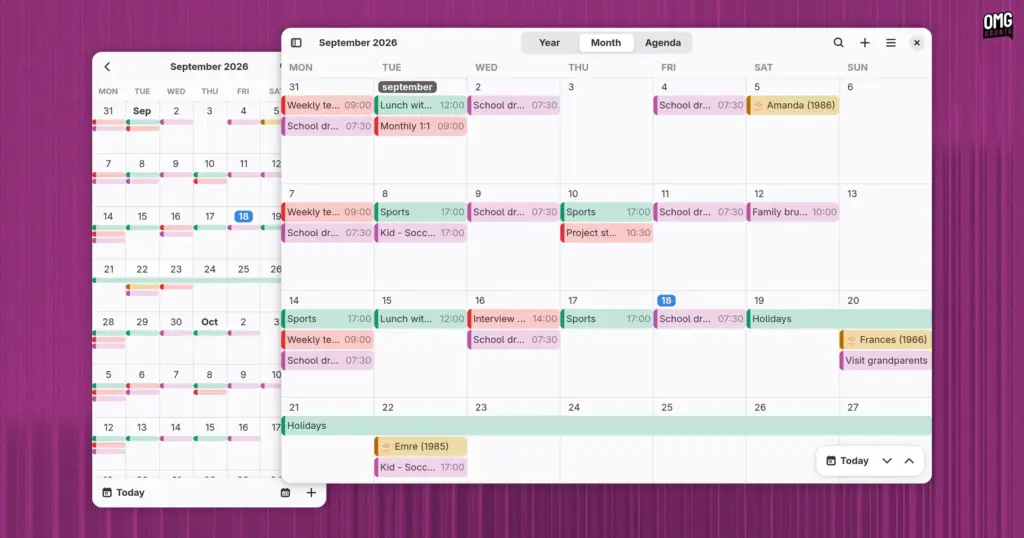
A new open-source calendaring client has entered the Linux application ecosystem. Named Era, the application is written in Rust and built specifically for the GNOME desktop environment. Self-described by its creator, Titouan Real, as both “beautiful and performant,” the project aims to offer a modern, highly responsive personal scheduling utility that feels completely at home alongside core desktop software.
Rather than remaining confined to raw source repositories during its early development cycle, Era has immediately lowered the barrier to entry for prospective testers. A public beta build is now packaged and available for installation directly through Flathub, allowing Linux enthusiasts and everyday users alike to take the software for a spin without needing to compile dependencies manually.
The arrival of Era reflects an ongoing shift across the wider Linux and GNOME development scenes, where software developers increasingly turn to the Rust programming language alongside modern interface toolkits to create safe, lightweight, and responsive utilities. While the Linux desktop is not lacking in time-management tools, Era enters the arena with an intentional design language and a modular architectural underpinning that sets it apart from traditional alternatives.
Visual Polish and Familiar Design Paradigms
At first glance, Era bears an unmistakable visual resemblance to GNOME’s default Calendar application. To a large degree, that aesthetic alignment is entirely intentional and practically unavoidable. In digital user interface design, there are only so many sensible ways to arrange a standard monthly grid of numbered dates within neat rectangular cells while leaving ample visual breathing room for brightly color-coded event labels.
Era achieves this native feel by building entirely on GTK4 and libadwaita, the modern design libraries that define the visual and behavioral standards of modern GNOME software. From its clean header bars and rounded window corners to its restrained typography and native color accents, the application presents a textbook GNOME presentation. A user encountering Era on an active desktop could easily mistake it for one of the platform’s official, pre-installed core system apps.
Beyond mere surface styling, the interface is built around high adaptivity. The layout smoothly rearranges itself to fit different window geometries and aspect ratios. When expanded across a wide desktop monitor, Era makes full use of the extra canvas by displaying dedicated overlay controls and buttons within the main calendar display, keeping essential actions close at hand without introducing visual clutter.
Conversely, when the application window is snapped into a narrow column or viewed on small screens—such as those found on Linux-powered mobile devices or handhelds—the interface contracts cleanly. Sidebar elements tuck away behind responsive toggles, text labels truncate gracefully, and the primary calendar view scales down without sacrificing day-to-day usability.
Daily Scheduling and View Management
Functionally, Era covers the critical baseline expectations required of any everyday personal organizer. Users can quickly flip through dates, browse upcoming schedules, query their agenda using an integrated search mechanism, and modify their daily itinerary on the fly.
To help users visualize their time at varying levels of detail, Era provides three primary navigation views:
 Linux & Open Source Solutions
Hylki Brings Modern Rust Engineering and Deep Customization to the GNOME Desktop
For years, the Linux desktop has maintained a complicated relationship with the...
 Linux & Open Source Solutions
OpenShot Video Editor Arrives on the Canonical Snap Store, Bringing Version 4.0 to Ubuntu Users
In a major milestone for open-source desktop multimedia production, the popular Qt-based...
 Linux & Open Source Solutions
Ubuntu 26.10 Arrives with Rust Coreutils, Passkey Authentication, and Smarter Window Snapping
Canonical has officially announced the release of Ubuntu 26.10, codenamed "Stonking Stingray."...







