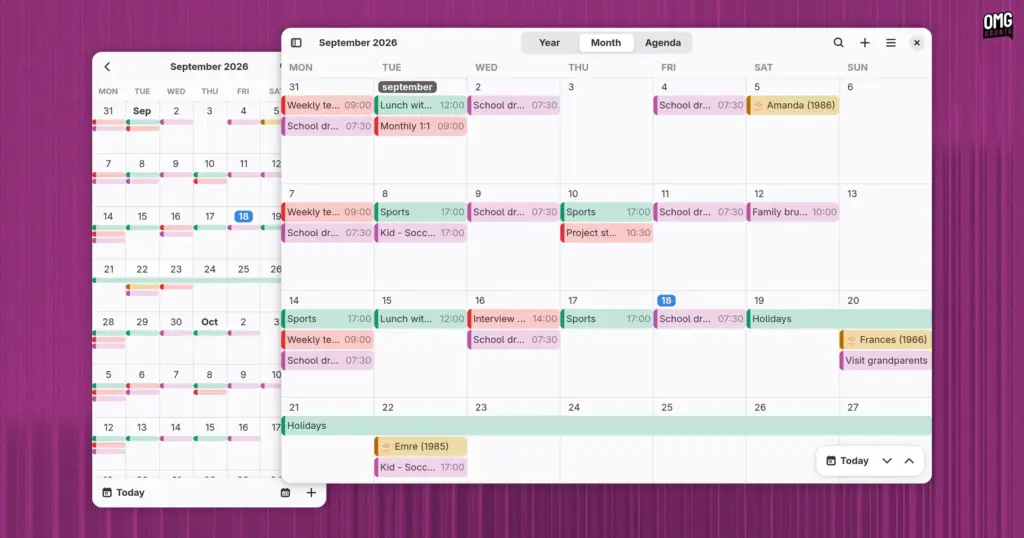
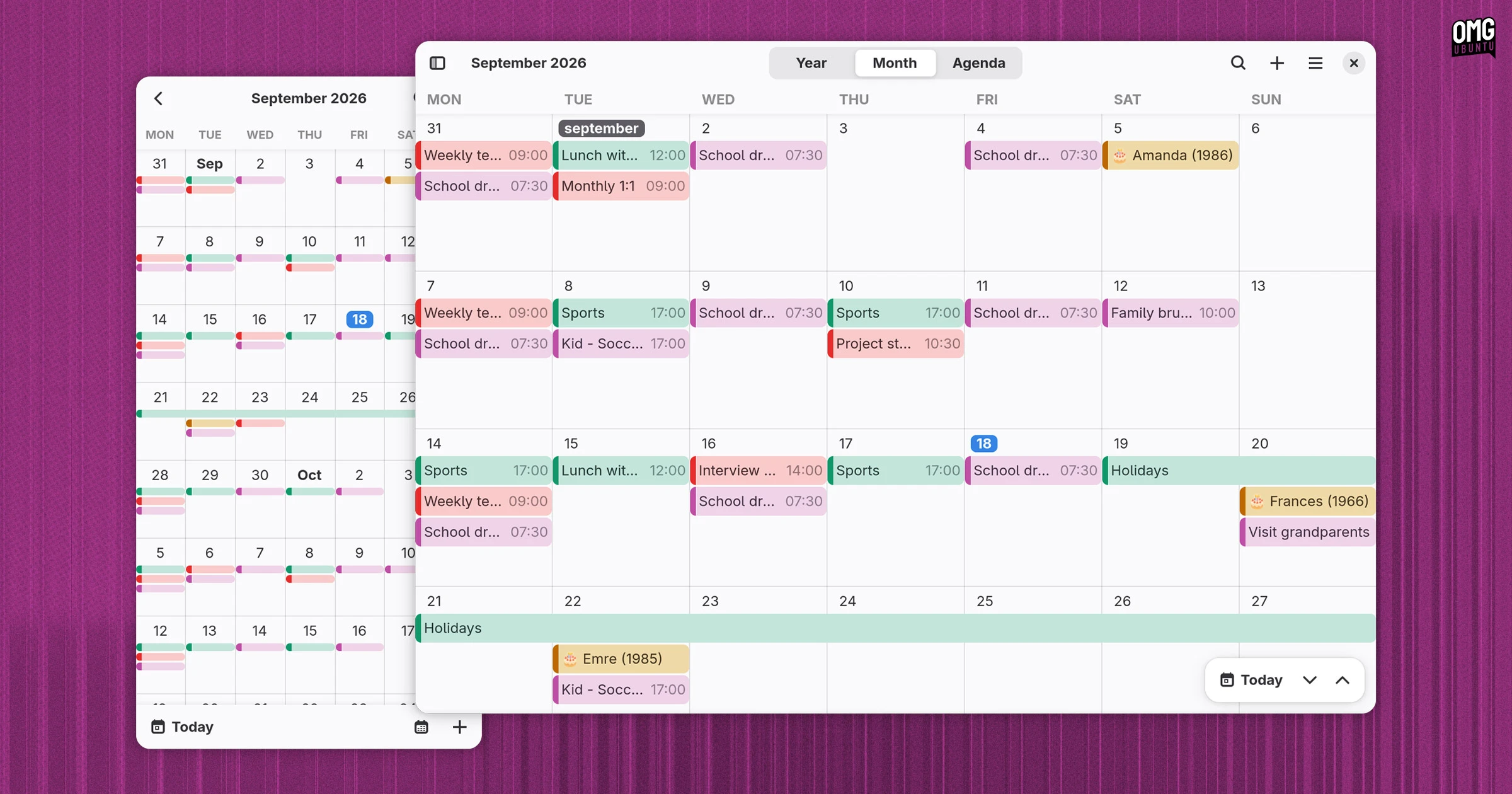
- Year View: A high-level, broad perspective that lets users look at the calendar across twelve full months, ideal for pinpointing long-range dates and planning annual milestones.
- Month View: The traditional desk-calendar grid that provides a balanced, day-by-day overview of upcoming obligations, complete with color-coded chips representing distinct categories and events.
- Agenda View: A focused, linear list of forthcoming commitments organized in chronological sequence, offering an uncluttered snapshot of immediate responsibilities.
Navigation between these modes is accompanied by a collapsible calendar management sidebar. From this panel, users can view, toggle, and organize distinct calendar sources, enabling them to isolate personal tasks from professional commitments or hide secondary feeds to reduce visual noise during busy workdays.
Creating and adjusting appointments within Era is handled through a structured event editor dialog. The interface provides all the input fields typical of modern calendar applications. Users can assign an event title, specify starting times and total durations down to the minute, and configure recurring patterns for repeating appointments, whether an event is a solitary meeting or an ongoing weekly sync. Crucially for business users and remote workers, the editor also includes dedicated fields for recording physical meeting locations as well as conference and virtual venue details.
On the data management side, Era can operate entirely offline as a local scheduling log. For users coming from other calendar platforms or working with standard appointment invitations, the software supports importing universal .ics (iCalendar) calendar files. It also provides synchronization capabilities with supported online calendar providers, ensuring schedules remain aligned across multiple client devices.
Modular Engineering: Rust, EDS, and Clepsydre
While Era’s visual shell closely follows established desktop conventions, the underlying engineering behind the scenes reveals a sophisticated technical setup.
In common with GNOME’s default Calendar, Era relies on Evolution Data Server (EDS) as its underlying system foundation for accessing, caching, and storing calendar data. Within the GNOME platform, Evolution Data Server operates as the standard system-level middleware responsible for managing accounts, contacts, address books, and scheduling information across independent user interfaces.
However, unlike most conventional GNOME utilities that bind directly to EDS, Era does not communicate with the service via standard direct hooks. Instead, the application routes all of its data operations through an intermediate software layer known as Clepsydre.
Clepsydre functions as a decoupled abstraction middle-layer that sits between Era’s front-end user experience and the back-end data store. By abstracting data access away from the specific quirks of Evolution Data Server, Clepsydre renders Era’s backend infrastructure completely hot-swappable.
This architectural choice has practical long-term implications. While Evolution Data Server is a ubiquitous standard across traditional desktop Linux distributions, it is rarely present or suitable on non-traditional Linux platforms, containerized environments, or alternative mobile operating systems. Because Era’s scheduling logic communicates exclusively with Clepsydre rather than directly with EDS, the developer can introduce alternative backends in the future—such as native storage layers for an Android port or alternative database backends—without needing to rewrite the application’s core scheduling mechanics or libadwaita interface.
The application’s implementation in Rust provides additional benefits, bringing rigorous memory-safety guarantees, efficient resource consumption, and predictable execution speed to the desktop environment.
 Linux & Open Source Solutions
KDE Plasma 6.8 Released on Project’s 30th Anniversary, Dropping X11 Sessions and Expanding Core Features
The KDE community has officially released KDE Plasma 6.8, marking a historic...
 Linux & Open Source Solutions
ONLYOFFICE Desktop Editors 10.0 Released as Fully Rebuilt App With Decoupled AI Tools and Over 1,000 Bug Fixes
The developers behind ONLYOFFICE have officially released version 10.0 of ONLYOFFICE Desktop...
 Linux & Open Source Solutions
NexPhone Multi-OS Smartphone Delayed to March 2027 as Hardware Challenges and Price Adjustments Emerge
The NexPhone, an ambitious multi-operating system smartphone designed to bridge the divide...