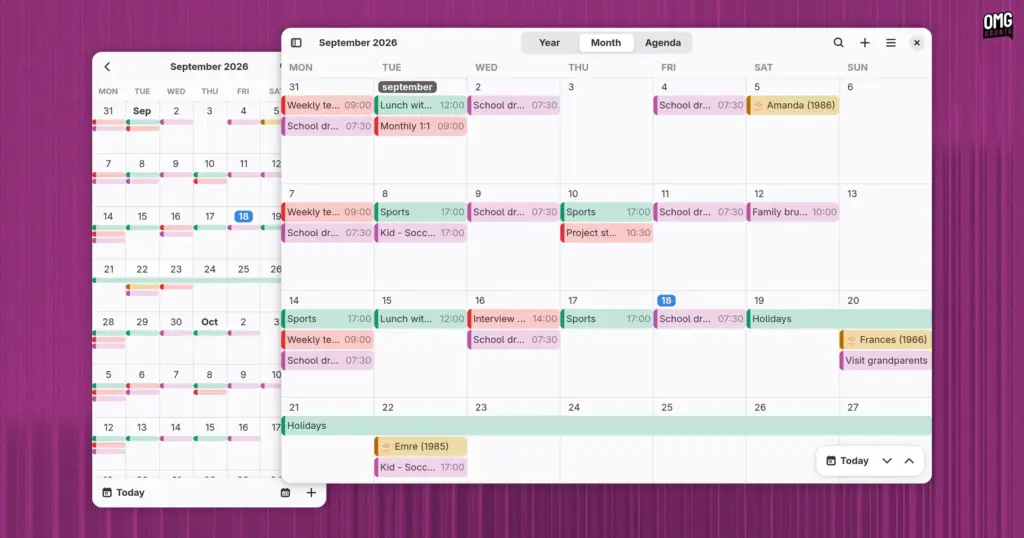
A new open-source calendaring client has entered the Linux application ecosystem. Named Era, the application is written in Rust and built specifically for the GNOME desktop environment. Self-described by its creator, Titouan Real, as both “beautiful and performant,” the project aims to offer a modern, highly responsive personal scheduling utility that feels completely at home alongside core desktop software.
Rather than remaining confined to raw source repositories during its early development cycle, Era has immediately lowered the barrier to entry for prospective testers. A public beta build is now packaged and available for installation directly through Flathub, allowing Linux enthusiasts and everyday users alike to take the software for a spin without needing to compile dependencies manually.
The arrival of Era reflects an ongoing shift across the wider Linux and GNOME development scenes, where software developers increasingly turn to the Rust programming language alongside modern interface toolkits to create safe, lightweight, and responsive utilities. While the Linux desktop is not lacking in time-management tools, Era enters the arena with an intentional design language and a modular architectural underpinning that sets it apart from traditional alternatives.
Visual Polish and Familiar Design Paradigms
At first glance, Era bears an unmistakable visual resemblance to GNOME’s default Calendar application. To a large degree, that aesthetic alignment is entirely intentional and practically unavoidable. In digital user interface design, there are only so many sensible ways to arrange a standard monthly grid of numbered dates within neat rectangular cells while leaving ample visual breathing room for brightly color-coded event labels.
Era achieves this native feel by building entirely on GTK4 and libadwaita, the modern design libraries that define the visual and behavioral standards of modern GNOME software. From its clean header bars and rounded window corners to its restrained typography and native color accents, the application presents a textbook GNOME presentation. A user encountering Era on an active desktop could easily mistake it for one of the platform’s official, pre-installed core system apps.
Beyond mere surface styling, the interface is built around high adaptivity. The layout smoothly rearranges itself to fit different window geometries and aspect ratios. When expanded across a wide desktop monitor, Era makes full use of the extra canvas by displaying dedicated overlay controls and buttons within the main calendar display, keeping essential actions close at hand without introducing visual clutter.
Conversely, when the application window is snapped into a narrow column or viewed on small screens—such as those found on Linux-powered mobile devices or handhelds—the interface contracts cleanly. Sidebar elements tuck away behind responsive toggles, text labels truncate gracefully, and the primary calendar view scales down without sacrificing day-to-day usability.
Daily Scheduling and View Management
Functionally, Era covers the critical baseline expectations required of any everyday personal organizer. Users can quickly flip through dates, browse upcoming schedules, query their agenda using an integrated search mechanism, and modify their daily itinerary on the fly.
To help users visualize their time at varying levels of detail, Era provides three primary navigation views:
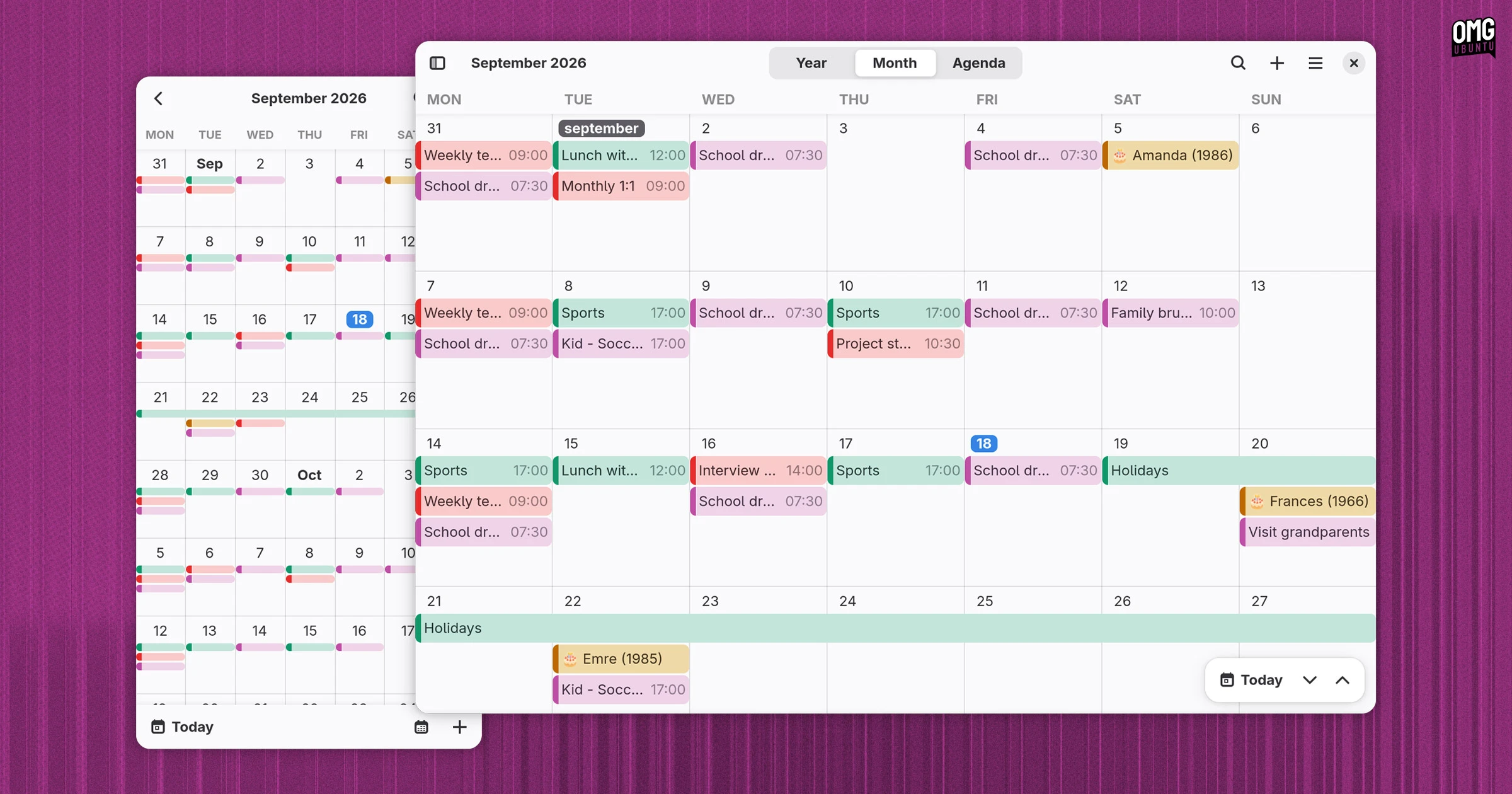
- Year View: A high-level, broad perspective that lets users look at the calendar across twelve full months, ideal for pinpointing long-range dates and planning annual milestones.
- Month View: The traditional desk-calendar grid that provides a balanced, day-by-day overview of upcoming obligations, complete with color-coded chips representing distinct categories and events.
- Agenda View: A focused, linear list of forthcoming commitments organized in chronological sequence, offering an uncluttered snapshot of immediate responsibilities.
Navigation between these modes is accompanied by a collapsible calendar management sidebar. From this panel, users can view, toggle, and organize distinct calendar sources, enabling them to isolate personal tasks from professional commitments or hide secondary feeds to reduce visual noise during busy workdays.
Creating and adjusting appointments within Era is handled through a structured event editor dialog. The interface provides all the input fields typical of modern calendar applications. Users can assign an event title, specify starting times and total durations down to the minute, and configure recurring patterns for repeating appointments, whether an event is a solitary meeting or an ongoing weekly sync. Crucially for business users and remote workers, the editor also includes dedicated fields for recording physical meeting locations as well as conference and virtual venue details.
On the data management side, Era can operate entirely offline as a local scheduling log. For users coming from other calendar platforms or working with standard appointment invitations, the software supports importing universal .ics (iCalendar) calendar files. It also provides synchronization capabilities with supported online calendar providers, ensuring schedules remain aligned across multiple client devices.
Modular Engineering: Rust, EDS, and Clepsydre
While Era’s visual shell closely follows established desktop conventions, the underlying engineering behind the scenes reveals a sophisticated technical setup.
In common with GNOME’s default Calendar, Era relies on Evolution Data Server (EDS) as its underlying system foundation for accessing, caching, and storing calendar data. Within the GNOME platform, Evolution Data Server operates as the standard system-level middleware responsible for managing accounts, contacts, address books, and scheduling information across independent user interfaces.
However, unlike most conventional GNOME utilities that bind directly to EDS, Era does not communicate with the service via standard direct hooks. Instead, the application routes all of its data operations through an intermediate software layer known as Clepsydre.
Clepsydre functions as a decoupled abstraction middle-layer that sits between Era’s front-end user experience and the back-end data store. By abstracting data access away from the specific quirks of Evolution Data Server, Clepsydre renders Era’s backend infrastructure completely hot-swappable.
This architectural choice has practical long-term implications. While Evolution Data Server is a ubiquitous standard across traditional desktop Linux distributions, it is rarely present or suitable on non-traditional Linux platforms, containerized environments, or alternative mobile operating systems. Because Era’s scheduling logic communicates exclusively with Clepsydre rather than directly with EDS, the developer can introduce alternative backends in the future—such as native storage layers for an Android port or alternative database backends—without needing to rewrite the application’s core scheduling mechanics or libadwaita interface.
The application’s implementation in Rust provides additional benefits, bringing rigorous memory-safety guarantees, efficient resource consumption, and predictable execution speed to the desktop environment.
A Renewed Appetite for Linux Desktop Productivity
Era’s debut comes during an interesting period of revitalization for foundational productivity software on the Linux desktop.
For several development cycles, routine utilities like calculators, text editors, and calendars received relatively subtle maintenance rather than transformative redesigns. More recently, however, standard tools have seen renewed community attention. GNOME’s built-in Calendar, for example, received an extensive overhaul in the GNOME 51 release cycle, delivering meaningful changes that users feel through smoother performance and tighter desktop integration rather than drastic visual overhauls.
At the same time, desktop environments outside of GNOME are investing in their own independent productivity pipelines. The Linux Mint project, for instance, has recently been developing a dedicated calendar client under the banner of its XApps initiative, designed to provide a capable, traditional calendaring experience tailored to its own ecosystem.
Rather than signaling redundancy, the arrival of independent alternatives like Era and Mint’s XApps entry demonstrates that developers are actively experimenting with different approaches to solving age-old desktop workflows.
Worth Using?
Evaluating any calendar utility in its early stages requires balancing ambition against day-to-day stability. Personal calendars are rarely perceived as the most glamorous software category on any operating system, yet they remain among the most mission-critical. When scheduling daily obligations, meetings, and deadlines, users prioritize reliability and data integrity above all else.
Because Era remains in an active beta stage, prospective users should approach it with the measured expectations appropriate for pre-release software. Those looking to replace production scheduling workflows on mission-critical machines may want to proceed prudently while evaluating how well its synchronization mechanisms perform with their specific providers.
Nonetheless, for an early-stage release, Era presents a remarkably mature and cohesive experience. The integration between modern GTK4 interface components, Rust-backed safety, and the flexible Clepsydre abstraction layer provides the application with a solid architectural foundation. Its official listing on Flathub notes that the utility is designed to “grow with you,” and its initial public build offers plenty of encouragement for users interested in testing fresh open-source desktop software.
For those eager to evaluate the client firsthand, Era is available to download and install today as a Flatpak via Flathub under its official identifier, org.gnome.gitlab.TitouanReal.Era.
 Linux & Open Source Solutions
Hylki Brings Modern Rust Engineering and Deep Customization to the GNOME Desktop
For years, the Linux desktop has maintained a complicated relationship with the...
 Linux & Open Source Solutions
The Document Foundation Unveils New Visual Identity to Establish Distinct Institutional Profile Apart from LibreOffice
The Document Foundation, the charitable non-profit entity responsible for overseeing the development...
 Linux & Open Source Solutions
NexPhone Multi-OS Smartphone Delayed to March 2027 as Hardware Challenges and Price Adjustments Emerge
The NexPhone, an ambitious multi-operating system smartphone designed to bridge the divide...