
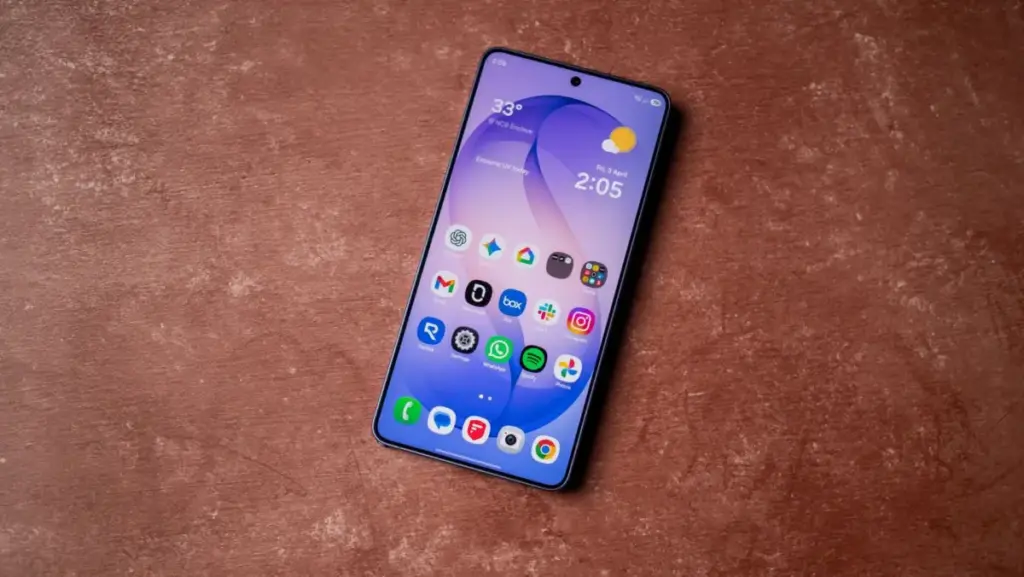
The arrival of a major Android operating system update is typically a moment of celebration for smartphone enthusiasts. It promises a refreshed interface, enhanced security protocols, and a suite of new features designed to make the daily mobile experience more fluid and capable. However, for a growing number of Samsung Galaxy S26 Ultra owners, the transition to One UI 9—Samsung’s implementation of Android 17—has turned from a moment of excitement into a technical nightmare.
Reports have begun to surface regarding a critical software bug that effectively "bricks" the user experience, leaving some of Samsung’s most expensive and powerful hardware stuck in a state of digital limbo. The issue, which appears to manifest during or immediately after the initial setup process of the new update, has prompted an official acknowledgement from the South Korean tech giant, alongside a series of temporary workarounds as engineers scramble to find a permanent resolution.
The Critical Startup Failure: Black Screens and Error Messages
The trouble began to gain public attention following a series of distressed posts on Samsung’s official community forums in South Korea. One particularly prominent report, highlighted by the community and later corroborated by technical outlets such as SammyFans, detailed a scenario where the Galaxy S26 Ultra becomes unresponsive during the boot-up phase.
According to the machine-translated report from a forum user, the device fails to reach the home screen after installing the One UI 9 update. Instead, the user is met with a persistent black screen or a cryptic error message. "Since the UI 9.0 update, this keeps appearing on my phone screen," the user wrote. "The screen is black and the home screen isn’t appearing either."
The error message in question specifically states, "The webpage is unavailable… for the following reasons," followed by a failure to load the standard Samsung account login or the initial setup wizard. This effectively prevents the user from accessing their apps, data, or any of the phone’s primary functions. For a device marketed as the pinnacle of mobile productivity and performance, such a fundamental failure in the software stack is a significant blow to user confidence.
Samsung’s development team was quick to investigate the report and has since identified the likely culprit. According to the company, the issue is not necessarily a total corruption of the OS, but rather a specific failure involving the "Android System WebView." In a statement responding to the forum reports, Samsung explained, "The development team has confirmed that this issue occurs when using an unstable system WebView on certain networks. We kindly ask that you follow the troubleshooting guide."
The Android System WebView is a critical system component powered by Chrome that allows Android apps to display web content without opening a separate browser. Because the modern One UI setup process and various system login screens are essentially web-based wrappers, a failure in the WebView component can halt the entire system’s ability to render the user interface, resulting in the "black screen" or "webpage unavailable" errors reported by users.
Navigating the Fix: Official Recommendations and User Workarounds
While a comprehensive software patch is the only long-term solution, Samsung has provided a set of immediate troubleshooting steps for those currently trapped by the bug. The company’s primary suggestion is to ensure that all core web components are updated, which can be difficult if the phone cannot reach the home screen. However, for those who can gain intermittent access or are attempting the update now, Samsung recommends updating the Google Chrome browser to its latest version immediately.
Furthermore, Samsung has noted that the instability seems to be exacerbated by specific network conditions. The company advises users to avoid using cellular data (LTE or 5G) during the initial post-update setup. Instead, users are encouraged to switch to a stable Wi-Fi connection. The theory is that a more consistent data stream allows the WebView component to stabilize and authenticate the Samsung Account login without timing out or crashing.
Beyond the official advice, the Android community has been busy crowdsourcing its own solutions. On platforms like Reddit, where the "XML Access Denied" error has also been linked to this update cycle, some users have found success through more drastic measures. One common suggestion involves booting the device into "Safe Mode," a diagnostic state that loads only the essential system software. By disabling Wi-Fi and cellular data before booting into Safe Mode, some users have managed to bypass the frozen setup screen and reach the home screen, where they can then re-enable services and update the necessary apps.
Another, more unorthodox fix reported by users involves the physical removal of the SIM card. By removing the SIM, the phone is forced to drop its cellular handshake, which sometimes clears the network-related conflict within the WebView component, allowing the setup wizard to proceed over a local Wi-Fi network.
A Pattern of Instability in the One UI 9 Rollout
While the Galaxy S26 Ultra is the current focus of this specific WebView bug, it is not the only device in Samsung’s stable to face a rocky road with One UI 9. Over the past several weeks, reports have trickled in from owners of the Galaxy S25 and Galaxy S24 series, as well as some of Samsung’s mid-range A-series devices, regarding similar system freezes.
Roughly two weeks ago, a surge of reports on Reddit highlighted an "XML Access Denied" error that would occur seemingly at random after the Android 17 transition. Like the WebView bug, this error often resulted in a frozen device that required a forced restart. The common thread among these issues appears to be the way the new software handles network-level authentication and system-level web rendering.
These technical hurdles are particularly frustrating for the Samsung faithful given the timeline of the One UI 9 release. The update, based on Google’s Android 17, was subject to numerous internal and external delays throughout 2025. Samsung fans had grown accustomed to the company’s usually prompt update schedule, but this year, the "Global Release" was pushed back several times, leading to speculation that the software was undergoing rigorous quality control to avoid exactly these types of scenarios.
The rollout finally began in earnest in late September, with T-Mobile customers in the United States being among the first to receive the massive 4GB download for the Galaxy S26 series. It was soon followed by releases for Verizon, AT&T, and unlocked variants. As the update has reached a wider audience—including those on budget-friendly hardware—the sheer diversity of network environments and user configurations has likely exposed these underlying instabilities that were missed during the beta testing phase.
Analysis: The Cost of Complexity in the Modern Mobile Era
The situation surrounding the Galaxy S26 Ultra and One UI 9 serves as a stark reminder of the immense complexity inherent in modern mobile operating systems. As Samsung continues to integrate more features—ranging from advanced AI processing to deep cloud integration—the number of potential failure points grows exponentially.
From a journalistic perspective, these issues raise serious questions about Samsung’s current quality assurance pipeline. When a consumer invests in a flagship "Ultra" device, there is an implicit contract that the hardware will be supported by stable, reliable software. To have the flagship of the fleet crippled by a component as fundamental as the System WebView suggests a disconnect between the development of new features and the maintenance of core system stability.
The irony of the situation is not lost on the community: the very delays that were supposed to ensure a "bug-free" experience may have contributed to a rushed final deployment as the company felt the pressure to meet a late-year release window. For many users, the frustration stems not just from the bug itself, but from the feeling that the premium "Galaxy experience" is being diluted by software that feels unpolished.
There is also the matter of communication. While Samsung’s response on the Korean forums was relatively swift, the lack of a global, high-profile advisory has left many users in other regions scouring the internet for answers. In the absence of a clear, centralized message from the manufacturer, misinformation can spread, and users may resort to "fixes" that could potentially void warranties or cause further data loss.
Looking ahead, it is almost certain that Samsung will release a "hotfix" or a secondary maintenance update to address the WebView and XML errors. Historically, the company is efficient at patching high-priority bugs once they have been identified in the wild. However, for those currently staring at a black screen on their $1,300 smartphone, the promise of a future patch is cold comfort.
As the One UI 9 rollout continues to reach more devices and more regions, the tech world will be watching closely to see if Samsung can stabilize its software platform. For now, the advice for Galaxy S26 Ultra owners who have not yet updated remains cautious: ensure your data is backed up, update your apps (especially Chrome) beforehand, and if possible, perform the update while connected to a reliable Wi-Fi network to minimize the risk of a system-halting error.
 Mobile Device Management (MDM) & Mobile OS
Google Expands Certified Refurbished Program to Include Pixel 9 Series with Significant Price Cuts
Google has officially expanded its hardware offerings in the United States by...
 Mobile Device Management (MDM) & Mobile OS
Google Unveils Android Bench 2.0 to Evaluate AI Performance on Complex, Long-Horizon Development Tasks
In a significant move to refine how artificial intelligence interacts with the...
 Mobile Device Management (MDM) & Mobile OS
Samsung Announces Shutdown of Samsung Sound App as Part of Broader Ecosystem Consolidation
Samsung is continuing its aggressive efforts to streamline its mobile and smart...







