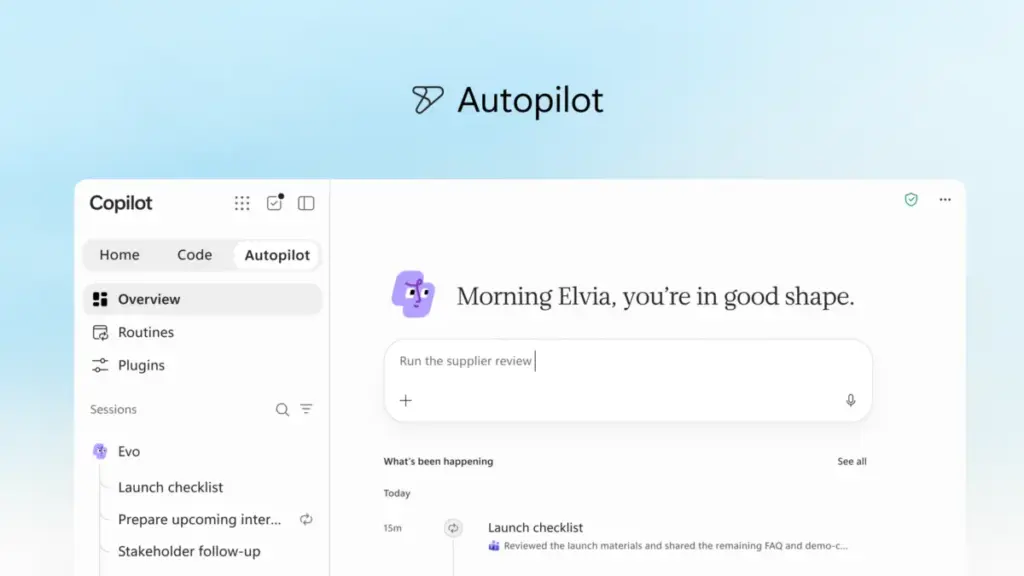
In a significant evolution of its artificial intelligence strategy, Microsoft has unveiled a comprehensive reimagining of Microsoft Copilot. This transformation is designed to align with the rapidly changing landscape of modern work, aiming to bridge the gap between human ambition and organizational achievement. By introducing a new architecture for Copilot, the company is seeking to integrate the essential tools that professionals rely on with a next-generation suite of AI capabilities, allowing for the seamless building, customization, and scaling of intelligence across every layer of the enterprise.
The announcement marks a shift from AI as a simple conversational assistant to a more integrated, proactive, and versatile ecosystem. According to Microsoft, this new era of Copilot is centered on three primary pillars: Home, Code, and Autopilot. Together, these features represent a move toward "agentic" workflows—where AI does not merely respond to prompts but actively participates in the completion of complex, multi-stage projects.
A New Experience for Every Mode of Work
At the heart of this update is the new Copilot Home, which serves as the primary starting point for users. In the modern workplace, tasks are often fragmented across meetings, emails, documents, and various third-party applications. Home is designed to act as a grounding force, providing a centralized location where users can regain their bearings and maintain momentum.
Within Home, Microsoft has integrated two distinct but complementary modes of interaction: Chat and Cowork. Chat remains the go-to interface for instant, conversational needs—handling quick inquiries, data lookups, and the creation of initial drafts. It is built for the "in-the-moment" requirements of a busy workday, keeping users informed and responsive.
In contrast, Cowork represents a deeper level of delegation. Instead of asking for a single piece of information, users can define a broad task and allow Copilot to manage it from inception to completion. Examples of these delegated tasks include the generation of a comprehensive Request for Proposal (RFP) response, the assembly of a product launch kit, or the preparation of a financial close package. Cowork is built for iteration, allowing the AI to handle the "heavy lifting" of complex projects that would otherwise require hours of manual coordination.
A critical component of this new experience is the deeper integration of Microsoft Office. Through "Office in Copilot," the full capabilities of Word, Excel, and PowerPoint are now native to the Copilot experience. This eliminates the friction often associated with AI-generated content, such as broken formatting or the need to copy-paste text between different applications. From the Home interface, a user can request a budget model or a presentation deck, and Copilot will create or update a live, editable document that is immediately accessible to the entire team.

This integration extends to real-time collaboration. As Copilot works on a document, teammates can be @mentioned, and their edits appear alongside the AI’s contributions. This ensures that progress remains synchronized across the Copilot app and the traditional Office suite. Furthermore, Microsoft has enhanced the specific "Skills" within these apps. PowerPoint can now automatically maintain brand consistency, while Excel can provide visual data recommendations and track exactly what changes were made during a collaborative session. Role-specific workflows, such as legal expertise in Word or financial modeling in Excel, are also being scaled to help organizations implement best practices across their entire workforce.
Looking ahead, Microsoft plans to remove the need for users to manually choose between these modes. Soon, users will simply state their objective, and Copilot will intelligently route the request to Chat, Cowork, or Code, depending on which capability is best suited for the specific job.
Democratizing Solution Building with Code
Perhaps the most radical shift in the new Copilot is the introduction of "Code," a feature that aims to move solution-building beyond the exclusive domain of professional software developers. For decades, the fundamental unit of knowledge work has been the file—the document, the spreadsheet, or the slide deck. Microsoft is now introducing a fourth unit: the small, purpose-built solution.
The "Code" capability allows any employee to describe a needed application, tracker, or automation in natural language. Copilot then selects the appropriate technical approach and builds the solution. These can range from persistent desktop widgets for quick data reference to interactive dashboards and cloud-hosted internal apps that can be shared across a team.
Powered by the same underlying technology as GitHub Copilot, "Code" operates within a secure, sandboxed environment hosted within the organization’s own tenant. This ensures that while the building process is simplified for the end-user, it remains governed by IT standards. By utilizing Microsoft IQ, every solution created is grounded in the specific context of the user’s work, with plugins syncing automatically to provide the necessary data connections.
To support this surge in user-generated solutions, the company is introducing the Microsoft Copilot Managed Runtime. This hosting infrastructure allows code to run safely within the Microsoft 365 environment. It is designed to be "IT-governed but user-friendly," enabling employees to connect their apps to live data and access them from any location. This runtime serves as the foundation for apps built in Cowork and Copilot Studio, and Microsoft is also opening the infrastructure to third-party and professional developers.
The Rise of Autopilot: A Proactive Digital Teammate
While Chat and Cowork require user initiation, the new "Autopilot" feature (previously known as Scout) represents a leap toward autonomous AI. Autopilot is described as a persistent, proactive personal agent that continues to work even when the user is offline.

By assigning Autopilot a name, a role, and a specific goal, users can set it to monitor communication channels, follow up on email threads, and manage recurring workflows. For instance, Autopilot could be tasked with overseeing a full supplier review process. It would independently build a schedule, manage the workback plan, handle meeting preparations, and reach out to stakeholders for necessary updates.
Because it is cloud-hosted and possesses its own identity and memory within the organization’s tenant, Autopilot does not require constant monitoring. It functions as a digital colleague that understands the nuances of how an organization operates, thanks to its integration with Microsoft IQ. Users can interact with it in familiar environments like Microsoft Teams and Outlook, @mentioning it just as they would a human teammate. Despite its autonomy, Autopilot remains under the user’s control, operating within defined boundaries and providing regular status updates to ensure transparency and accountability.
Expanding Business Context and Governance
The effectiveness of any AI is dependent on the quality and depth of the data it can access. Microsoft is addressing this through Microsoft IQ, a unified intelligence platform that connects an organization’s operational data with its accumulated knowledge.
A major update to this framework is the introduction of Fabric IQ, which brings context from over 20 million semantic models in Power BI directly into Copilot. This allows Chat and Cowork to be grounded in the most accurate and up-to-date business data. Furthermore, Copilot is now gaining the ability to pull context from Dynamics 365 and the Power Platform. For a sales professional, this means Copilot can automatically incorporate deal histories or customer support tickets into a proposal without the need to switch between different enterprise applications.
To manage the expanding ecosystem of AI capabilities, Microsoft is launching a new plugin registry. This unified catalog serves as a single point of discovery for Microsoft-built, partner-built, and custom plugins. It provides IT departments with the necessary tools to approve and govern plugins centrally, ensuring that new capabilities are introduced at scale without compromising security or compliance.
The Economics of AI: Managing Spend and Value
As organizations integrate AI more deeply into their operations, managing the associated costs has become a primary concern. Microsoft is addressing this through a dual-pricing model and the introduction of "FinOps for AI."
For standard, everyday tasks—such as summaries, drafts, and analysis—Microsoft offers the User Subscription License (USL). This provides a fixed-cost model for Copilot across the Microsoft 365 suite. A key feature of this subscription is "Auto," an intelligent routing system that weighs the accuracy, speed, and cost of each request to select the most appropriate AI model for the job.

For more intensive, "agentic" work—including the use of Cowork, Code, and Autopilot—Microsoft is utilizing Usage-Based Billing (UBB). This model allows organizations to match their costs directly to the value generated by advanced frontier models, such as Astra and Fable.
To help business leaders navigate these costs, Microsoft is introducing new FinOps capabilities within Agent 365 and Microsoft Copilot. These tools allow administrators to set spending policies, route credit requests through automated approval workflows, and restrict certain model families to specific user groups. Business leaders can also gain insights into which tasks are generating the highest return on investment, while end-users can track their own credit usage and balances directly within the app.
A Sneak Peek at Future Innovations
The announcements made today represent only the beginning of Microsoft’s roadmap for the coming year. The company provided a "sneak peek" at several upcoming features, including "Today," a personalized command center. Expected to enter private preview in October, "Today" will proactively surface missed communications, urgent tasks, and upcoming meetings across Outlook and Teams. It is designed not just to show work, but to prepare it—having drafts ready for review and schedule changes proposed before the user even begins their day.
Additionally, the introduction of "@Copilot in Teams" will allow the AI to participate in group chats and channels with full shared context. Teams will be able to ask Copilot why specific decisions were made, and the AI will pull the relevant background from past conversations. It can even go a step further by preparing cross-functional reviews that highlight dependencies and open questions, ensuring that projects remain aligned across different departments.
The new Copilot experience is currently rolling out through Microsoft’s Frontier program, with broader availability expected in the coming weeks. These innovations will be a central theme at the upcoming Microsoft Ignite conference, scheduled for November 17–20 in San Francisco, where the company plans to share further details on how these tools are empowering organizations to reimagine the nature of work.
 Productivity Software & Office Suites
Microsoft Unveils Microsoft 365 G7: A New Frontier for AI-Driven Governance in the Public Sector
In a move designed to redefine how the public sector interacts with...
 Productivity Software & Office Suites
Microsoft Announces New AI-Integrated Office Suites to Streamline Small Business Operations
In the demanding ecosystem of small business management, success is often measured...
 Productivity Software & Office Suites
Microsoft Unveils Specialized AI Capabilities for Finance Professionals in Excel to Address Sector-Specific Complexity
The trajectory of transformative technology has followed a consistent, predictable rhythm for...