In a significant move to redefine the boundaries of digital productivity, Microsoft has unveiled a reimagined Copilot experience designed to integrate artificial intelligence more deeply into the "flow of human ambition." The tech giant is positioning this "new Copilot" not merely as a sidecar assistant, but as a centralized platform that connects the essential tools of the modern workplace with a sophisticated new generation of agentic capabilities. This evolution seeks to empower both individuals and large-scale organizations to build, customize, and scale AI solutions across their entire operational footprint.
The announcement, spearheaded by Jared Spataro, Microsoft’s lead for AI at Work, introduces a fundamental shift in how users interact with AI. By moving beyond simple chat interfaces, Microsoft is creating a multi-modal environment where users can toggle between instant conversation, delegated complex tasks, and custom software creation, all within a unified workspace.
A New Experience for Every Mode of Work
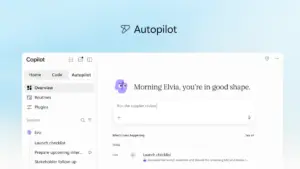
At the heart of this transformation is the revamped Copilot app, which introduces three primary pillars: Home, Code, and Autopilot. These features are designed to address the fragmented nature of modern work, where employees often find themselves caught in a constant shuffle between meetings, emails, and document editing.
Home: The Unified Starting Point
The new "Home" interface serves as the central nervous system for the user’s workday. It is designed to be the definitive starting point where two distinct modes of AI interaction—Chat and Cowork—converge. As digital work becomes increasingly decentralized, Home provides a grounding mechanism, allowing users to review recent activities, receive proactive suggestions on pending tasks, and resume projects exactly where they left off.
The distinction between Chat and Cowork is central to Microsoft’s vision. Chat remains the go-to for instantaneous, conversational needs—answering quick questions, drafting brief emails, or summarizing a recent thread. Cowork, however, represents a shift toward delegation. In this mode, users define a high-level objective, such as responding to a Request for Proposal (RFP) or closing a financial period, and the AI manages the end-to-end execution. This allows for complex, iterative work that results in a finished product rather than just a conversational response. Microsoft has indicated that soon, the system will automatically route requests to the appropriate mode—Chat, Cowork, or Code—based on the nature of the prompt.

Office in Copilot: Seamless Productivity
A major friction point in early AI adoption was the need to move context between an AI chat and a dedicated productivity application. Microsoft is addressing this by embedding the full power of Word, Excel, and PowerPoint directly into the Copilot experience through "Office in Copilot." This integration ensures that when a user asks Copilot to draft a brief or model a budget, it creates a live, editable document that maintains all formatting and context. This collaborative environment allows team members to be @mentioned directly within the interface, with edits syncing in real-time between the Copilot app and the traditional Office suite.
Furthermore, Microsoft has enhanced the specific "skills" within these apps. PowerPoint can now automatically ensure decks remain on-brand while offering fine-tuned image adjustments. Excel has been upgraded to provide transparency in data manipulation; when Copilot or a teammate makes a change, the system explains the "why" behind the edit and suggests the most effective visualizations for the data.
Code: Democratizing Solution Building
The introduction of "Code" marks a significant expansion of what Microsoft considers "knowledge work." While documents and spreadsheets remain vital, Microsoft is introducing a "fourth unit" of work: purpose-built, small-scale solutions. Powered by the same underlying technology as GitHub Copilot, "Code" allows non-developers to describe an app, automation, or dashboard in natural language. Copilot then builds the solution in a sandboxed, secure environment.
These solutions range from persistent desktop widgets for tracking metrics to cloud-hosted internal apps that can be shared across a team. To ensure these creations remain grounded in reality, Microsoft IQ provides the necessary business context, ensuring that any app built within the "Code" environment is relevant to the user’s specific organizational data.
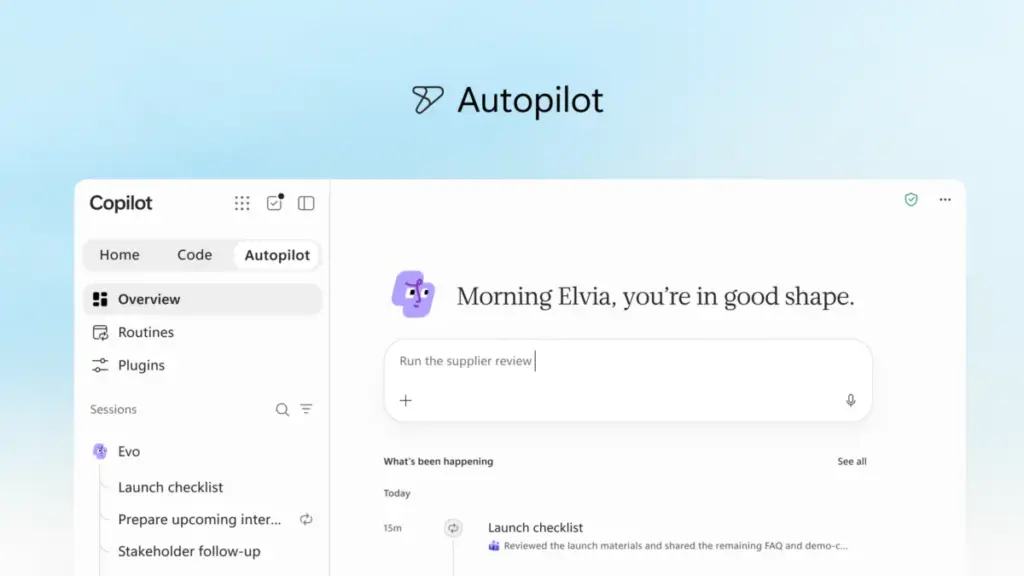
Autopilot: The Persistent Digital Teammate
Perhaps the most ambitious addition is "Autopilot," a feature previously known as Scout. Unlike traditional AI that requires a prompt to act, Autopilot is a proactive, persistent agent. Users can assign Autopilot a name, a role, and a specific goal—such as managing a supplier review process. The agent then works independently, watching communication channels, following up on threads, and scheduling meetings without human intervention.
Because Autopilot is cloud-hosted and possesses its own identity and memory within a company’s tenant, it continues to function even when the user is offline. It operates within strict organizational guardrails, ensuring that while it has the autonomy to reach out to stakeholders for updates, it remains fully auditable and governed by IT protocols.

Expanding Your Business Context
For an AI to be truly effective, it must understand the specific language and data of the business it serves. Microsoft is addressing this through Microsoft IQ, a unified intelligence platform that connects an organization’s operational data with its collective knowledge.
A key development in this area is the integration of Fabric IQ. This brings over 20 million semantic models from Power BI directly into the Copilot grounding layer. This means that when a user interacts with Chat or Cowork, the AI has a real-time view of the company’s most trusted data. Additionally, Copilot is now grounded in workflows from Dynamics 365 and the Power Platform. For sales teams, this translates to the ability to pull deal histories or customer support tickets directly into a proposal without ever switching applications.
To further extend these capabilities, Microsoft has launched a new unified plugin registry. This catalog brings together first-party, partner, and custom-built plugins, allowing IT departments to centrally approve and manage how AI interacts with external data sources. This registry ensures that as organizations scale their AI usage, they maintain a consistent and secure way to introduce new capabilities.
Managing AI Spend
As AI moves from experimental use to a core business expense, managing costs has become a primary concern for executives. Microsoft is introducing a dual-model approach to AI spending: User Subscription Licenses (USL) and Usage-Based Billing (UBB).
The USL model is designed for "everyday AI," covering standard tasks like drafting, summarizing, and basic analysis in Microsoft 365 apps at a fixed cost. A new "Auto" routing feature within the USL weighs the accuracy, speed, and cost of each request to select the most efficient model for the task.
In contrast, more intensive "agentic" work—such as the long-running processes performed by Cowork, Code, and Autopilot—will move to a Usage-Based Billing model. This allows organizations to use advanced frontier models, such as Astra and Fable, while maintaining granular control over their spend.

To support this, Microsoft is introducing "FinOps for AI" capabilities. These tools, integrated into Agent 365 and Microsoft Copilot, allow administrators to set spending policies, route credit requests through automated approval workflows, and restrict certain high-cost model families to specific user groups. Business leaders can also use these insights to determine which AI-driven tasks are providing the highest return on investment, allowing for data-driven decisions on where to expand or optimize AI usage.
A Sneak Peek at What’s Next
Microsoft concluded its announcement with a preview of upcoming features aimed at making Copilot even more personalized and collaborative.
The "Today" command center is slated to enter private preview in October. Designed as a proactive dashboard, "Today" will aggregate missed information from emails, Teams threads, and calendars. Rather than just listing tasks, "Today" will prepare the work in advance—drafting responses to missed messages or proposing schedule changes—allowing the user to simply review and approve actions to get caught up.
Furthermore, Microsoft is introducing "@Copilot" in Teams. This capability allows the AI to act as a shared participant in a group chat or channel. It possesses the shared context and permissions of the entire team, enabling it to explain why certain decisions were made based on past conversations or to prepare cross-functional reviews that highlight dependencies and owners across different departments.
Get Started
The rollout of the new Copilot experience has already begun through Microsoft’s Frontier program. This program serves as a gateway for organizations to access these new capabilities as they arrive, with continuous updates expected in the coming weeks.
Microsoft is positioning this era of Copilot as a fundamental reimagining of the relationship between humans and software. By providing a single platform to ask, delegate, build, and automate, the company aims to move AI from a novelty tool to a foundational element of organizational infrastructure. Further details on these innovations and their broader impact on the future of work are expected to be a central theme at the upcoming Microsoft Ignite conference in November.
 Productivity Software & Office Suites
Microsoft Confirmed as Headline Sponsor for ESPC 2026 in Amsterdam as AI Transformation Takes Center Stage
The European Microsoft community is preparing for one of its most significant...
 Productivity Software & Office Suites
Microsoft Reports 30 Million Copilot Seats as Enterprise AI Shifts from Assistance to Autonomous Agents
In its most recent earnings report, Microsoft announced a significant milestone in...
 Productivity Software & Office Suites
Microsoft Unveils Advanced AI ‘Skills’ and Data Connectors to Transform Excel for Finance Professionals
The evolution of modern computing has historically followed a predictable trajectory, moving...