A familiar name from the golden era of the Linux desktop has made an unexpected return. Banshee, the once-ubiquitous open-source media player that served as the centerpiece of music management for countless Linux distributions over a decade ago, is now officially available as a package on Canonical’s Snap Store. The release allows modern desktop environments to run a software stack that has sat largely frozen in time since its final upstream release in 2014.
Packaged by longtime open-source advocate and former Canonical community manager Alan Pope, widely known across the community as popey, the newly minted Banshee snap delivers the project’s last stable iteration, version 2.6.2. Rather than representing an active revival of original development, the release is best understood as a triumph of software preservation. By taking advantage of containerized application runtimes, the package resurrects an application that modern operating system libraries left behind years ago, packaging historical dependencies alongside specific modern compatibility adjustments.
For veteran Linux users, the appearance of Banshee on modern desktop releases such as Ubuntu 26.04 LTS offers a striking visual and operational trip down memory lane. For the broader computing ecosystem, it provides a practical demonstration of how modern universal packaging formats like Snap can rescue abandoned desktop software from bit rot and restore it to operational status on today’s hardware.
Preserving a Media Player Frozen in Time
The Banshee snap is not an official continuation of the upstream project, nor does it signal that the long-dormant open-source application has assembled a new development team to compete with modern streaming tools. Instead, the maintainer describes the release in terms closer to a reanimated entity than a full-scale reincarnation. The software operates inside a self-contained environment, relying on Canonical’s Core22 runtime base to provide the necessary legacy libraries, audio frameworks, and runtime environments that have otherwise been purged from modern distributions.
According to the official listing on the Snap Store, this package is not a raw binary repackaging of archived files. Pope applied targeted compatibility patches to allow the 2014 codebase to compile and communicate effectively with modern desktop systems. The package also attempts to restore selected online services where practicable. However, the store documentation explicitly cautions prospective users that not every historical integration will function as it did during the height of the player’s popularity.
Containerization formats such as Snap and Flatpak have frequently been discussed as tools for software archivism, but few high-profile desktop applications offer as clean an example of the concept in action. By isolating the software’s outmoded dependencies from the host machine, the package avoids compromising system stability or forcing users to maintain insecure, deprecated libraries on their primary operating system.
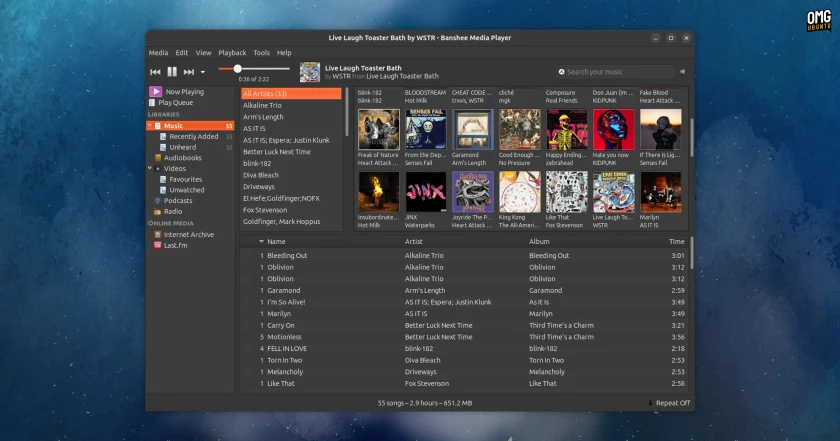
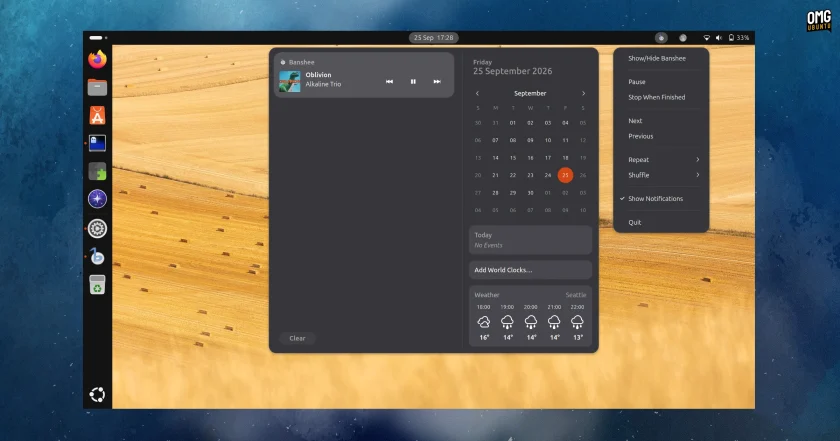
When put through its paces on an Ubuntu 26.04 LTS installation, the application boots promptly into its classic, clean layout. Upon the initial launch, the media player prompts the user to point the software toward a local music folder. Once directed, Banshee scans local directories and populates the library catalog with notable speed, handling virtually every traditional audio format thrown at it without stutter or configuration errors.
Local music playback operates just as smoothly as it did during the player’s peak. Banshee accurately parses embedded metadata, extracts and displays embedded album artwork in its dedicated lower-left display pane, and organizes vast discographies into familiar artist and album hierarchies.
Modern desktop integration remains surprisingly intact despite the software’s age. The snap hooks directly into the host system’s Media Player Remote Interfacing Specification (MPRIS) implementation, allowing users to control playback, pause tracks, and skip songs using the native media controls embedded in the desktop environment’s top bar or notification tray. Hardware media keys on modern keyboards function immediately out of the box. The player even spawns its vintage indicator applet menu in the system tray, demonstrating how faithfully the container maintains the original desktop integration hooks.
Because the software runs in a confined container, certain modern security and isolation behaviors apply. If a user stores their local audio library across an external hard drive or a secondary storage partition, Banshee will not have permission to view or index those directories by default. Users must manually grant the snap access to external storage interfaces through their system settings or snap management tools before the player can populate music from external volumes.
Where the Legacy Seams Begin to Show
While local audio playback remains solid, attempting to use the application across a broader set of features quickly exposes the practical limits of running a 2014 application in the modern computing landscape.
The software’s once-vaunted external network integrations are where the software’s age becomes most evident. A test attempt to authenticate with Last.fm to scrobble tracks highlights these technical barriers. When invoking the login handshake, the application halts and triggers a local error dialog stating that it could not launch the external URL. The underlying protocol calls, web authentication handshakes, and application launchers built into the 2014 codebase struggle to interface with modern browser handoffs and updated web security requirements.
Similarly, secondary media functions from the original Banshee feature suite do not hold up under modern demands. Video playback inside the player fails to render modern files reliably. In the years since Banshee 2.6.2 made its debut, the industry has shifted toward newer compression standards, container formats, and resolutions that the player’s bundled media engines simply were not architected to decode smoothly. Meanwhile, support for physical media like DVD playback—a capability that was notoriously finicky even in the player’s heyday—remains essentially unviable on contemporary hardware setups.
The application also remains frozen with whatever software bugs and idiosyncrasies were present in the codebase when development ceased in 2014. Because the snap functions as an archival packaging project rather than an ongoing rewrite, upstream flaws that were never resolved during the project’s original run remain permanently baked into the software experience.
Banshee and Ubuntu Go Way Back
The return of Banshee carries historical significance for longtime Linux enthusiasts because the media player previously occupied a central, highly debated position in the desktop ecosystem. Between 2011 and 2012, Banshee enjoyed a tenure as the default out-of-the-box music application for Ubuntu, having been selected to replace Rhythmbox starting with the release of Ubuntu 11.04.
At the time, the decision to elevate Banshee to default status was one of the most widely discussed architectural choices in the Linux community. The conversation centered not on the player’s intuitive user interface or robust podcast management, but on its technical foundation: Banshee was written in C# and built upon the Mono platform.
Mono, originally initiated by GNOME project co-founder Miguel de Icaza, was an open-source development platform created to enable developers to run Microsoft .NET-compatible applications across Unix-like operating systems. While Mono enabled rapid software development and gave Linux users access to modern cross-platform software frameworks, it also provoked profound philosophical and practical anxieties among traditional open-source advocates.
A vocal segment of the Linux community harbored deep-seated suspicions regarding Mono, arguing that building critical desktop infrastructure around technologies tied directly to Microsoft’s intellectual property created an unnecessary vulnerability. Critics frequently voiced concerns that Microsoft could leverage patent claims against Linux distributions or third-party developers that relied heavily on .NET-derived architectures.
Those intellectual property disputes never came to pass. Over the subsequent decade, Microsoft’s posture toward the open-source community shifted dramatically. Rather than pursuing patent litigation, Microsoft eventually acquired Xamarin—the commercial firm that maintained Mono—and took direct custody of the Mono project. In August 2024, Microsoft took the final step of officially handing stewardship of the Mono project over to the Wine community, solidifying its place as a community-driven compatibility layer.
Ubuntu’s own romance with Mono-based default software proved relatively short-lived, concluding not because of legal disputes, but due to pragmatic engineering constraints. Alongside Banshee, Ubuntu had historically included other Mono-based productivity tools on its installation media, such as the note-taking application Tomboy and the brain-training suite gBrainy. However, the Mono runtime and its accompanying framework libraries imposed a considerable footprint on installation disk images.
During an era when Ubuntu committed strictly to shipping operating system installers capable of fitting onto a single 700 MB CD-ROM, storage budgets were aggressively contested. The redundant weight of shipping Mono solely to power a handful of utility applications led Canonical engineers to re-evaluate their default application lineup. Within a year, Ubuntu dropped Banshee from its default installation, returning the default audio player duties to Rhythmbox for subsequent releases.
Following its departure from the default desktop image, community-driven maintenance of the player continued for several years, but momentum steadily ebbed. By 2018, the package reached the end of the line across major enterprise and community distributions. Debian maintainers formally removed Banshee from the Debian software archives because the codebase continued to rely on a suite of legacy, unmaintained libraries that the distribution was systematically retiring. Once stripped from Debian, the package evaporated from the downstream software repositories of Ubuntu and its derivatives, leaving users with no native path to install the software on modern systems—until the arrival of this new snap.
Install the Banshee Snap
For users interested in experiencing a working piece of Linux desktop history, the newly packaged software is straightforward to retrieve. On an Ubuntu desktop or any Linux distribution configured with snap support, the application can be found by opening the native App Center and searching directly for "Banshee."
Alternatively, users can install the package directly through the terminal by executing:
sudo snap install bansheeThe underlying package architecture relies on the Core22 runtime environment. If an individual is testing the software on an experimental or future distribution release where the Core22 snap is not present by default, the package manager will automatically download and configure the runtime container in the background alongside the player.
Whether running the software is practical for day-to-day listening in the current era depends largely on what an individual expects from their desktop environment. As an authentic piece of software preservation, the snap performs its job admirably, giving users a direct conduit back to the desktop workflows of 2012 without requiring virtual machines or archaic operating system installations.
However, the reality of running a legacy GTK2 application on a modern desktop quickly becomes apparent visually. In an era dominated by high-resolution displays, Wayland compositors, and adaptive layouts, GTK2 applications show their limits. On modern screens utilizing fractional scaling, the interface struggles to scale uniformly; certain graphical UI elements remain sharp while others blur, and text rendering may present irregular margins across different window segments.
Nevertheless, for those who spent years cataloging expansive local MP3 libraries inside Banshee’s familiar columns, the ability to launch the software on a contemporary desktop remains an impressive achievement in package engineering and a welcome nod to open-source history.
 Linux & Open Source Solutions
Kagi Halts Development of Orion Browser for Linux and Windows, Plans to Open Source Codebase
Kagi has officially announced that it is ending the internal development of...
 Linux & Open Source Solutions
Ubuntu 26.10 Beta Rescheduled to October 1 Following Unforeseen Infrastructure Issues
Canonical has officially postponed the public beta release of its upcoming operating...
 Linux & Open Source Solutions
Ubuntu 26.10 Introduces Top-Screen Layout Picker to Streamline Window Tiling
Ubuntu 26.10 is introducing a new way for users to organize their...