
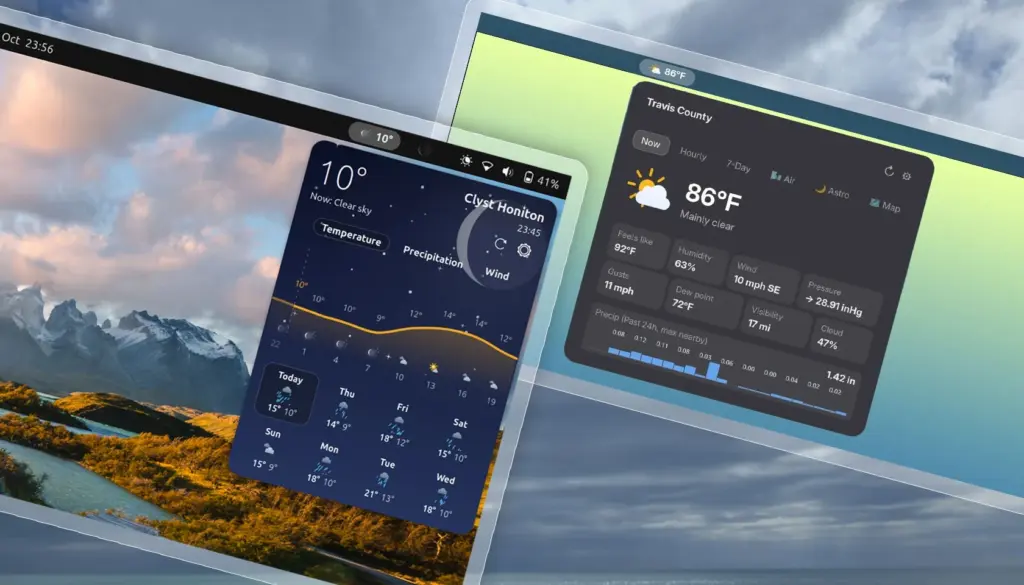
While dedicated desktop applications for checking the weather have long enjoyed a steady presence on the Linux desktop, many users continue to favor an approach that requires fewer clicks and virtually no window management: the top-panel applet. For the modern desktop workflow, launching a standalone program simply to check whether an afternoon umbrella will be necessary often feels superfluous. Instead, system integration directly into the GNOME Shell top bar provides immediate glanceability, allowing users to keep track of atmospheric conditions without disrupting active workspaces.
The GNOME Shell ecosystem has never experienced a real shortage of weather extensions. The repository of community-crafted add-ons spans a broad spectrum of design philosophies. On the minimalist end of the spectrum, lightweight utilities like Weather or Not occupy minimal panel real estate by displaying little more than a modest text label with the current temperature and an unobtrusive icon. On the other end, highly involved extensions unfurl expansive, multi-tiered drop-down panels laden with meteorological metrics, barometric readings, hourly breakdowns, and multi-day synoptic charts.
Recently, however, there has been a notable wave of newer weather extensions making their way to GNOME Shell. This flurry of development may well be a natural reaction to recent global climate events, where intense heatwaves and unpredictable weather patterns across the world have made tracking temperatures a more frequent, if not anxious, daily habit for everyday computer users. Among these newcomers, a pair of distinct add-ons—Weatherglass and Weather Prime—have emerged with visual styles and technical approaches that aim to move past traditional forecast layouts.
Weatherglass offers animated flourishes
For users who appreciate visual dynamism on their desktop, Weatherglass is designed to capture attention immediately. Most weather applets in the GNOME ecosystem share a familiar operational structure: they fetch forecast data from an online provider and parse it into an organized, readable menu. Where Weatherglass distinguishes itself from the wider crowd is in its heavy reliance on motion design and fluid graphical animations.
The extension integrates directly into the GNOME top bar with an indicator that combines the current local temperature with a continuously looping animated weather condition icon. Clicking on this indicator triggers a drop-down card that departs noticeably from the standard GNOME interface aesthetic. The panel reveals an animated backdrop tailored to active weather conditions, layered behind both current observations and detailed hourly projections. Below the immediate conditions, users are presented with an eight-day forecast illustrated through visual graphs mapping temperature curves, expected precipitation, and fluctuating wind speeds.
 Linux & Open Source Solutions
ONLYOFFICE Desktop Editors 10.0 Released as Fully Rebuilt App With Decoupled AI Tools and Over 1,000 Bug Fixes
The developers behind ONLYOFFICE have officially released version 10.0 of ONLYOFFICE Desktop...
 Linux & Open Source Solutions
KDE Plasma 6.8 Released on Project’s 30th Anniversary, Dropping X11 Sessions and Expanding Core Features
The KDE community has officially released KDE Plasma 6.8, marking a historic...
 Linux & Open Source Solutions
OpenShot Video Editor Arrives on the Canonical Snap Store, Bringing Version 4.0 to Ubuntu Users
In a major milestone for open-source desktop multimedia production, the popular Qt-based...







