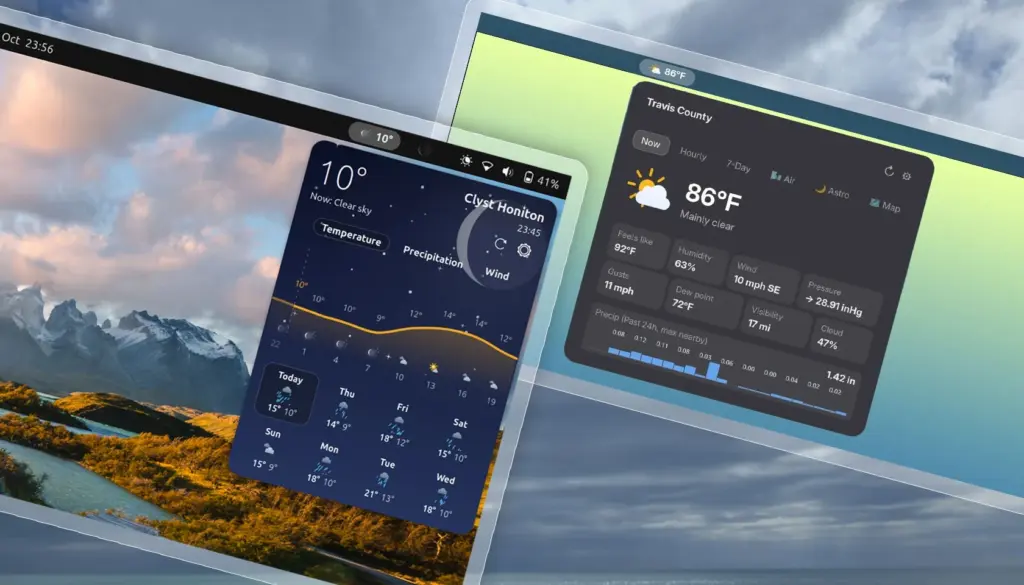
While dedicated desktop applications for checking the weather have long enjoyed a steady presence on the Linux desktop, many users continue to favor an approach that requires fewer clicks and virtually no window management: the top-panel applet. For the modern desktop workflow, launching a standalone program simply to check whether an afternoon umbrella will be necessary often feels superfluous. Instead, system integration directly into the GNOME Shell top bar provides immediate glanceability, allowing users to keep track of atmospheric conditions without disrupting active workspaces.
The GNOME Shell ecosystem has never experienced a real shortage of weather extensions. The repository of community-crafted add-ons spans a broad spectrum of design philosophies. On the minimalist end of the spectrum, lightweight utilities like Weather or Not occupy minimal panel real estate by displaying little more than a modest text label with the current temperature and an unobtrusive icon. On the other end, highly involved extensions unfurl expansive, multi-tiered drop-down panels laden with meteorological metrics, barometric readings, hourly breakdowns, and multi-day synoptic charts.
Recently, however, there has been a notable wave of newer weather extensions making their way to GNOME Shell. This flurry of development may well be a natural reaction to recent global climate events, where intense heatwaves and unpredictable weather patterns across the world have made tracking temperatures a more frequent, if not anxious, daily habit for everyday computer users. Among these newcomers, a pair of distinct add-ons—Weatherglass and Weather Prime—have emerged with visual styles and technical approaches that aim to move past traditional forecast layouts.
Weatherglass offers animated flourishes
For users who appreciate visual dynamism on their desktop, Weatherglass is designed to capture attention immediately. Most weather applets in the GNOME ecosystem share a familiar operational structure: they fetch forecast data from an online provider and parse it into an organized, readable menu. Where Weatherglass distinguishes itself from the wider crowd is in its heavy reliance on motion design and fluid graphical animations.
The extension integrates directly into the GNOME top bar with an indicator that combines the current local temperature with a continuously looping animated weather condition icon. Clicking on this indicator triggers a drop-down card that departs noticeably from the standard GNOME interface aesthetic. The panel reveals an animated backdrop tailored to active weather conditions, layered behind both current observations and detailed hourly projections. Below the immediate conditions, users are presented with an eight-day forecast illustrated through visual graphs mapping temperature curves, expected precipitation, and fluctuating wind speeds.
In terms of configuration, Weatherglass covers essential territory while retaining a few curious limitations. Users can switch meteorological readouts between metric and imperial systems, although the settings currently enforce an all-or-nothing approach. Those who prefer a hybrid setup—such as monitoring wind speed in miles per hour while tracking temperature in degrees Celsius—will find themselves out of luck, as the extension lacks modular unit toggling. On the data side, the applet shows flexibility by supporting multiple meteorological backends, including Open-Meteo, Norway’s Met.no, and the United States National Oceanic and Atmospheric Administration’s National Weather Service (NOAA NWS). It also incorporates automated geolocation detection to streamline the initial setup process.
The extension’s preferences panel includes an integrated preview mechanism that allows users to inspect the animations before leaving them enabled. The inclusion of an explicit toggle to disable visual effects proves to be more than just a matter of aesthetic preference; it serves a practical operational purpose. During hands-on evaluation, Weatherglass exhibited an aggressive appetite for system resources. Even when the main drop-down panel remained closed and out of sight, the extension was observed continuously utilizing CPU and GPU cycles in the background. For desktop workstations plugged into the wall, this overhead may go unnoticed, but on portable hardware, continuous graphics rendering inside an extension inevitably leads to increased power consumption and shortened battery life.
At present, Weatherglass is available through the official GNOME Extensions website, where its compatibility targets systems running GNOME 50, such as Ubuntu 26.04 LTS installations. Whether the extension will receive timely updates to support upcoming releases like GNOME 51—and whether future patches will address the underlying background resource draw—remains to be seen as community feedback filters in.
Weather Prime is like a mini app
Positioning itself with a different set of visual ambitions, Weather Prime approaches the panel format with an architecture reminiscent of a full application condensed into a compact drop-down. Billed by its creators as a complete weather station for the GNOME top panel, the project attempts to balance data density with modern desktop styling.
In the top panel, Weather Prime adopts a pill-shaped indicator displaying active local conditions. Clicking this panel element unrolls a richly populated drop-down menu that attempts to solve the presentation problem common to many data-heavy applets. Instead of arranging numbers and forecasts in dry, spreadsheet-style columns or unadorned vertical lists, the extension structures information using graphical pods, dedicated trend lines, and carefully placed visual accents designed to make dense data easier to scan.
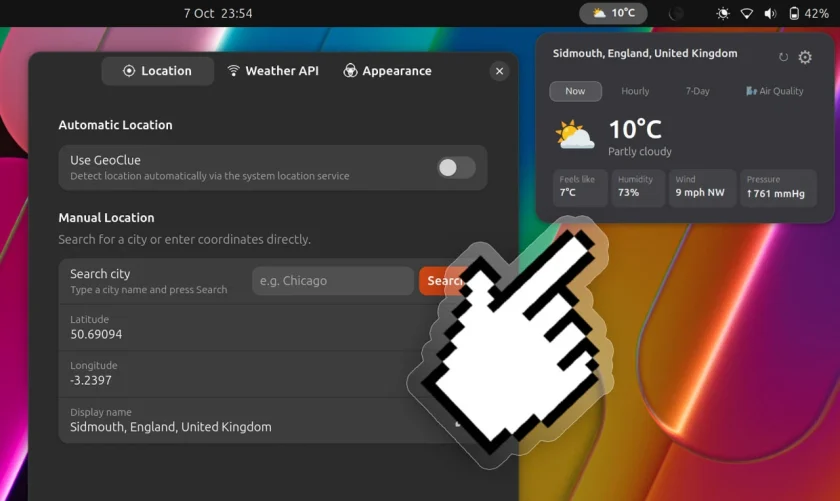
Despite that strong visual premise, real-world testing reveals a measurable gap between the extension’s promotional presentation and its actual day-to-day output. Depending on the user’s geographical location or the selected data source, the information delivered within the drop-down did not consistently match the depth shown in the official store previews. Features highlighted in project materials, such as integrated live radar mapping and specialized astronomical indicators—encompassing tide schedules, moon phases, and precise solar tracking—were absent during practical evaluation.
While the resulting drop-down remains visually pleasant and clean to look at, it falls short of functioning as an embedded, panel-based replacement for a full-featured desktop client like Mousam, which remains a benchmark for dedicated weather software on the Linux platform.
On the connectivity front, WeatherPrime offers a remarkably low barrier to entry by using Open-Meteo as its default, preconfigured data provider. Users are not required to register for developer accounts or configure personal API tokens to get the extension up and running. The software does include settings to switch to WeatherAPI.com for those who wish to supply their own access key, though attempts to utilize that secondary service encountered connection failures during testing, making the default Open-Meteo pipeline the only dependable route.
Users interested in testing Weather Prime can find it hosted on the GNOME Extensions directory, where it is verified for GNOME 50 installations under Ubuntu 26.04 LTS. The project also maintains a presence on GitHub under the Catalyx-Prime repository for those who prefer manual installation. However, the repository has seen a lull in development activity, with no commits recorded over a four-month period. Given the rapid progression of the GNOME desktop environment and the frequent architectural adjustments between Shell releases, an extended pause in maintenance suggests that compatibility updates for future releases like GNOME 51 may be slow to materialize.
 Linux & Open Source Solutions
OpenShot Video Editor Arrives on the Canonical Snap Store, Bringing Version 4.0 to Ubuntu Users
In a major milestone for open-source desktop multimedia production, the popular Qt-based...
 Linux & Open Source Solutions
KDE Plasma 6.8 Released on Project’s 30th Anniversary, Dropping X11 Sessions and Expanding Core Features
The KDE community has officially released KDE Plasma 6.8, marking a historic...
 Linux & Open Source Solutions
Era Arrives on Flathub as a New Rust-Powered Calendar Application for the GNOME Desktop
A new open-source calendaring client has entered the Linux application ecosystem. Named...