
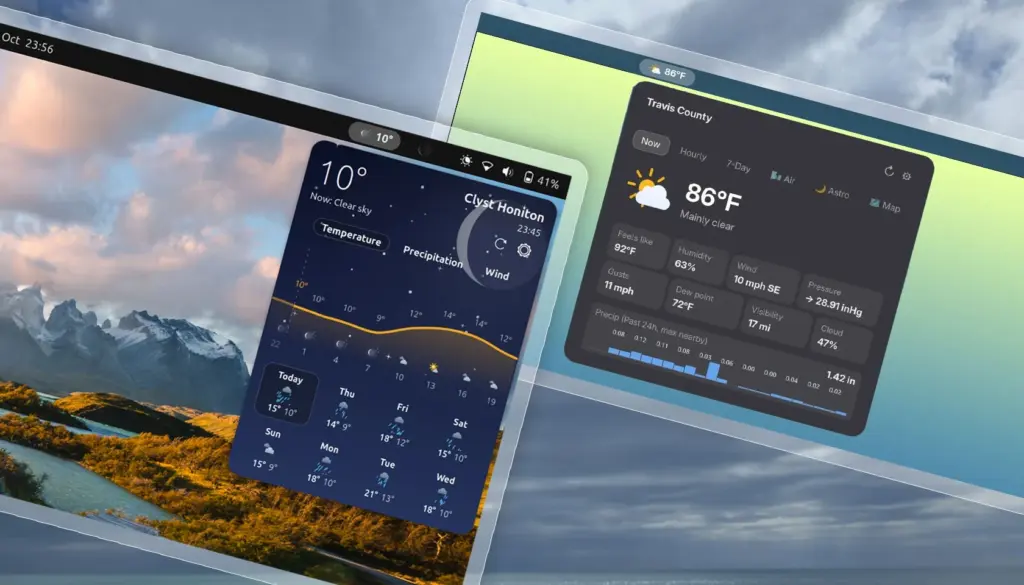
In terms of configuration, Weatherglass covers essential territory while retaining a few curious limitations. Users can switch meteorological readouts between metric and imperial systems, although the settings currently enforce an all-or-nothing approach. Those who prefer a hybrid setup—such as monitoring wind speed in miles per hour while tracking temperature in degrees Celsius—will find themselves out of luck, as the extension lacks modular unit toggling. On the data side, the applet shows flexibility by supporting multiple meteorological backends, including Open-Meteo, Norway’s Met.no, and the United States National Oceanic and Atmospheric Administration’s National Weather Service (NOAA NWS). It also incorporates automated geolocation detection to streamline the initial setup process.
The extension’s preferences panel includes an integrated preview mechanism that allows users to inspect the animations before leaving them enabled. The inclusion of an explicit toggle to disable visual effects proves to be more than just a matter of aesthetic preference; it serves a practical operational purpose. During hands-on evaluation, Weatherglass exhibited an aggressive appetite for system resources. Even when the main drop-down panel remained closed and out of sight, the extension was observed continuously utilizing CPU and GPU cycles in the background. For desktop workstations plugged into the wall, this overhead may go unnoticed, but on portable hardware, continuous graphics rendering inside an extension inevitably leads to increased power consumption and shortened battery life.
At present, Weatherglass is available through the official GNOME Extensions website, where its compatibility targets systems running GNOME 50, such as Ubuntu 26.04 LTS installations. Whether the extension will receive timely updates to support upcoming releases like GNOME 51—and whether future patches will address the underlying background resource draw—remains to be seen as community feedback filters in.
Weather Prime is like a mini app
Positioning itself with a different set of visual ambitions, Weather Prime approaches the panel format with an architecture reminiscent of a full application condensed into a compact drop-down. Billed by its creators as a complete weather station for the GNOME top panel, the project attempts to balance data density with modern desktop styling.
In the top panel, Weather Prime adopts a pill-shaped indicator displaying active local conditions. Clicking this panel element unrolls a richly populated drop-down menu that attempts to solve the presentation problem common to many data-heavy applets. Instead of arranging numbers and forecasts in dry, spreadsheet-style columns or unadorned vertical lists, the extension structures information using graphical pods, dedicated trend lines, and carefully placed visual accents designed to make dense data easier to scan.
 Linux & Open Source Solutions
Canonical Unveils Official Ubuntu Desktop Images for RISC-V Ahead of Ubuntu 26.10
Installing a complete graphical Ubuntu desktop on 64-bit RISC-V hardware is poised...
 Linux & Open Source Solutions
Ubuntu 26.10 Beta Rescheduled to October 1 Following Unforeseen Infrastructure Issues
Canonical has officially postponed the public beta release of its upcoming operating...
 Linux & Open Source Solutions
Ex-Microsoft dev builds a new task manager for Linux
For millions of personal computer users over the past three decades, Plummer’s...







