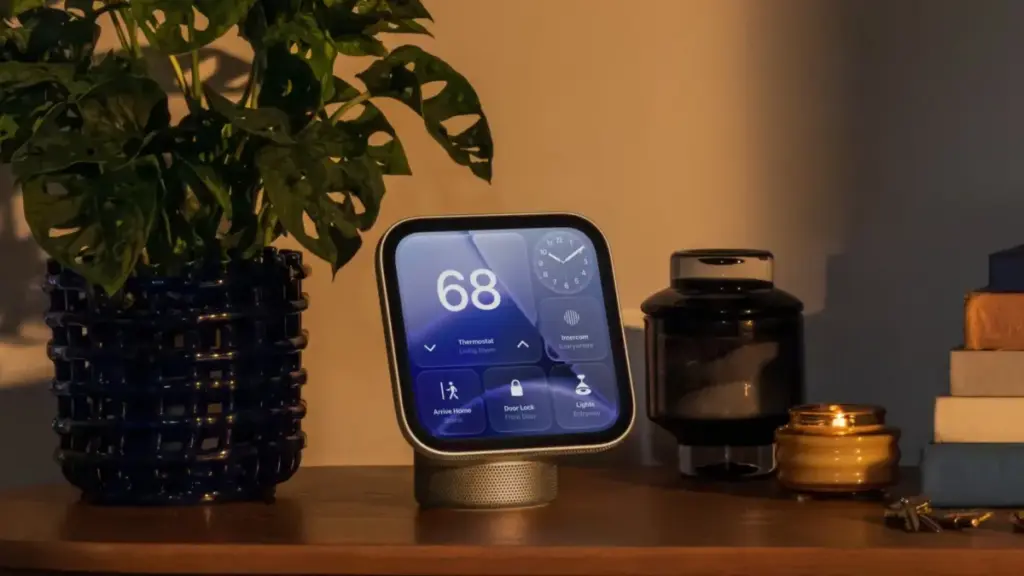
Apple officially released its new HomeView smart home hub on Friday, November 13, 2026, marking the arrival of one of the central products in its fall hardware lineup. Launching alongside the fourth-generation Apple TV 4K, the HomeView hub serves as a dedicated smart home command center designed to integrate deeply into the company’s hardware and software ecosystem. The release brings a close to an unusually dense period of product rollouts for Apple, which has seen the debut of more than 25 new hardware devices and accessories since late August.
As the first units reach consumers and early adopters begin setting up the device, broader details have emerged regarding the operational quirks, hardware design choices, authentication protocols, and software capabilities of the new hub. From its buttonless physical housing to its specialized camera controls and strict data lockout procedures, the HomeView introduces several distinct user experience considerations that shape how the device functions within a household.
Hardware Design and Power Management
One of the most immediate physical characteristics of the HomeView is its entirely buttonless chassis. Apple has eliminated traditional hardware controls, omitting any physical buttons to power the device on, turn it off, or trigger a reboot. Users looking to restart the hardware must perform the operation through the built-in Settings app on the device’s interface or physically disconnect the power cable from the wall outlet for a brief moment.
The physical placement of the HomeView within a room plays a critical role in its functional reliability. According to technical documentation and setup guidelines from Apple, proper positioning is mandatory for the hub’s onboard sensors and camera array to operate correctly. The screen of the device must be angled directly toward the user’s face, requiring a clear line of sight.
Environmental surroundings also affect performance. Apple specifies that the HomeView cannot be placed directly beneath overhanging shelves, deep cabinets, or other architectural elements that might cast shadows or obstruct the top of the display. Furthermore, the environment demands front-facing, even lighting to ensure the camera can clearly register the space. If multiple occupants are standing within the room, the device relies on proximity and framing, requiring the primary user to be centered in the frame and located closest to the camera array relative to bystanders.
Facial Recognition and Sunwear Limitations
Authentication on the HomeView relies heavily on facial identification via its embedded front-facing camera, though the system comes with clear operational parameters. Apple notes that the HomeView will generally fail to recognize users if their facial features are covered, explicitly pointing out that wearing sunglasses will prevent successful facial identification.
In instances where the HomeView fails to identify an individual, setup guidance recommends removing any facial coverings, accessories, or headwear that block the camera’s view of key facial features. Because the system relies on an unobstructed view under standard ambient lighting, dramatic backlighting or uneven lateral shadows can similarly trigger authentication failures. When visual tracking fails, the hardware relies on secondary verification methods tied to paired personal electronics.
Built-in Mirror Feature and Camera Controls
To assist users with camera positioning and offer quick visual checks, Apple has integrated a dedicated "Mirror" tool within the HomeView Control Center. When activated, the Mirror feature displays a live feed of the front-facing camera directly on the main screen, allowing users to inspect their appearance or verify how they are framed within the camera’s field of view.
The Mirror utility includes integrated controls designed to adapt to low-light environments and varying room depths. Users can switch on an edge light feature, which illuminates the perimeter of the HomeView display to cast soft, front-facing light onto the user’s face. Additionally, the interface provides quick toggle options for 1x and 2x digital zoom levels, allowing individuals to adjust their framing directly from the screen during setup or active use.
 macOS & Apple IT Support
Amazon Slashes AirPods Pro 3 to Record-Low $169.99 in Major Black Friday Price Cut
In one of the most significant retail developments of the holiday shopping...
 macOS & Apple IT Support
Apple Weekly Round-Up: iPhone Duo Sales Trigger Retail Crowds, ‘Pro and Tell’ Event Set for LA, and iOS 27.2 Nears Launch
In what is proving to be one of the most intense autumn...
 macOS & Apple IT Support
Amazon Cuts $49 Off 11th-Generation iPad as Fall Discounting Continues
Amazon has introduced a new round of price reductions on Apple’s standard...