
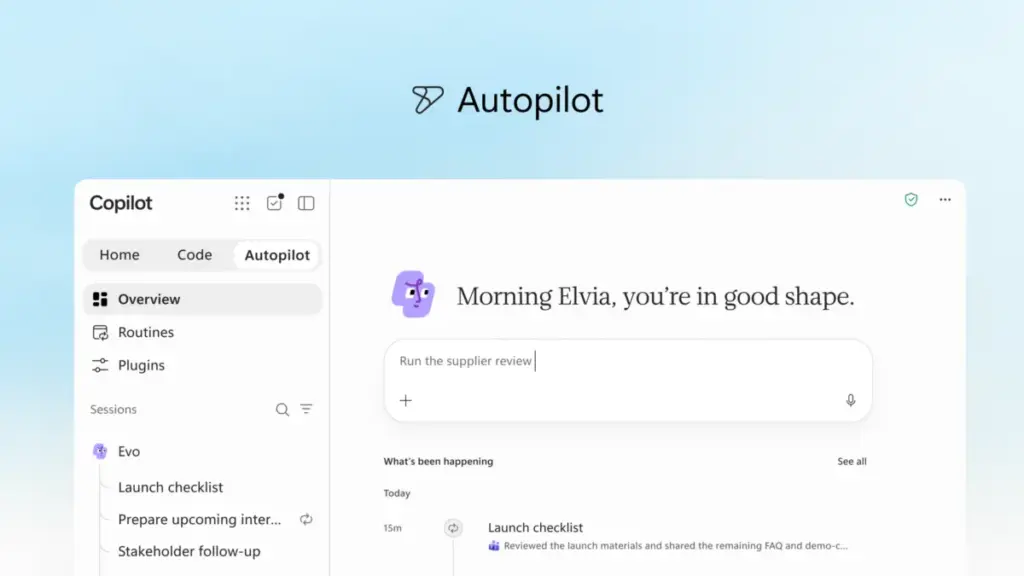
In a significant evolution of its artificial intelligence strategy, Microsoft has unveiled a comprehensive reimagining of Microsoft Copilot. The update marks a transition from a side-bar assistant to a primary workspace designed to integrate seamlessly into the "flow of human ambition." By introducing a suite of new capabilities—including a centralized "Home" interface, a natural-language coding environment, and autonomous "Autopilot" agents—the company aims to provide a unified platform where individuals and organizations can build, customize, and scale AI-driven workflows.
The overhaul reflects a broader shift in the industry toward "agentic" AI—systems that do not merely respond to prompts but proactively manage complex tasks. Jared Spataro, who leads Microsoft’s AI at Work efforts, noted that the new Copilot is intended to connect the essential tools workers rely on with a next-generation capability set required to handle the increasing complexity of modern professional life.
A Unified Experience for Diverse Modes of Work
At the center of this transformation is the new Copilot "Home," which serves as the primary starting point for users. As digital work has become increasingly fragmented across various meetings, chat threads, documents, and applications, Home is designed to act as a grounding mechanism. It provides a real-time view of recent activity, offers intelligent suggestions on how the AI can assist with current projects, and allows users to resume work exactly where they left off.
Within this new interface, Microsoft is distinguishing between two primary modes of interaction: Chat and Cowork. Chat remains the familiar, conversational interface optimized for quick inquiries, data lookups, and draft creation. Cowork, however, represents a more advanced tier of delegation. Instead of a back-and-forth dialogue, users define a high-level task—such as responding to a Request for Proposal (RFP), creating a product launch kit, or assembling a financial close package—and the AI manages the process end-to-end to deliver a completed result.
The integration of the Microsoft 365 suite is also being deepened through a feature called Office in Copilot. This capability embeds the full functionality of Word, Excel, and PowerPoint directly into the Copilot experience. The goal is to eliminate the friction of context switching and the risk of broken formatting or versioning errors that often occur when moving content between an AI chat and a standalone document. From the Home screen, users can direct Copilot to draft briefs or model budgets, and the AI generates live, editable files that are immediately accessible to the entire team for collaborative refinement.

Furthermore, Microsoft has refined how Copilot behaves within specific Office applications. In PowerPoint, the AI now automatically ensures that decks remain on-brand while allowing for the fine-tuning of images and templates. In Excel, a new transparency feature allows collaborators to see exactly what changes the AI has made and why, while the system offers recommendations for the most effective data visualizations. Specialized "Skills" are also being introduced to bring role-specific expertise, such as legal or financial workflows, directly into the apps.
Democratizing Solution Building Through Natural Language
One of the most ambitious components of the update is the introduction of "Code," a feature that moves software creation out of the exclusive domain of professional developers. Microsoft posits that for decades, the "unit" of knowledge work has been the file—the document, spreadsheet, or slide deck. With Code, the company is introducing a fourth unit: the purpose-built solution.
Powered by the same underlying technology as GitHub Copilot, the Code feature allows any user to describe a desired application, tracker, or automation in natural language. Copilot then selects the appropriate technical approach and builds the solution within a secure, sandboxed environment. These solutions can range from simple desktop widgets for quick data reference to cloud-hosted internal apps designed for team-wide use.
 Productivity Software & Office Suites
Microsoft Reimagines the Future of Productivity with the Launch of the New Copilot
In a significant evolution of its artificial intelligence strategy, Microsoft has unveiled...
 Productivity Software & Office Suites
The Rise of the Knowledge Spine: How Frontier Firms are Redefining Enterprise AI through Agentic Systems
In the rapidly evolving landscape of corporate technology, the conversation among business...
 Productivity Software & Office Suites
Microsoft Reimagines Copilot as a Centralized Engine for the Future of AI-Driven Work
In a major strategic shift aimed at redefining the intersection of human...







