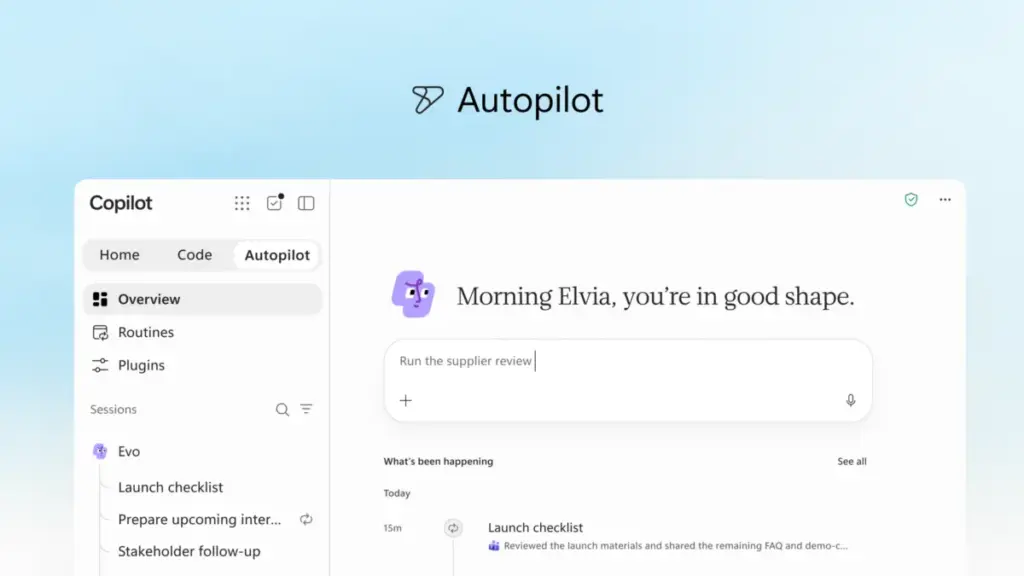
In a significant evolution of its artificial intelligence strategy, Microsoft has unveiled a comprehensive reimagining of Microsoft Copilot. The update marks a transition from a side-bar assistant to a primary workspace designed to integrate seamlessly into the "flow of human ambition." By introducing a suite of new capabilities—including a centralized "Home" interface, a natural-language coding environment, and autonomous "Autopilot" agents—the company aims to provide a unified platform where individuals and organizations can build, customize, and scale AI-driven workflows.
The overhaul reflects a broader shift in the industry toward "agentic" AI—systems that do not merely respond to prompts but proactively manage complex tasks. Jared Spataro, who leads Microsoft’s AI at Work efforts, noted that the new Copilot is intended to connect the essential tools workers rely on with a next-generation capability set required to handle the increasing complexity of modern professional life.
A Unified Experience for Diverse Modes of Work
At the center of this transformation is the new Copilot "Home," which serves as the primary starting point for users. As digital work has become increasingly fragmented across various meetings, chat threads, documents, and applications, Home is designed to act as a grounding mechanism. It provides a real-time view of recent activity, offers intelligent suggestions on how the AI can assist with current projects, and allows users to resume work exactly where they left off.
Within this new interface, Microsoft is distinguishing between two primary modes of interaction: Chat and Cowork. Chat remains the familiar, conversational interface optimized for quick inquiries, data lookups, and draft creation. Cowork, however, represents a more advanced tier of delegation. Instead of a back-and-forth dialogue, users define a high-level task—such as responding to a Request for Proposal (RFP), creating a product launch kit, or assembling a financial close package—and the AI manages the process end-to-end to deliver a completed result.
The integration of the Microsoft 365 suite is also being deepened through a feature called Office in Copilot. This capability embeds the full functionality of Word, Excel, and PowerPoint directly into the Copilot experience. The goal is to eliminate the friction of context switching and the risk of broken formatting or versioning errors that often occur when moving content between an AI chat and a standalone document. From the Home screen, users can direct Copilot to draft briefs or model budgets, and the AI generates live, editable files that are immediately accessible to the entire team for collaborative refinement.

Furthermore, Microsoft has refined how Copilot behaves within specific Office applications. In PowerPoint, the AI now automatically ensures that decks remain on-brand while allowing for the fine-tuning of images and templates. In Excel, a new transparency feature allows collaborators to see exactly what changes the AI has made and why, while the system offers recommendations for the most effective data visualizations. Specialized "Skills" are also being introduced to bring role-specific expertise, such as legal or financial workflows, directly into the apps.
Democratizing Solution Building Through Natural Language
One of the most ambitious components of the update is the introduction of "Code," a feature that moves software creation out of the exclusive domain of professional developers. Microsoft posits that for decades, the "unit" of knowledge work has been the file—the document, spreadsheet, or slide deck. With Code, the company is introducing a fourth unit: the purpose-built solution.
Powered by the same underlying technology as GitHub Copilot, the Code feature allows any user to describe a desired application, tracker, or automation in natural language. Copilot then selects the appropriate technical approach and builds the solution within a secure, sandboxed environment. These solutions can range from simple desktop widgets for quick data reference to cloud-hosted internal apps designed for team-wide use.
To support this surge in user-generated software, the company is launching the Microsoft Copilot Managed Runtime. This hosting infrastructure ensures that the code generated by Copilot runs safely within an organization’s existing Microsoft 365 environment. While it is designed to be easily accessible for non-technical employees, it remains fully governed by IT departments. This foundation supports apps built in Cowork, Code, and Copilot Studio, and Microsoft is eventually opening the runtime to third-party and professional developers as well.
The Rise of the Autonomous Digital Teammate
Perhaps the most forward-looking element of the announcement is Autopilot, an evolution of the technology previously known as Scout. Unlike traditional AI assistants that wait for a user to initiate a command, Autopilot is a persistent, proactive agent. Users can assign the agent a name, a specific role, and a long-term goal, allowing it to work independently in the background.
Autopilot is designed to handle recurring and complex processes, such as managing a full supplier review. In this scenario, the agent can build a schedule, handle preparation, attend to follow-ups, and even reach out to human stakeholders for updates without constant monitoring. Because it is cloud-hosted, Autopilot continues to function even when the user is offline.

To ensure it operates as a true member of the team, Autopilot possesses its own identity, memory, and workspace within the organization’s tenant. It is integrated into the tools teams already use, such as Microsoft Teams and Outlook, where it can be @mentioned like any other colleague. Despite its autonomy, the system is built with strict permissions and audit trails, ensuring that human users remain in control of the objectives and boundaries.
Expanding Grounding and Business Context
For an AI to be effective in a corporate setting, it must understand the specific context of the business it serves. Microsoft is addressing this through Microsoft IQ, a unified intelligence platform that connects an organization’s operational data with the knowledge held across the Microsoft stack.
The company is expanding the data available to Copilot by integrating Fabric IQ, which brings context from over 20 million semantic models in Power BI into the AI’s reasoning engine. Additionally, Copilot is now being grounded in data and workflows from Dynamics 365 and the Power Platform. This means a salesperson drafting a proposal can have Copilot automatically incorporate deal histories and customer support tickets directly into the document, removing the need for manual lookups.
To further extend these capabilities, Microsoft is launching a new plugin registry. This centralized catalog allows IT departments to discover, approve, and manage plugins from Microsoft, third-party partners, and custom internal builds. This unified registry ensures that specialized AI skills can be introduced at scale while maintaining the necessary security and governance controls.
A New Framework for Managing AI Investment
As AI usage scales, organizations are increasingly focused on managing costs and measuring value—a discipline Microsoft refers to as FinOps for AI. To address this, the company is evolving its pricing and management models.
Standard productivity tasks, such as summaries and first drafts, will continue to be covered under a User Subscription License (USL). A key innovation here is "Auto," a routing system that automatically weighs the accuracy, speed, and cost of each request to select the most appropriate model for the job.

For more resource-intensive "agentic" work—including the use of Cowork, Code, Autopilot, and frontier models like Astra and Fable—Microsoft is utilizing Usage-Based Billing (UBB). This allows organizations to match their costs directly to the value generated by high-end AI operations.
New FinOps capabilities within Agent 365 and Microsoft Copilot will allow administrators to manage these spending policies at scale. Admins can now set which model families are available to specific user groups, route credit requests through existing approval workflows, and analyze which AI tasks are delivering the strongest business outcomes. On the individual level, end-users will be able to view their own credit usage and history directly within the Copilot interface, encouraging responsible use within organizational guardrails.
The Road Ahead: Proactive Command Centers and Shared Context
While many of the features announced today are beginning their rollout through the Frontier program, Microsoft also provided a glimpse into the near future of the platform.
Coming soon to the Home interface is "Today," a proactive command center that aggregates information from email, calendars, Teams threads, and tasks. Rather than just listing what needs to be done, Today is designed to prepare the work in advance—drafting responses, proposing schedule changes, and providing the necessary context for forgotten follow-ups.
Additionally, the company is testing "@Copilot in Teams," which allows the AI to participate in group chats and channels with the shared context of the entire team. This capability enables the AI to answer questions about past decisions by pulling from conversations across various threads and even offering to prepare cross-functional reviews when those decisions impact multiple departments.
The "new Copilot" represents a major bet by Microsoft that the future of work lies not in fragmented applications, but in a centralized AI ecosystem that can both follow instructions and act on its own initiative. As these features move from private preview to broad availability in the coming months, the company continues to position itself at the forefront of the transition to an AI-powered economy.
 Productivity Software & Office Suites
Microsoft Shifts Focus to Enterprise AI Utility: A New Strategic Framework for Agents, Economics, and Partnership
In an era defined by a relentless cycle of artificial intelligence breakthroughs,...
 Productivity Software & Office Suites
Microsoft Unveils Microsoft 365 G7: A New AI-Driven Frontier Suite for Government Organizations
In an era where the public sector faces a dual mandate of...
 Productivity Software & Office Suites
Microsoft Unveils the "New Copilot" Ecosystem: Integrating Autonomous Agents, Custom Code, and Advanced Office Workflows
REDMOND, Wash. — In a major step toward redefining the intersection of...