
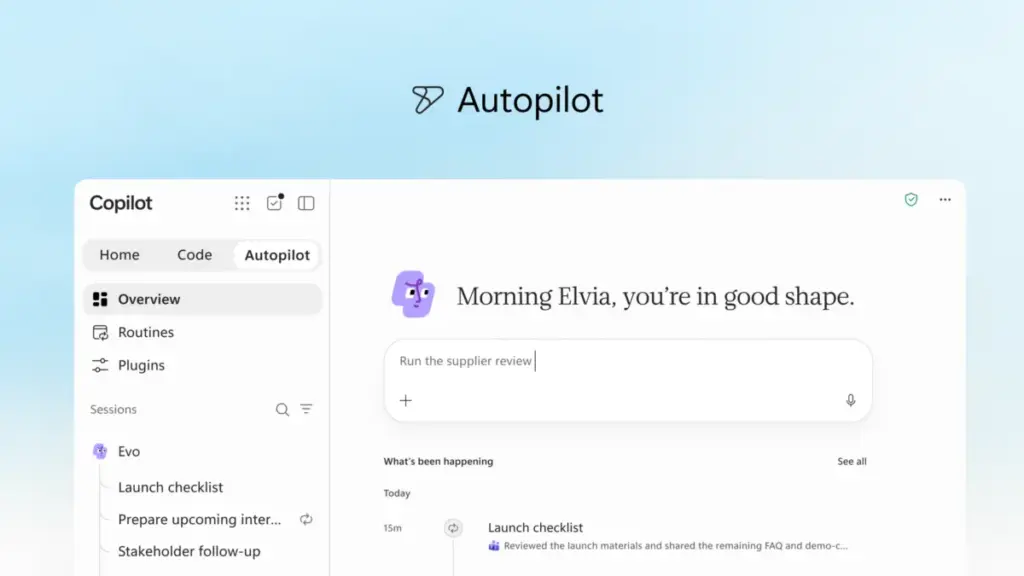
In a significant shift that signals the next phase of the artificial intelligence era, Microsoft has announced a comprehensive reimagining of its Copilot platform. The tech giant is moving beyond simple chat interfaces to create a more integrated, proactive, and "agentic" ecosystem designed to align with the evolving flow of human ambition in the workplace. By introducing the "new Copilot," Microsoft aims to bridge the gap between the tools employees use daily and a new generation of AI capabilities that can build, customize, and scale solutions across an organization.
The update represents a fundamental change in how AI is positioned within the enterprise. Rather than existing as a sidebar or a secondary application, the new Copilot is being restructured into a centralized hub for productivity. This evolution is centered on three core pillars: Home, Code, and Autopilot. Each of these components is designed to address different modes of work, ranging from quick conversational queries to complex project delegation and custom software creation.
A New Experience for Every Mode of Work
At the center of this transformation is "Home," a new starting point within the Copilot app that serves as a unified command center. Microsoft recognizes that modern work is often fragmented, with employees constantly shifting their attention between meetings, emails, chat threads, and document editing. Home is designed to ground users in their current context, providing a clear view of recent activity and offering intelligent suggestions on how Copilot can assist with the task at hand.
Within this new interface, Microsoft is distinguishing between two primary modes of interaction: Chat and Cowork. Chat remains the go-to for instant, conversational needs—answering quick questions, drafting brief messages, or summarizing information. Cowork, however, represents a shift toward delegation. In this mode, users define a complex task—such as responding to a Request for Proposal (RFP), creating a product launch kit, or preparing a financial close package—and Copilot executes the process from start to finish. This allows users to iterate on a completed result rather than building from scratch.
Perhaps the most significant update to the daily workflow is the introduction of "Office in Copilot." This feature integrates the full functionality of Word, Excel, and PowerPoint directly into the Copilot experience. The goal is to eliminate the friction of app-switching and the common issues of broken formatting or version control that occur when moving content between an AI chat and a document. From the Home screen, users can ask Copilot to model a budget or build a presentation deck; the AI then creates a live, editable file that stays in sync across both the Copilot interface and the traditional Office applications. This collaborative environment allows for side-by-side refinement, where @mentions of teammates enable real-time co-authoring within the AI-generated context.

The individual Office apps are also seeing specialized enhancements. PowerPoint is becoming more brand-aware, automatically maintaining corporate templates while allowing users to fine-tune images and slides through AI. Excel is gaining more transparency; when Copilot or a collaborator makes changes to a spreadsheet, the AI can explain exactly what was modified and why, while also recommending data visualizations. Furthermore, Microsoft is introducing "Skills"—specialized expertise such as legal or financial workflows—that can be brought directly into these applications to standardize best practices across a department.
Democratizing Solution Building with Code
Microsoft is also expanding the definition of knowledge work through a new capability called "Code." Traditionally, the unit of productivity has been the file—a document, a spreadsheet, or a slide deck. Microsoft argues that a fourth unit is emerging: the purpose-built solution. Code is designed to allow non-developers to create their own applications, trackers, and automations using natural language.
 Productivity Software & Office Suites
Microsoft Reimagines Copilot as a Central Hub for AI-Driven Work and Autonomous Agents
In a significant shift for the future of digital productivity, Microsoft has...
 Productivity Software & Office Suites
Microsoft Unveils Advanced AI ‘Skills’ and Data Connectors to Transform Excel for Finance Professionals
The evolution of modern computing has historically followed a predictable trajectory, moving...
 Productivity Software & Office Suites
Microsoft Unveils Natural Language App Creation in Copilot Studio, Bridging the Gap Between AI Innovation and Enterprise Governance
The landscape of software development is undergoing a fundamental transformation, driven by...







