
In a significant shift that signals the next phase of the artificial intelligence era, Microsoft has announced a comprehensive reimagining of its Copilot platform. The tech giant is moving beyond simple chat interfaces to create a more integrated, proactive, and "agentic" ecosystem designed to align with the evolving flow of human ambition in the workplace. By introducing the "new Copilot," Microsoft aims to bridge the gap between the tools employees use daily and a new generation of AI capabilities that can build, customize, and scale solutions across an organization.
The update represents a fundamental change in how AI is positioned within the enterprise. Rather than existing as a sidebar or a secondary application, the new Copilot is being restructured into a centralized hub for productivity. This evolution is centered on three core pillars: Home, Code, and Autopilot. Each of these components is designed to address different modes of work, ranging from quick conversational queries to complex project delegation and custom software creation.
A New Experience for Every Mode of Work
At the center of this transformation is "Home," a new starting point within the Copilot app that serves as a unified command center. Microsoft recognizes that modern work is often fragmented, with employees constantly shifting their attention between meetings, emails, chat threads, and document editing. Home is designed to ground users in their current context, providing a clear view of recent activity and offering intelligent suggestions on how Copilot can assist with the task at hand.
Within this new interface, Microsoft is distinguishing between two primary modes of interaction: Chat and Cowork. Chat remains the go-to for instant, conversational needs—answering quick questions, drafting brief messages, or summarizing information. Cowork, however, represents a shift toward delegation. In this mode, users define a complex task—such as responding to a Request for Proposal (RFP), creating a product launch kit, or preparing a financial close package—and Copilot executes the process from start to finish. This allows users to iterate on a completed result rather than building from scratch.
Perhaps the most significant update to the daily workflow is the introduction of "Office in Copilot." This feature integrates the full functionality of Word, Excel, and PowerPoint directly into the Copilot experience. The goal is to eliminate the friction of app-switching and the common issues of broken formatting or version control that occur when moving content between an AI chat and a document. From the Home screen, users can ask Copilot to model a budget or build a presentation deck; the AI then creates a live, editable file that stays in sync across both the Copilot interface and the traditional Office applications. This collaborative environment allows for side-by-side refinement, where @mentions of teammates enable real-time co-authoring within the AI-generated context.

The individual Office apps are also seeing specialized enhancements. PowerPoint is becoming more brand-aware, automatically maintaining corporate templates while allowing users to fine-tune images and slides through AI. Excel is gaining more transparency; when Copilot or a collaborator makes changes to a spreadsheet, the AI can explain exactly what was modified and why, while also recommending data visualizations. Furthermore, Microsoft is introducing "Skills"—specialized expertise such as legal or financial workflows—that can be brought directly into these applications to standardize best practices across a department.
Democratizing Solution Building with Code
Microsoft is also expanding the definition of knowledge work through a new capability called "Code." Traditionally, the unit of productivity has been the file—a document, a spreadsheet, or a slide deck. Microsoft argues that a fourth unit is emerging: the purpose-built solution. Code is designed to allow non-developers to create their own applications, trackers, and automations using natural language.
Powered by the same underlying technology as GitHub Copilot, the Code feature enables users to describe a business problem—such as the need for a persistent desktop widget to track shipments or an interactive dashboard to test financial outcomes—and watch as Copilot builds the solution. These apps are hosted securely within the company’s Microsoft 365 environment through the new Microsoft Copilot Managed Runtime. This infrastructure ensures that while any employee can build a tool, the results remain governed by IT, connected to live company data, and accessible across the organization.
For professional developers, this system is designed to be complementary. While they continue to use GitHub Copilot for high-level software engineering, the broader Copilot platform allows for more connectivity between custom-built internal tools and the wider enterprise ecosystem. This "sandboxed" approach aims to balance the need for rapid innovation with the strict security requirements of modern IT departments.
The Rise of the Autonomous Digital Teammate
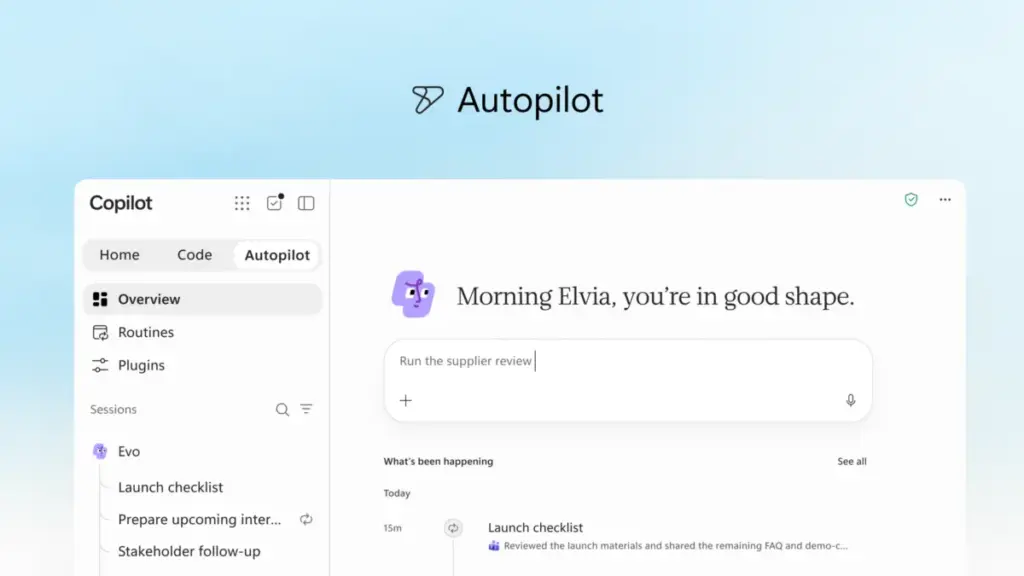
The most forward-looking element of the announcement is "Autopilot," a proactive personal agent previously known by the internal codename "Scout." Unlike traditional AI that waits for a user prompt, Autopilot is designed to work independently. Users can assign it a name, a role, and a specific goal, such as managing a supplier review process.
Once activated, Autopilot can monitor communication channels, follow up on email threads, and handle the logistical heavy lifting of a project. It can build schedules, coordinate meetings, and reach out to stakeholders for updates without constant human intervention. Because it is cloud-hosted, it continues to operate even when the user is offline.

Autopilot is built on "Microsoft IQ," a platform that provides the agent with an understanding of the organization’s specific workflows and history. It functions as a digital colleague with its own identity and memory, appearing in Teams, Outlook, and documents where it can be @mentioned like any other team member. Microsoft emphasizes that while the agent is autonomous, it operates within strict boundaries and permissions set by the user and the organization, ensuring that human oversight remains central to the process.
Expanding Business Context and Data Grounding
For AI to be truly effective in a corporate setting, it must understand the specific data and context of the business it serves. Microsoft is addressing this through "Fabric IQ," which connects Copilot to the vast amounts of data held in Power BI and other semantic models. This grounding ensures that when a user asks a question or delegates a task, the AI is pulling from trusted, real-time internal data rather than general information.
Furthermore, Microsoft is integrating data from Dynamics 365 and the Power Platform into the Copilot workflow. For example, a salesperson drafting a proposal can now have Copilot automatically incorporate deal history or active support tickets directly into the document. This deep integration is supported by a new unified plugin registry, a central catalog where IT can manage and approve Microsoft, partner, and custom-built plugins. This registry allows developers to publish a tool once and have it function across all Copilot-supported experiences, from Teams to Word.
Managing the Economics of AI
As AI usage scales, organizations are increasingly concerned with the associated costs. Microsoft is addressing this through a new "FinOps for AI" framework, designed to help businesses manage spend while maximizing value. The company is introducing a two-tiered approach to billing: User Subscription Licenses (USL) and Usage-Based Billing (UBB).
For everyday tasks like drafting emails or summarizing meetings, the USL provides a fixed-cost model. At the heart of this is a feature called "Auto," which intelligently routes requests to the model best suited for the task based on a balance of accuracy, speed, and cost. For more complex, "agentic" work—such as the long-running tasks handled by Autopilot or the custom applications built in Code—Microsoft is moving toward a usage-based model. This allows organizations to use advanced frontier models, such as Astra and Fable, while maintaining control over their budget.
New administrative tools are also being introduced to provide transparency. Admins will be able to set spending policies, manage model availability for different groups, and analyze which AI tasks are generating the highest ROI. End users will also gain visibility into their own credit usage, helping them stay within organizational guardrails while utilizing AI tools.

A Sneak Peek at the Proactive Future
Looking ahead, Microsoft offered a glimpse into upcoming features designed to make Copilot even more personalized. A new command center called "Today" is set to enter private preview in October. Today acts as a proactive assistant that scans mail, calendars, and Teams threads to surface what needs immediate attention. It doesn’t just show the work; it prepares it. For instance, it might have a draft response ready for an urgent email or a proposed schedule change for a conflicting meeting, allowing the user to simply review and send.
Additionally, the introduction of "@Copilot" in Teams will allow the AI to act as a participant in group settings with shared context. In a channel or group chat, the AI can explain the reasoning behind past decisions by pulling from previous conversations across the organization. It can also help manage the ripple effects of those decisions—such as adjusting launch timings or manufacturing schedules—and prepare cross-functional reviews to keep all stakeholders aligned.
As these features begin to roll out through the Frontier program in the coming weeks, Microsoft is positioning the new Copilot as the essential infrastructure for the future of work. By moving from reactive chat to proactive partnership, the company is betting that the "flow of human ambition" is best supported by an AI that can not only talk but also build, manage, and act. These innovations will be a major focus at the upcoming Microsoft Ignite conference in November, where the company plans to share further details on how these tools will empower organizations to reimagine their operations in an AI-first world.
 Productivity Software & Office Suites
Microsoft Reports 30 Million Paid Copilot Seats as Enterprise AI Shifts from Assistance to Autonomy
In a recent earnings call that signaled a pivotal moment for the...
 Productivity Software & Office Suites
Microsoft Reimagines Copilot as a Central Hub for AI-Driven Enterprise Productivity
In a significant move to redefine the landscape of modern work, Microsoft...
 Productivity Software & Office Suites
Microsoft Reimagines Copilot as a Central Hub for AI-Driven Work and Autonomous Agents
In a significant shift for the future of digital productivity, Microsoft has...







