
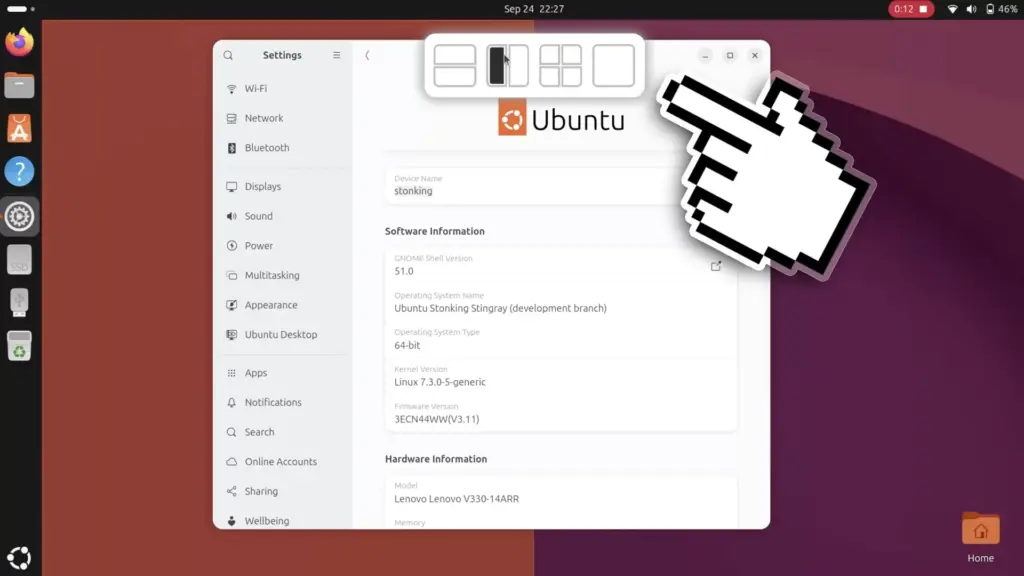
Ubuntu 26.10 is introducing a new way for users to organize their workspaces, featuring an intuitive layout picker that glides into view from the top edge of the display whenever an application window is moved. This interface enhancement brings a modern drop-zone approach to the Linux distribution’s native window management, simplifying the process of arranging open applications across the desktop. Designed to reduce the physical effort of snapping windows into predefined grid arrangements, the new mechanism represents an ongoing evolution of Ubuntu’s desktop ergonomics.
The visual behavior of the new feature will feel immediately recognizable to anyone who has interacted with the snap layouts in Windows 11 or experimented with the popular Tiling Shell extension on GNOME Shell. The underlying principle across these implementations remains broadly consistent: providing users with an accessible, visual target area at the top of the monitor where windows can be deposited into neatly calculated screen divisions. Instead of requiring users to throw windows against distant display borders or memorize multi-key combinations, the layout picker consolidates available configurations into a central interface element that activates dynamically during window drag operations.
When a user clicks a window’s title bar and begins dragging it across the desktop, the top-mounted layout picker smoothly descends into view. The panel reveals a series of preset drop zones, each representing a distinct window arrangement. As the cursor steers the floating application over one of these designated zones, the system renders a translucent ghost preview across the desktop workspace. This preview clearly delineates the exact dimensions and positioning that the application will adopt, removing the guesswork from window placement. Once the user releases the mouse button over the intended drop zone, the window snaps instantly into the selected region of the screen.
The utility of this system does not conclude once the primary window settles into its designated slot. As part of Ubuntu’s integrated Tiling Assistant mechanism, the operating system immediately acts to streamline the remainder of the user’s workspace. Just as it does with standard edge-snapping actions, the interface displays intelligent tiling suggestions to populate the remaining open spaces on the monitor. If an individual drops a document or browser into a single quadrant of a four-way split, the system surfaces interactive thumbnail previews of other active windows, inviting the user to fill the adjacent quadrants with single clicks. This cohesive workflow ensures that multi-window arrangements can be established in a matter of moments, rather than requiring individual windows to be painstakingly positioned one after another.
In terms of layout variety, the drop zones featured within the new top-mounted picker directly reflect the window configurations already supported by Ubuntu’s traditional edge-dragging mechanics. The available presets center around straightforward halves and quarters, operating strictly within a two-column and two-row paradigm. Users cannot create custom layouts, alter partition ratios directly from the picker, or assemble asymmetrical combinations of rows and columns. While community-developed tools such as Tiling Shell have gained popularity by supporting heavily customized arrangements with variable widths and complex multi-window matrices, Ubuntu’s native implementation opts for operational simplicity. The design avoids the cognitive overhead and visual density that often accompany highly customizable tiling systems, ensuring that the primary picker remains lightweight and immediately understandable to general users.
 Linux & Open Source Solutions
NexPhone Multi-OS Smartphone Delayed to March 2027 as Hardware Challenges and Price Adjustments Emerge
The NexPhone, an ambitious multi-operating system smartphone designed to bridge the divide...
 Linux & Open Source Solutions
Ubuntu 26.10 Introduces Restricted Media Codec Installation to App Center’s Add-Ons Hub
Ubuntu 26.10 has expanded the functionality of its modern App Center by...
 Linux & Open Source Solutions
The Document Foundation Unveils New Visual Identity to Establish Distinct Institutional Profile Apart from LibreOffice
The Document Foundation, the charitable non-profit entity responsible for overseeing the development...







