
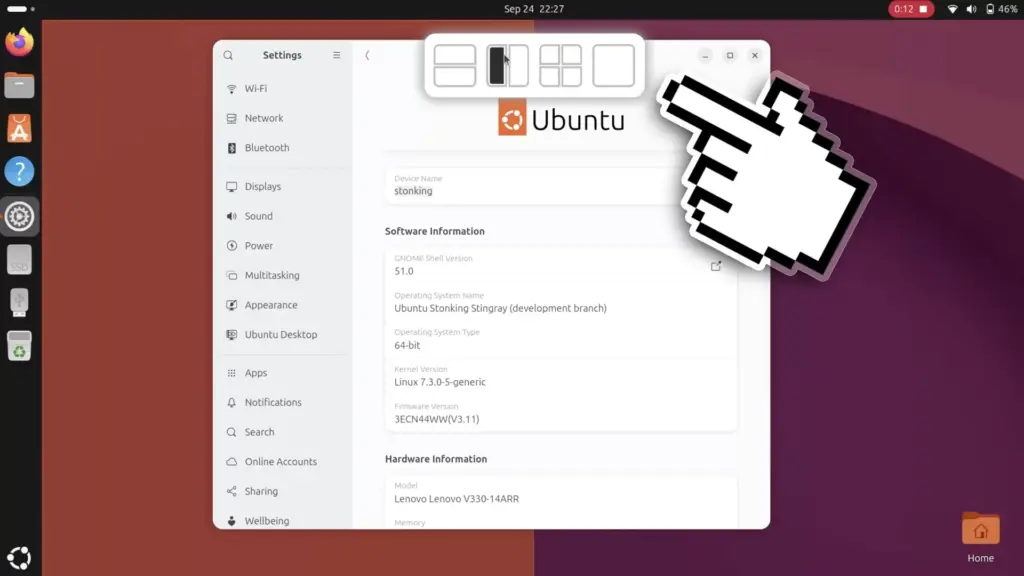
Despite the obvious productivity benefits of the new layout picker, its current implementation in Ubuntu 26.10 lacks an immediate mechanism for users to disable the feature if they find it unnecessary. Navigating through the standard system configuration menus, including the dedicated settings pane under Settings > Ubuntu Desktop, reveals no toggle switch or user preference option dedicated to the layout bar. For individuals who prefer a minimalist desktop or who frequently relocate floating windows across the upper portions of their display without intending to snap them, the automatic appearance of a descending menu can become visually distracting. The sudden motion of the interface sliding downward can interrupt the visual flow of moving windows freely, making the absence of a simple user-facing off switch a notable omission in the standard settings interface.
Users determined to adjust the behavior of the new feature are not entirely without options, though the solution requires venturing beyond the distribution’s default control panel. Because the picker is implemented within the underlying Tiling Assistant extension, a toggle switch to deactivate the top-screen layout drop zone does exist within the extension’s internal preference architecture. However, gaining access to these deeper configuration parameters requires the installation of dedicated third-party utilities, such as the Extensions Manager application available for GNOME-based desktops.
Through external configuration tools, users can access an array of unexposed settings that Canonical chooses not to surface within the mainstream Ubuntu settings application. In addition to switching off the layout picker entirely, these deeper extension menus provide control over visual elements such as configurable window gaps, allowing users to introduce aesthetic padding between snapped windows according to their personal tastes. For the time being, the need to rely on external software to manage the layout picker underscores the ongoing tension between Canonical’s preference for streamlined, uncluttered system settings and the desire of power users for comprehensive interface control.
The introduction of the layout picker represents another deliberate step forward in Canonical’s gradual transformation of the default GNOME desktop into an adaptable productivity environment. By taking inspiration from proven desktop paradigms and continuing to build upon the foundation established by Tiling Assistant, Ubuntu 26.10 delivers a more fluid, cohesive approach to multitasking that bridges the gap between basic window positioning and advanced grid management. As the Stonking Stingray release approaches its finalized state, the community will be watching closely to see whether additional polish, such as an official disable toggle in the primary settings menu, arrives to complete this late-breaking addition.
 Linux & Open Source Solutions
Canonical Unveils Official Ubuntu Desktop Images for RISC-V Ahead of Ubuntu 26.10
Installing a complete graphical Ubuntu desktop on 64-bit RISC-V hardware is poised...
 Linux & Open Source Solutions
Ubuntu 26.10 Introduces Restricted Media Codec Installation to App Center’s Add-Ons Hub
Ubuntu 26.10 has expanded the functionality of its modern App Center by...
 Linux & Open Source Solutions
Ubuntu 26.10 Arrives with Rust Coreutils, Passkey Authentication, and Smarter Window Snapping
Canonical has officially announced the release of Ubuntu 26.10, codenamed "Stonking Stingray."...







