
In the rapidly evolving landscape of data storage, the terminology used to describe modern hardware often leads to a fundamental misunderstanding of how technology actually functions. For many consumers and enterprise IT buyers, the terms "Flash" and "SSD" are used interchangeably, yet they represent two distinct levels of a complex technological stack. Understanding the relationship between the raw memory medium and the finished storage product is no longer a matter of semantics; it is a prerequisite for making informed purchasing decisions in an era where data speed and reliability define the limits of computing performance.
Flash storage is not a device in itself, but rather the underlying memory technology—a collection of electronic chips designed to store data using no moving parts. A Solid-State Drive (SSD), by contrast, is a sophisticated, integrated device built around those chips. According to industry leaders like IBM, an SSD is a complete ecosystem that includes a controller, specialized firmware, and a standardized interface. While they are often discussed as if they were competing options, they are actually complementary components of a single architecture. The real challenge for modern buyers lies in navigating the specific variables within that architecture, such as NAND types, interface protocols, and endurance ratings.
Flash Is the Chip, SSD Is the Product Built Around It
The distinction between the raw material and the finished product is the first hurdle in understanding modern storage. Flash storage refers to non-volatile electronic memory chips that retain data by storing electrical charges in memory cells on silicon. Because these cells do not require a constant power supply to keep their state, Flash is the ideal medium for everything from the smallest USB thumb drives to the massive storage arrays found in enterprise data centers.
However, as Pure Storage emphasizes, the presence of Flash memory does not automatically make a device an SSD. A common USB stick or an SD card utilizes the same fundamental Flash technology, but these devices lack the complex management layers required to function as a primary system drive. What transforms a collection of raw NAND chips into an SSD is the "intelligence" added to the package. This includes the controller, which acts as the processor for the drive, and the firmware, which dictates how data is moved, stored, and protected. This extra layer of management is where the most significant performance differences emerge between various grades of storage hardware.
NAND vs. NOR: The Physics of Storage Trade-Offs
The world of Flash memory is split into two primary families: NAND and NOR. These names refer to the type of logic gate used in the memory cells, and each serves a very different purpose in the technology ecosystem. As IBM explains, NAND is the dominant force in the storage market because it offers high storage density, smaller physical cell sizes, and significantly faster write and erase speeds. These characteristics make NAND the only viable choice for high-capacity storage like SSDs.
In contrast, NOR Flash trades density and write speed for faster read performance and the ability to access data randomly at the byte level. Because of its higher cost per bit and lower capacity, NOR has largely been relegated to specialized roles, such as storing firmware or serving in embedded systems where code must be executed directly from the memory chip.
Virtually every modern SSD on the market today is built on NAND technology. Inside these NAND chips, data is stored using floating-gate transistors that trap electrons to represent binary states. The way these cells are configured is the single most important variable for a buyer to consider. This configuration, known as the cell type, determines the drive’s speed, its lifespan, and its price point.
Single-Level Cell (SLC) NAND stores only one bit per cell. It is the gold standard for performance and durability, capable of withstanding the most grueling write cycles, but it is also the most expensive to manufacture. Consequently, SLC is rarely found in consumer products, appearing instead in military-grade hardware and high-end enterprise servers. Multi-Level Cell (MLC) and Triple-Level Cell (TLC) NAND increase density by storing two and three bits per cell, respectively. TLC has become the mainstream standard, offering a pragmatic balance between capacity and reliability. At the budget end of the spectrum is Quad-Level Cell (QLC), which stores four bits per cell. While QLC allows for massive capacities at a lower cost per gigabyte, it typically suffers from slower write speeds and lower endurance, making it a common choice for high-capacity drives of 4TB and above where extreme performance is less critical.
The Intelligence Layer: What an SSD Adds to Raw NAND
A stack of NAND chips on its own is effectively "dumb" hardware. It cannot manage where data goes or ensure that the memory cells don’t wear out prematurely. The SSD architecture solves this by adding a controller that manages the complex internal operations of the drive. Two of the most critical functions performed by the controller are wear-leveling and garbage collection.
Wear-leveling is a sophisticated algorithm that ensures data writes are distributed evenly across all available memory cells. Since every NAND cell has a finite number of times it can be written to before it fails, wear-leveling prevents any single part of the drive from wearing out faster than the rest. Garbage collection is equally vital; it identifies and reclaims "stale" blocks of data that are no longer in use, preparing them to be written to again. IBM notes that these processes are what make an SSD a reliable, long-term storage solution compared to simpler Flash devices.
To support these background tasks, manufacturers use a technique called over-provisioning. This involves reserving a portion of the drive’s total NAND capacity—beyond what is advertised to the user—to be used exclusively by the controller for management tasks. SK Hynix indicates that standard over-provisioning typically ranges from 7% to 28% of the drive’s total capacity. This "hidden" space is essential for maintaining steady write performance and extending the drive’s life. Buyers are encouraged to match the exact SKU and firmware revision of a drive to its official datasheet, as these internal configurations can vary significantly even within the same product line.
Furthermore, many modern drives utilize a pseudo-SLC write cache to boost performance. This involves running a portion of the TLC or QLC NAND in a high-speed, single-bit mode to handle incoming data quickly. While this provides a burst of speed for initial writes, the drive will eventually slow down once that cache is filled. This performance "cliff" is a critical consideration for users who regularly move very large files, as the bottleneck is tied to the volume of data written in a single session rather than the drive’s overall capacity.
Interfaces, Form Factors, and the Reality of Endurance
The physical and logical connection between the SSD and the rest of the computer is another area where performance can vary wildly. For years, the SATA interface was the standard, but it is now a significant bottleneck, capped at roughly 550 MB/s. Modern systems have largely moved to NVMe (Non-Volatile Memory Express), which allows the SSD to communicate directly with the CPU over PCIe lanes. While a SATA SSD is limited by its bus, a Gen 4 NVMe drive can reach speeds between 4,500 and 7,000 MB/s.
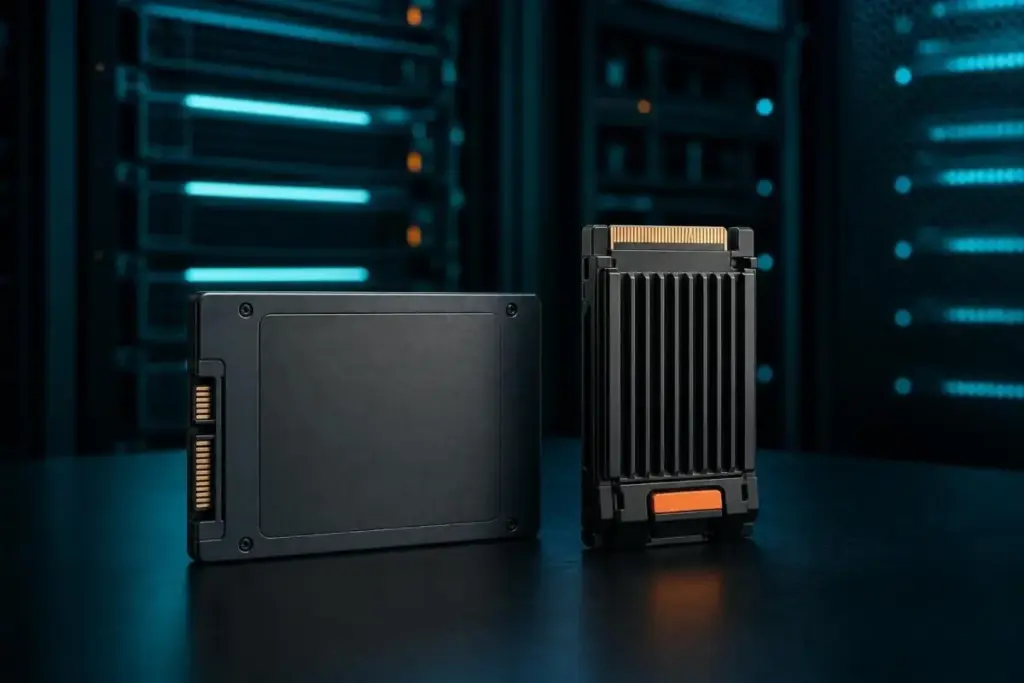
It is important to note that the physical shape of the drive, known as the form factor, does not always dictate its speed. The M.2 form factor, which looks like a small stick of gum, can support either the older SATA interface or the newer NVMe protocol. Conversely, the traditional 2.5-inch brick shape is still common for SATA drives in legacy systems. Understanding that M.2 is a physical connector rather than a speed rating is vital for ensuring hardware compatibility.
Reliability is measured through endurance ratings, typically expressed as Total Bytes Written (TBW). This figure represents the total amount of data that can be written to the drive over its lifetime before the warranty expires. However, these numbers are not absolute. A datasheet for a Micron 6550 ION SSD, for example, might list an endurance of 112,000TB for large 128KB random writes, but that figure could drop to 28,000TB if the workload consists of smaller 4KB writes. This discrepancy highlights the importance of matching a drive’s endurance rating to the specific type of work it will be doing.
The Persistent Role of the Hard Disk Drive
Despite the overwhelming speed advantages of SSDs, the traditional Hard Disk Drive (HDD) has not been rendered obsolete. The comparison between SSDs and HDDs remains the only genuine "either-or" choice in the storage world. SSDs are circuit-based and incredibly fast, with Pure Storage claiming they can be up to 14 times faster than their mechanical counterparts. However, HDDs, which store data on spinning magnetic platters, still hold a commanding lead in cost per gigabyte.
For many organizations, the solution is not to choose one or the other, but to implement a hybrid storage strategy. In this model, SSDs are used for "hot" data—operating systems, applications, and active databases—where low latency and high IOPS (Input/Output Operations Per Second) are required. HDDs are reserved for "cold" data, such as long-term archives and bulk backups, where the sheer volume of storage matters more than the speed of access.
Final Considerations for the Modern Buyer
The industry consensus is clear: the question is no longer "Flash vs. SSD," but rather which specific configuration of SSD technology meets the demands of a given workload. When evaluating storage options, the primary focus should be on the NAND type (SLC, TLC, or QLC), the interface (SATA vs. NVMe), the form factor, and the endurance rating.
Industry experts advise that headline speed and endurance figures should be viewed with a healthy degree of skepticism. These numbers often reflect best-case scenarios measured under specific laboratory conditions, such as certain block sizes or queue depths. Before committing to a large-scale purchase, the most reliable approach is to test a drive against the specific read/write patterns of the intended environment. By looking past the marketing jargon and focusing on the underlying architecture of the controller and the NAND, buyers can ensure they are investing in hardware that will remain stable and performant throughout its lifecycle.
 Enterprise Tech & Infrastructure
The Architecture of Performance: Analyzing the Strategic Role of RAID 10 in Enterprise Storage
In the rapidly evolving landscape of enterprise data management, the selection of...
 Enterprise Tech & Infrastructure
The Critical Role of Enterprise Hard Drives in Modern Data Infrastructure: A Comprehensive Review of the Top 2023 Solutions
In the rapidly evolving landscape of digital infrastructure, enterprise hard drives remain...
 Enterprise Tech & Infrastructure
Google and Nvidia Advance "Magic State Cultivation" to Tackle Quantum Computing’s Error Correction Hurdle
The global pursuit of practical, scalable, and fault-tolerant quantum computing is currently...







