
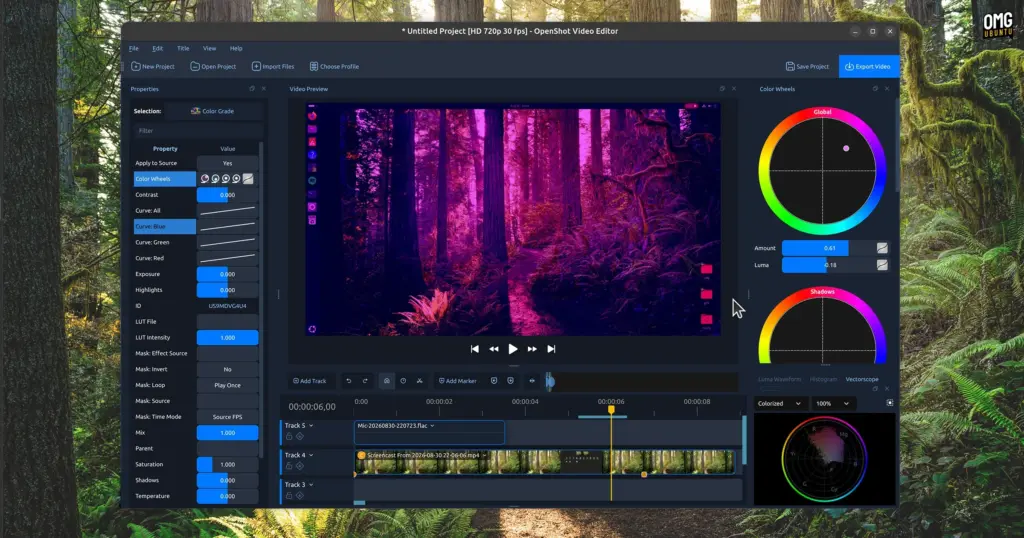
In a major milestone for open-source desktop multimedia production, the popular Qt-based non-linear video editor OpenShot has officially debuted on the Canonical Snap Store. The deployment, packaged as an official snap release under the identifier openshot-qt, went live on 22 September. Its arrival marks a notable evolution in how Ubuntu users access the video creation suite, making the software immediately installable across all currently supported Ubuntu distributions directly through the native graphical App Center.
The launch offers creators on Ubuntu a modern, self-contained way to run the software, though it also introduces a familiar quirk within Canonical’s package discovery ecosystem: because the traditional Debian archive format continues to be hosted alongside modern delivery mechanisms, searches for OpenShot within Ubuntu’s App Center present users with two distinct installation options. Beneath the surface, however, the newly introduced snap package addresses longstanding dependency hurdles, modernizes security permissions, and simplifies deployment across multiple generations of Linux desktop operating systems.
Resolving Desktop Dependencies and Expanding LTS Compatibility
For years, users running Ubuntu have relied on traditional Debian packages (.deb) distributed either through the core Ubuntu archive repositories or via the project’s long-standing Personal Package Archive (PPA) on Launchpad. While these native packaging formats have served the Linux community effectively, they inherently bind an application’s underlying dependencies to the specific library versions bundled with the host operating system.
Because OpenShot is built upon the Qt application framework, updates to its graphical interface, rendering pipeline, and core audio-visual components frequently demand newer versions of Qt libraries than those maintained in older operating system releases. On Ubuntu Long Term Support (LTS) releases—which are engineered primarily for predictability, stability, and enterprise longevity rather than fast-paced framework turnover—the system Qt versions can quickly fall behind upstream requirements. Consequently, users running older but actively supported LTS installations often encountered dependency conflicts or were outright prevented from installing new application builds through the official PPA.
Snap packaging directly eliminates these packaging frictions. By encapsulating OpenShot alongside its required runtime dependencies, libraries, and Qt components within an isolated squashfs image, the snap build ensures that the editor runs identically regardless of the underlying operating system version. For desktop editors working on enterprise-grade LTS installations, this decoupling allows immediate access to modern software iterations without necessitating an upgrade of the host system’s entire base platform.
OpenShot 4.0: Modern Editing Tools Under the Hood
The arrival of the official snap package follows closely on the heels of the major OpenShot 4.0 milestone, which debuted in August. That update introduced a comprehensive slate of architectural improvements, visual refinements, and creative additions aimed at elevating the suite’s capabilities for both casual creators and experienced editors.
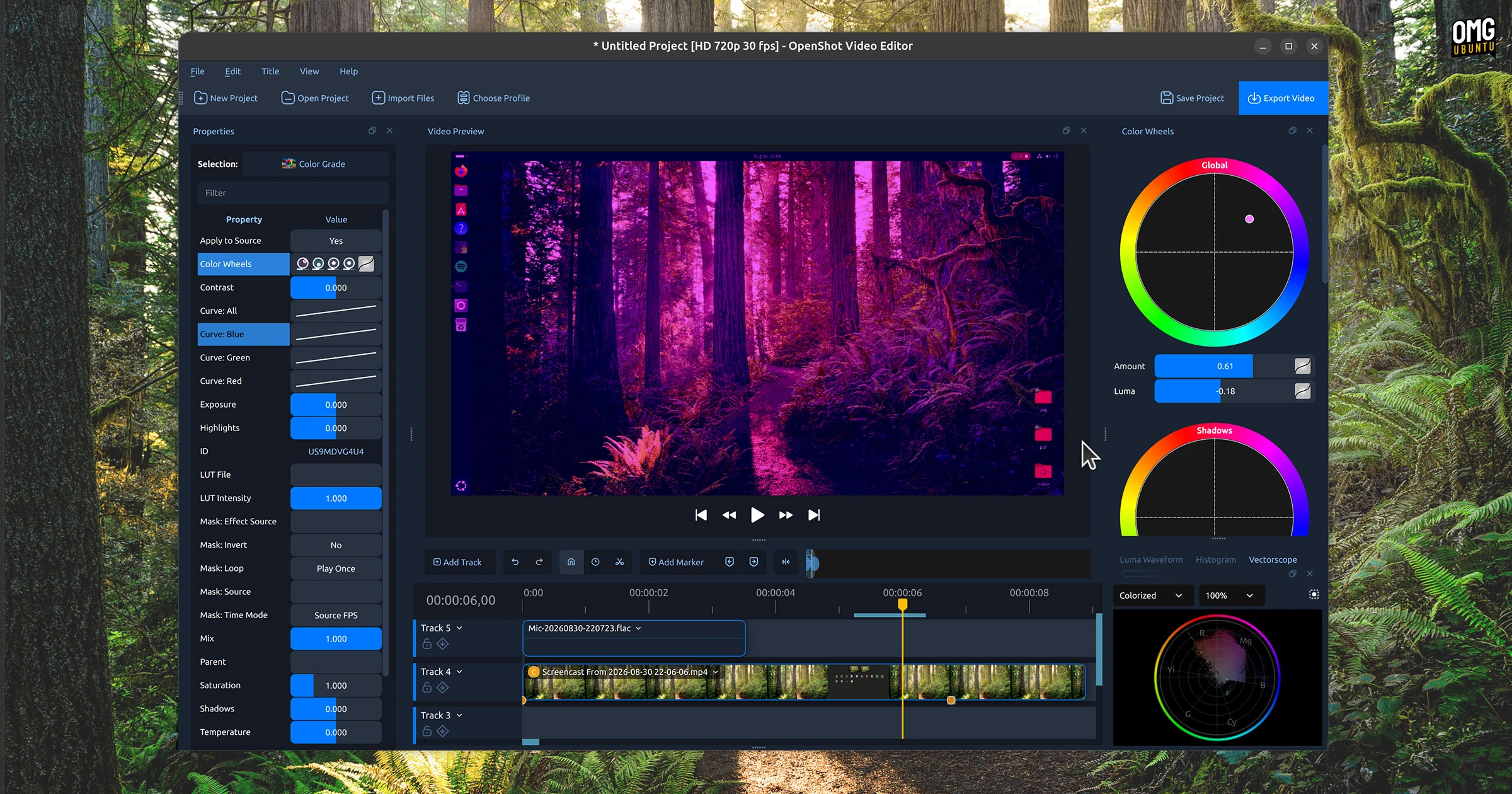
Central to the 4.0 release was the long-awaited introduction of integrated colour grading tools. Featuring dedicated colour wheels and refined adjustment controls, the upgraded toolset permits editors to manage balance, saturation, exposure, and tone with much higher visual fidelity directly within the primary workspace. Prior iterations of the software offered more rudimentary colour manipulation; the addition of dedicated grading wheels brought OpenShot closer in line with contemporary post-production conventions.
In addition to colour manipulation, OpenShot 4.0 revamped multitrack recording, providing smoother capture workflows for desktop producers assembling multi-layered audio and video compositions. The release also deepened software integration with ComfyUI, a cloud-based generative artificial intelligence service. Through this capability, users can incorporate advanced image and video workflows directly into their timeline projects, bridging traditional timeline editing with modern external processing tools. Bringing these upgraded capabilities into an easily installable snap format allows Ubuntu creators to leverage these features with minimal manual setup.
How to install OpenShot snap package
For users who prefer operating directly within the terminal, installing the newly minted snap build requires only a single command:
sudo snap install openshot-qtOnce installed, OpenShot integrates seamlessly into the desktop application launcher. However, because snap applications operate within a sandboxed confinement framework designed to isolate running processes from unauthorized parts of the host system, the application is not completely an "install and go" experience for every workflow.
To preserve system security, the snap confinement system strictly isolates application processes from sensitive hardware peripherals and external storage paths by default. A video editor inherently requires access to a variety of input devices and storage volumes—such as connected microphones for voiceovers, webcams for live capture, and external solid-state drives housing raw footage. Because these interfaces are disconnected upon initial installation, users must explicitly grant the necessary system permissions before utilizing these specific functions.
Ubuntu provides graphical controls to manage these permissions easily. Users can navigate to:
Settings > Apps > OpenShot
From this menu, toggles can be enabled for microphone input, camera capture, and external storage access.
Alternatively, users who favor the command line can establish these permissions directly by manually connecting the relevant snap interfaces:
sudo snap connect openshot-qt:audio-record
sudo snap connect openshot-qt:camera
sudo snap connect openshot-qt:removable-media
Connecting audio-record enables timeline voice tracking and audio capture; camera permits direct recording from internal webcams or USB video capture devices; and removable-media allows OpenShot to open, edit, and export video files stored on external drives, USB thumb sticks, and mounted network volumes.

The Role of the Long-Standing OpenShot PPA
The arrival of an official Canonical Snap Store package naturally raises questions regarding the future of the established OpenShot Launchpad PPA. For over a decade, the project’s PPA has served as the default distribution channel for Ubuntu users seeking bleeding-edge builds ahead of standard distribution archive freezes.
In practice, the introduction of the snap release is unlikely to disrupt the PPA’s continuing availability. A significant portion of the Linux user base prefers native deb packages over sandboxed distribution formats, citing faster native startup times, seamless desktop theme inheritance, and avoidance of confinement-layer permission prompts. The OpenShot team’s PPA provides these users, as well as those who choose not to run Canonical’s Snapd daemon, an ongoing avenue to install the application and receive software updates as they are compiled upstream.
Alongside native Deb packages, the project continues to offer its cross-distribution AppImage format. By offering multiple installation methods—including the PPA, the official AppImage, and now the official Snap package—OpenShot accommodates diverse user preferences and system constraints, ensuring users retain granular control over how software runs on their machines.
Cross-Distribution Packaging and the Status on Flathub
While the Canonical Snap Store represents a key distribution vector on Ubuntu and Ubuntu-derived operating systems, the broader Linux ecosystem continues to maintain significant momentum behind Flatpak and the Flathub repository.
At present, an OpenShot listing exists on Flathub, but the package remains designated as unverified. Furthermore, the Flathub package has lagged behind upstream developments and has not yet been transitioned to the OpenShot 4.0 generation. As a result, Flatpak users on Fedora, Arch Linux, openSUSE, and other non-Ubuntu distributions are currently reliant on older builds or alternative packaging methods to access the application.
With the snap package successfully deployed, verified, and active within Canonical’s infrastructure, expectations are rising across the wider open-source desktop community that a modernized, officially maintained Flathub release will eventually follow. An official Flatpak implementation would provide users outside the Ubuntu ecosystem the same isolated execution, modern dependency bundling, and direct access to OpenShot 4.0 that Snap users on Ubuntu can now take advantage of through the App Center.
 Linux & Open Source Solutions
Ubuntu 26.10 Introduces Top-Screen Layout Picker to Streamline Window Tiling
Ubuntu 26.10 is introducing a new way for users to organize their...
 Linux & Open Source Solutions
GNOME Shell Weather Extensions Bring Dynamic Visuals to the Desktop Panel
While dedicated desktop applications for checking the weather have long enjoyed a...
 Linux & Open Source Solutions
Canonical Releases Official Ubuntu Desktop Images for RISC-V Hardware Ahead of Ubuntu 26.10
Installing Ubuntu on RISC-V hardware is poised to become significantly more straightforward...







