
The Linux operating system is frequently celebrated for its stability, modularity, and the granular control it offers to its users. However, even the most robust distributions are not immune to the occasional catastrophic failure. Whether triggered by a volatile kernel update, a misconfigured graphics driver, or a corrupted configuration file, the experience of a system that refuses to reach the login screen is a universal rite of passage for many enthusiasts and professional administrators alike. For the uninitiated, the immediate instinct might be to reach for a bootable USB drive and perform a total reinstallation—a process often referred to in the community as "nuking and paving." Yet, the architecture of Linux is designed with recovery in mind, providing a sophisticated suite of boot-time interventions that can often restore a system to full functionality without the loss of a single byte of user data.
Understanding the mechanics of the Linux boot process and the specific parameters that can be passed to the kernel is more than just a technical exercise; it is a critical skill set that transforms a user from a passive consumer of a desktop environment into an active administrator of their own machine. By leveraging the Grand Unified Bootloader (GRUB) and the systemd initialization system, users can bypass failing components, roll back problematic updates, and access low-level environments specifically designed for surgical repair.
The Safety Net of the Kernel Rollback
The Linux kernel is the fundamental bridge between a computer’s hardware and its software. Because it manages everything from memory allocation to peripheral communication, any regression in a new kernel version can have immediate and visible consequences. A routine update might inadvertently break compatibility with a specific Wi-Fi chipset, cause a filesystem to mount improperly, or—most commonly—conflict with proprietary graphics drivers.

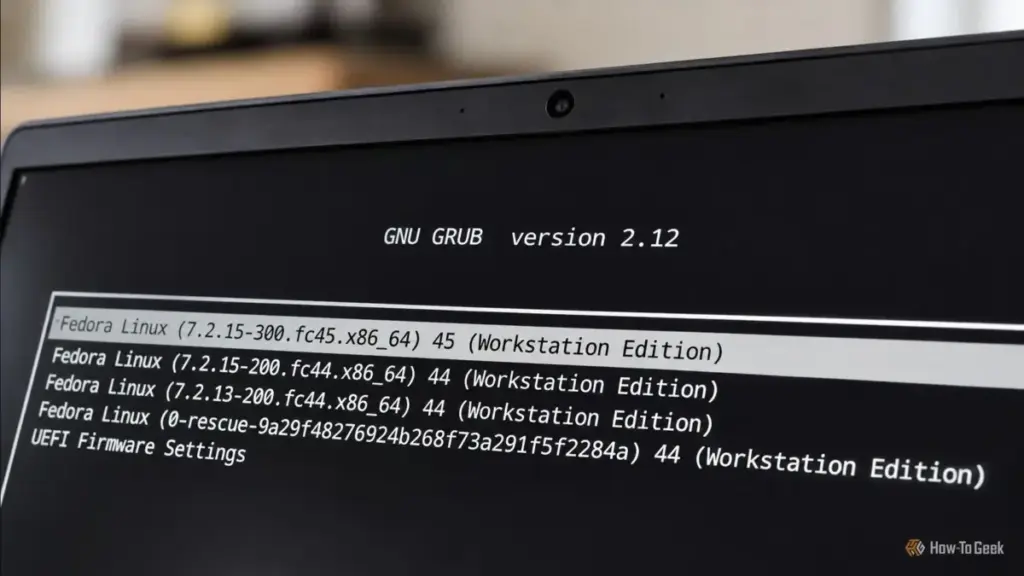
The foresight of most modern Linux distributions, such as Fedora, Ubuntu, and Arch, is evident in their retention of older, known-working kernel versions. When a new kernel is installed, the previous version is typically preserved as a fallback. This creates a built-in safety net that can be accessed through the GRUB menu. If a system fails to boot after an update, the first line of defense is to enter the "Advanced Options" menu during the initial startup sequence.
Accessing this menu requires precise timing. On older BIOS-based systems, holding the Shift key during the initial boot phase usually triggers the menu, while modern UEFI systems often require the user to repeatedly tap the Escape key. Once inside the advanced menu, the user is presented with a list of installed kernels. Selecting a version that was functional prior to the update allows the system to bypass the problematic code. This temporary measure is often enough to reach the desktop, where the user can then investigate the failure, check mailing lists for known bugs, or wait for a subsequent patch that addresses the regression.
Harnessing Systemd for Rescue and Repair
When the kernel itself is functional but the system stalls during the initialization of services, the problem likely resides within the init system—which, for the vast majority of modern distributions, is systemd. Systemd operates using "targets," which are essentially different states of system operation. The "graphical.target" is what most users interact with daily, but systemd provides more specialized environments for when things go wrong.
Rescue mode, or rescue.target, is a specialized state that stops the normal boot process before the graphical environment and most non-essential services are loaded. It mounts the local filesystems and drops the user into a command-line interface. This environment is ideal for tasks that require the system to be mostly "at rest," such as repairing configuration files in the /etc directory or removing a software package that is causing a conflict.
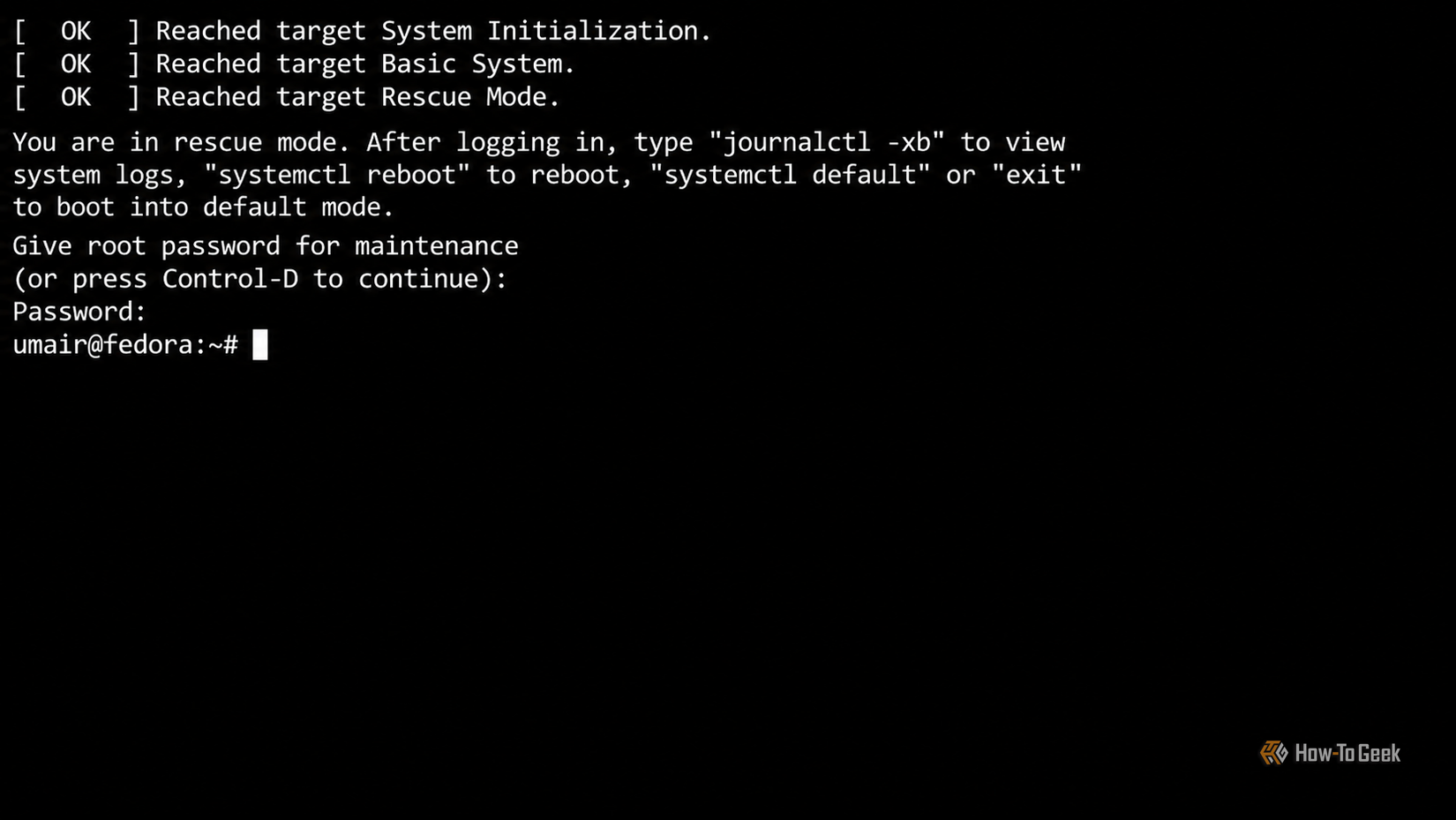
To access this mode, an administrator must edit the GRUB boot entry by pressing ‘e’ on the keyboard. By appending systemd.unit=rescue.target to the line beginning with linux, the system is instructed to change its destination. This mode often requires the root password, ensuring that the recovery environment remains secure even if physical access to the machine is achieved. Once inside, the journalctl -xb command becomes an invaluable tool, allowing the user to parse the system logs for the specific errors that prevented a successful boot.
Emergency Interventions for Critical Failures
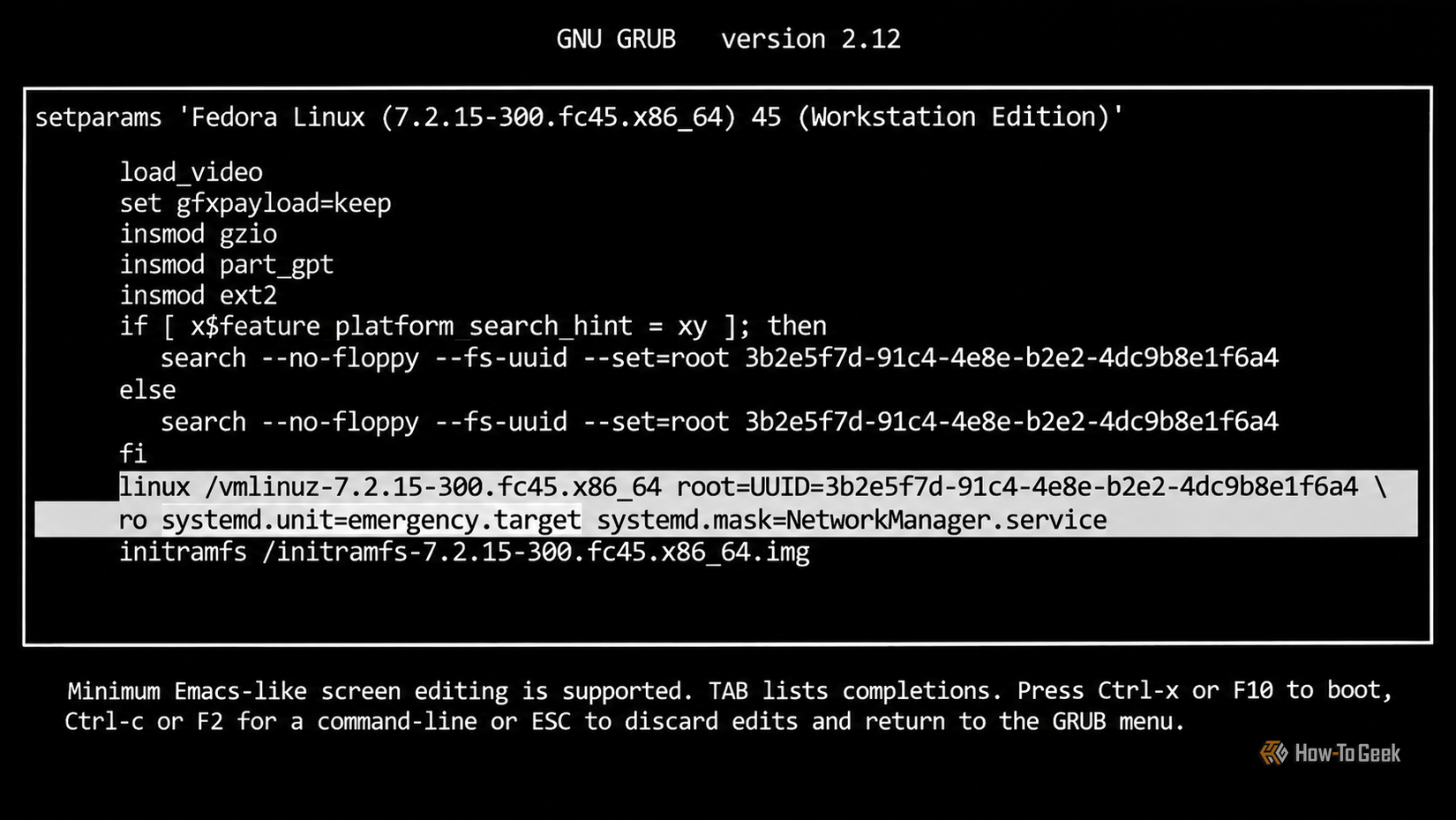
There are scenarios where even rescue mode is unable to stabilize the system. If the failure occurs so early in the boot process that essential filesystems cannot be mounted—perhaps due to an error in the /etc/fstab file or a corrupted disk—the system will likely fail to reach the rescue target. In these dire circumstances, emergency mode serves as the ultimate fallback.
Invoked via the systemd.unit=emergency.target parameter, this mode provides the most minimal environment possible. It starts the fewest number of services and provides a root shell with almost no background infrastructure. This is often the only way to fix a mount-point error that would otherwise cause the system to hang indefinitely. Because the root filesystem is frequently mounted as read-only in this state to prevent further damage, administrators must often manually remount it with write permissions using the command mount -o remount,rw /. This allows for the correction of critical system files, after which the system can be rebooted into a normal state.
Bypassing Failing Services and the Initialization System
Sometimes, the culprit of a failed boot is not a core system component, but a single misbehaving service. A network configuration change or a faulty daemon can cause the boot process to wait for a timeout that never comes, effectively locking the user out of their system. Rather than entering a full recovery mode, systemd allows users to "mask" specific services during the boot process.
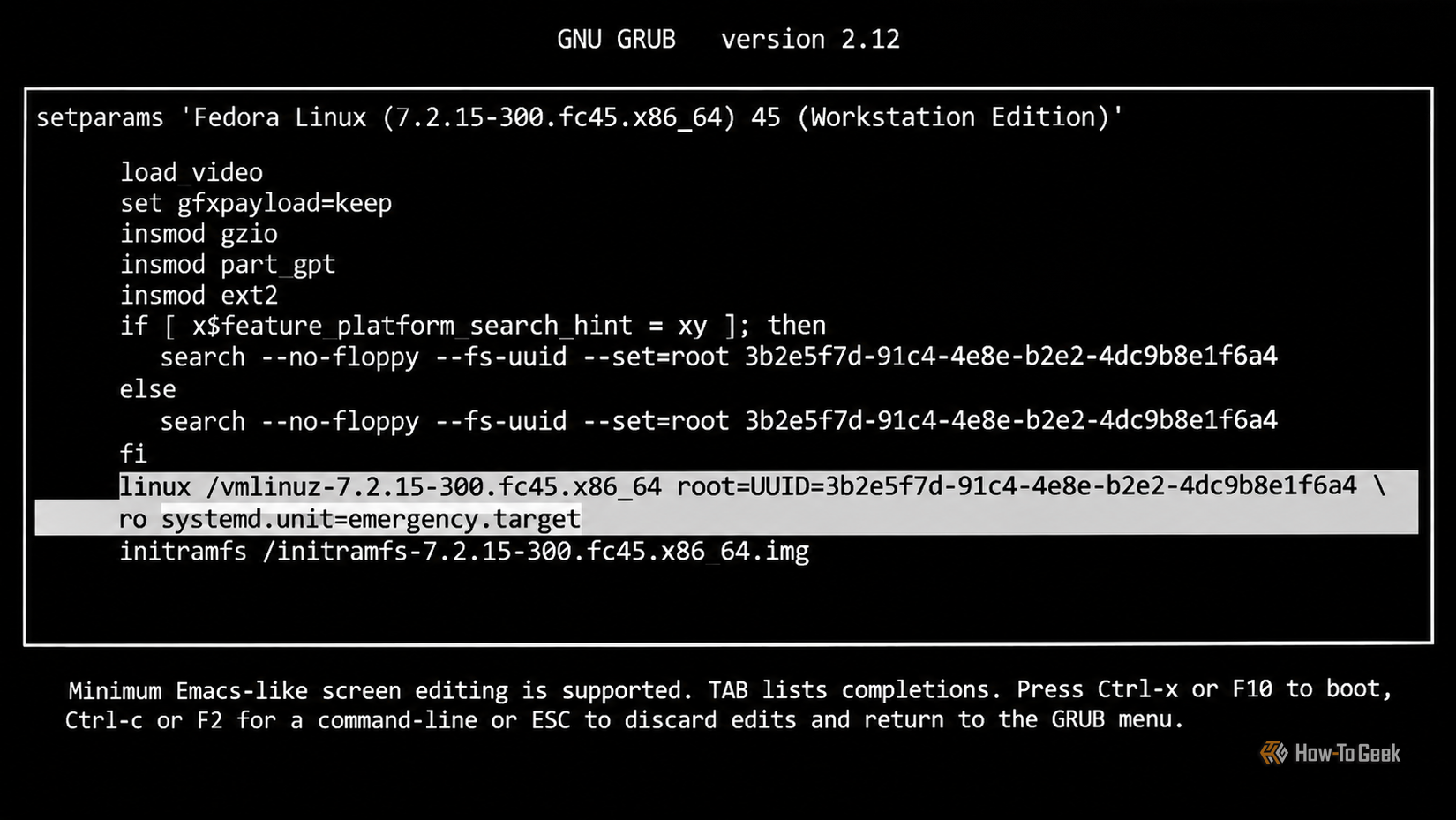
By adding a parameter like systemd.mask=NetworkManager.service to the GRUB command line, the user can tell the system to act as if that service does not exist for the duration of that boot. This is a highly effective way to isolate variables during troubleshooting. If the system boots successfully with a service masked, the administrator has identified the source of the problem and can then proceed to reconfigure or reinstall that specific component.
In the most extreme cases, where systemd itself is suspected of causing the failure or is too damaged to function, Linux offers a way to bypass the init system entirely. By appending init=/bin/bash to the kernel parameters, the kernel is instructed to ignore the standard initialization sequence and launch a Bash shell as Process ID 1 (PID 1). This is a raw, unvarnished environment where the user is essentially operating the kernel directly. While many familiar system commands will be unavailable because the background services they rely on haven’t started, it remains a powerful last resort for password resets and deep-level filesystem repairs.
Resolving Graphics and Display Conflicts
One of the most common and frustrating failures in the Linux ecosystem is the "black screen of death." This usually occurs when the kernel attempts to set the display resolution and refresh rate—a process known as Kernel Mode Setting (KMS)—before the appropriate graphics drivers are fully ready or if the drivers themselves are incompatible with the hardware.
The nomodeset parameter is a specialized instruction that tells the kernel to refrain from loading video drivers until the X server or display manager starts. This forces the system to use basic, BIOS-level graphics during the boot sequence. While this results in a lower-resolution display and a lack of hardware acceleration, it is often the only way to reach a login screen on systems with problematic NVIDIA or AMD driver configurations. Once a visual interface is achieved, the user can then install the correct drivers or roll back a faulty update that caused the initial conflict.
The Proactive Approach: Snapshots and System Integrity
While knowing these boot options is essential for crisis management, the modern Linux landscape has shifted toward proactive system integrity. The rise of advanced filesystems like Btrfs and ZFS has introduced the concept of atomic snapshots. Tools such as Timeshift and Snapper allow users to take a "picture" of their entire system state before performing an update or making a significant configuration change.
If a system fails to boot after an update, these snapshots can often be accessed directly from the GRUB menu (if configured correctly) or from a live USB environment. Restoring a snapshot is an instantaneous process that returns every system file to its exact state at the time the snapshot was taken. This technology has significantly reduced the stress associated with maintaining a "rolling release" distribution, where updates are frequent and occasionally volatile.
The transition from a broken system to a recovered one is a journey through the layers of the Linux architecture. By understanding how to communicate with the kernel and the init system during the first few seconds of the boot process, users can demystify the "black box" of system startup. These six options—kernel rollbacks, rescue mode, emergency mode, service masking, direct shell access, and graphics mode suppression—represent a comprehensive toolkit for anyone looking to master the art of Linux system administration. In the world of open source, a broken system is rarely an end; it is usually just the beginning of a deeper understanding of how the machine truly works.
 Tech Tutorials & How-To Guides
Google Transitions Beyond Chromebooks: A Deep Look at the New Googlebook OS and Its Enhanced Local File Management
The landscape of portable computing has undergone a seismic shift with the...
 Tech Tutorials & How-To Guides
The Weight of Quality: Overcoming the Material Limitations of Desktop 3D Printing
The rise of desktop 3D printing has fundamentally democratized manufacturing, allowing hobbyists...
 Tech Tutorials & How-To Guides
The Hidden Cost of DLSS: Why NVIDIA’s Software Lead No Longer Justifies the GeForce Price Premium
For over a decade, NVIDIA has cultivated a nearly impenetrable software ecosystem...







