
In a significant shift toward the next generation of digital labor, Microsoft has announced a comprehensive reimagining of its Copilot platform. This evolution, framed as the "new Copilot," aims to transition AI from a simple conversational assistant into a persistent, proactive, and deeply integrated engine for professional work. By connecting the tools that organizations rely on with advanced capabilities for building, customizing, and scaling artificial intelligence, Microsoft is positioning Copilot as the central interface for what it describes as the "flow of human ambition."
The core of this update is a fundamental restructuring of the Copilot application itself, which now introduces three distinct pillars of functionality: Home, Code, and Autopilot. These features are designed to meet the diverse needs of the modern workforce, ranging from quick information retrieval to complex project delegation and custom software solution building. As work continues to evolve across hybrid environments and increasingly complex digital ecosystems, Microsoft’s latest move signals a commitment to making AI a constant, reliable presence in the enterprise.
A Unified Starting Point for the Modern Workflow
The centerpiece of the user experience is "Home," a new starting point within the Copilot app where the previously separate functions of Chat and Cowork are unified. In the current corporate environment, employees often find themselves navigating a fragmented landscape of meetings, emails, documents, and specialized applications. Home is designed to serve as a grounding mechanism, allowing users to get their bearings, review recent activity, and receive intelligent suggestions on how to move projects forward.
Within this new interface, "Chat" remains the destination for instant, conversational interactions—ideal for quick lookups, drafting short messages, or catching up on missed discussions. "Cowork," however, represents a more advanced tier of delegation. Instead of simply asking for a summary, users can define a complex task, such as responding to a Request for Proposal (RFP), creating a product launch kit, or preparing a financial close package. Cowork then executes the task from end-to-end, returning a completed result that the human user can then iterate upon.
Further bridging the gap between AI and traditional productivity, Microsoft is introducing "Office in Copilot." This integration brings the full functionality of Word, Excel, and PowerPoint directly into the Copilot experience. The goal is to eliminate the friction associated with switching between apps, which often leads to broken formatting or version control issues. From the Home screen, a user can prompt Copilot to draft a brief or model a budget; the AI then creates a real, editable file that stays in sync across the entire Microsoft 365 suite. This allows for side-by-side refinement where teammates can be @mentioned, and their edits appear in real-time, ensuring that progress travels with the user regardless of which application they are using.

Democratizing Solution Building with "Code"
One of the most ambitious aspects of the new Copilot is the introduction of "Code." For decades, the primary unit of knowledge work has been the file—a document, a spreadsheet, or a slide deck. While these remain essential, Microsoft believes that small, purpose-built software solutions are becoming the fourth unit of work. With Code, the company is attempting to move solution-building beyond the exclusive domain of professional developers.
Powered by the same underlying technology as GitHub Copilot, the Code feature allows anyone to describe a needed application, automation, or dashboard in natural language. Copilot then selects the appropriate technical approach and builds the solution. These can range from simple desktop widgets for quick data reference to cloud-hosted internal apps that can be shared across a team. To ensure enterprise-grade security, Code runs in a sandboxed environment and is hosted within the organization’s own tenant. This is supported by "Microsoft Copilot Managed Runtime," a new hosting infrastructure that allows these custom-built solutions to run safely within the Microsoft 365 environment, governed by IT but accessible to the broader workforce.
The Rise of the Persistent Digital Teammate
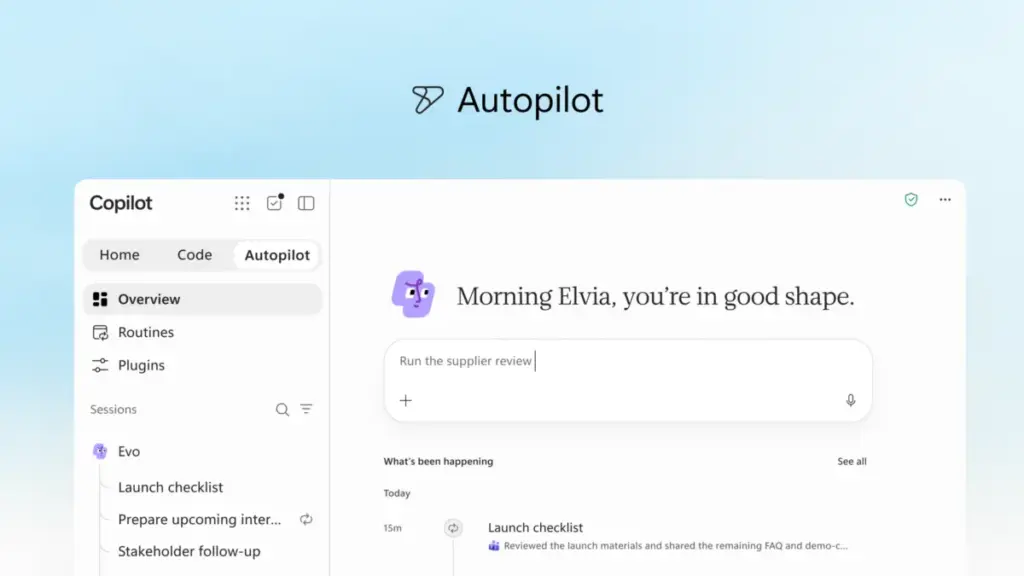
Perhaps the most significant leap toward autonomous AI is "Autopilot," a feature previously known by the internal codename "Scout." Unlike traditional AI assistants that wait for a prompt to act, Autopilot is designed to be a persistent, proactive agent that works even when the user is offline.
Users can assign Autopilot a specific name, role, and goal. Once activated, the agent can monitor communication channels, follow up on email threads, and manage recurring workflows. For example, Autopilot could be tasked with overseeing a full supplier review process. It would build the schedule, handle the preparation for meetings, reach out to stakeholders for updates, and manage the necessary follow-ups—all without constant human monitoring. Because it is cloud-hosted and possesses its own identity and "memory" within the organization’s tenant, Autopilot functions more like a digital colleague than a software tool. It is built on Microsoft IQ, ensuring it understands the specific context and operational nuances of the organization it serves.
Grounding AI in Deep Business Context

For AI to be truly effective in an enterprise setting, it must be grounded in the specific data and workflows of the business. To this end, Microsoft is expanding the business context available to Copilot through "Microsoft IQ," a unified intelligence platform.
A key component of this expansion is "Fabric IQ," which connects Copilot to the vast amounts of data held within Power BI semantic models. This integration allows Chat and Cowork to provide answers and execute tasks based on real-time business data. Furthermore, Copilot is now being grounded in data from Dynamics 365 and the Power Platform. This means a salesperson drafting a proposal can have Copilot automatically pull in deal histories or customer support tickets directly into the document, eliminating the need for distracting external lookups.
To facilitate the connection between Copilot and the various third-party actions that drive a business, Microsoft is also launching a new "Plugin Registry." This unified catalog will house plugins from Microsoft, its partners, and custom-built solutions. It provides IT departments with a centralized location to approve and govern the tools being used, while allowing developers to publish a plugin once and have it function across all supported Copilot experiences.
The Economics of Enterprise AI: FinOps and Billing
As organizations scale their use of AI, managing costs and understanding value have become paramount concerns. Microsoft is addressing this through a dual-pronged pricing strategy and the introduction of "FinOps for AI."
For standard, everyday tasks like drafting and summarization, Microsoft offers a User Subscription License (USL) at a fixed cost. At the heart of this subscription is "Auto," an intelligent routing system that weighs the accuracy, speed, and cost of each request to determine which AI model is best suited for the specific job. This ensures that users get the best quality without the organization incurring unnecessary expenses.
For more complex, long-running "agentic" work—such as the tasks performed by Cowork, Code, and Autopilot—Microsoft is utilizing Usage-based billing (UBB). This model provides organizations with full control, allowing them to match the cost of the AI’s work to the actual value it delivers.

To help administrators navigate this new economic landscape, Microsoft is introducing new cost management capabilities. These tools allow IT leaders to manage spending policies at scale, route credit requests through automated approval workflows, and set which model families are available to different user groups. End users will also have visibility into their own credit usage and history directly within the Copilot interface, encouraging a culture of responsible AI consumption within organizational guardrails.
A Glimpse into the Proactive Future
Looking ahead, Microsoft provided a "sneak peek" at upcoming features designed to make Copilot even more personalized. "Today" is a forthcoming proactive command center that will live within Copilot, Outlook, and Teams. It is designed to act as a digital chief of staff, surfacing what the user missed, what requires immediate attention, and what can be deferred. "Today" goes beyond simple notification; it prepares drafts, proposes schedule changes, and provides the context for forgotten follow-ups so the user can take action immediately.
Additionally, the company is enhancing collaboration through "@Copilot in Teams." This capability allows an entire team to invoke Copilot within a channel or group chat, where the AI has access to the shared context and permissions of that specific group. It can answer questions about past decisions by pulling from previous conversations and can even offer to prepare cross-functional reviews that track dependencies and owners across different departments.
These advancements are currently rolling out through Microsoft’s Frontier program, with broader availability expected in the coming weeks and months. As the tech giant prepares for its annual Microsoft Ignite conference in November, the "new Copilot" stands as a testament to the company’s vision of a future where AI is not just a tool we use, but a platform upon which all modern work is built.
 Productivity Software & Office Suites
Microsoft and European Tech Leaders Set Sights on Amsterdam for ESPC 2026: A Deep Dive into the Future of AI-Powered Work
As the global landscape of enterprise technology continues its rapid shift toward...
 Productivity Software & Office Suites
Microsoft Shifts Focus from AI Hype to Enterprise Utility as Jared Spataro Outlines New Strategic Roadmap
In a comprehensive message addressed to the global business community, Jared Spataro,...
 Productivity Software & Office Suites
Microsoft Reimagines Copilot: New "Autopilot" and "Code" Features Lead a Major Shift Toward Agentic Work
In a significant pivot toward the next era of enterprise productivity, Microsoft...







