
For years, the Linux desktop has maintained a complicated relationship with the traditional email client. While power users have historically gravitated toward heavyweight, feature-dense workhorses such as Mozilla Thunderbird and GNOME’s veteran Evolution suite, users seeking a modern, streamlined experience have faced a narrower set of options. Projects such as Geary demonstrated that a focused, conversation-first interface could thrive on the Linux desktop, yet modernizing that vision to keep pace with rapid shifts in toolkit design and platform libraries has remained an ongoing challenge.
A newly released email client named Hylki is attempting to carve out its own place within this shifting landscape. Built from the ground up in Rust and tailored specifically for the GNOME desktop environment, Hylki arrives as part of an emergent cohort of Linux mail applications—alongside recent efforts such as Postcard, Convey, and Letters—seeking to deliver a modern, Geary-inspired workflow without the technical debt or visual legacy of older software suites.
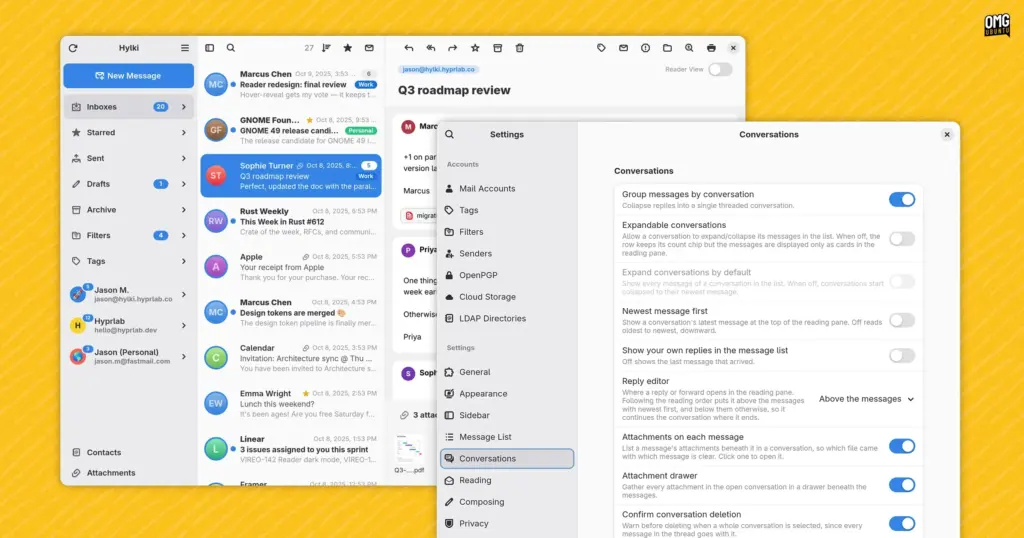
Engineered with GTK4 and the modern libadwaita styling libraries, Hylki adheres strictly to GNOME design standards. It presents the familiar, ergonomic three-column vertical layout that has become standard across contemporary mail clients: a left-hand navigation pane for accounts and folders, a central index of message threads, and a spacious reading pane on the right. Rather than treating messages as isolated dispatches, the application is fundamentally constructed around conversation threading, grouping related exchanges into coherent, unified views in the manner popularized by modern webmail interfaces.
On its project site, Hylki’s developers summarize the application’s core mission with three straightforward tenets: the software aims to be fast to open, effortless to read, and private by default. While many software projects make similar claims, Hylki attempts to deliver on them by marrying low-level performance considerations with an unusually deep layer of user interface customization, catering to users who want a clean desktop aesthetic without sacrificing control over their daily mail workflow.
First Impressions and Everyday Mail Handling
Setting up an email client is historically one of the more tedious rituals of desktop computing, often requiring manual port numbers, security protocols, and host addresses. Hylki eases this friction by providing native compatibility with GNOME Online Accounts. Users who have already authenticated their personal or enterprise email providers within GNOME’s central system settings can connect Hylki directly, pulling down accounts without re-entering credentials. For users relying on independent mail servers, private domains, or niche hosting providers, the client also includes comprehensive support for manual IMAP and POP3 account setup.
The application natively accommodates multiple accounts. Users can isolate their communications into distinct operational silos or view everything in aggregate using a unified inbox, an increasingly essential feature for those balancing personal and professional correspondence within a single window.
Hylki stands out early through its first-run onboarding sequence. While setup wizards in productivity software are frequently dismissed by users clicking through default prompts as quickly as possible, Hylki’s initial launch experience is carefully structured. It introduces a thoughtful mix of functional toggles, organizational settings, and layout preferences before the user ever encounters an empty message list, allowing fundamental behaviors to be tailored to personal habits right from the start.
In day-to-day use, the application covers the baseline management tasks expected of any modern mail utility. Conversation threading ensures long exchanges remain legible, displaying replies sequentially within a single scrollable view rather than scattering fragments across an inbox.
When composing messages, Hylki offers a versatile set of tools. Users can choose to draft replies inline directly beneath a thread or launch a dedicated pop-out window to compose in a separate workspace. The composer supports rich text, raw HTML, Markdown, and plain text formats, catering equally to users who favor visual text formatting and those who insist on lightweight, markup-driven drafting. For users managing communications across multiple time zones or striving to manage personal work-life boundaries, the client incorporates a message queueing mechanism that allows outgoing mail to be scheduled for later delivery rather than dispatched immediately.
Security and encryption are integrated via host packages, enabling native OpenPGP support. This allows users to read, sign, and encrypt communications securely from within the desktop environment, provided their local system is configured with the necessary cryptographic packages.
Beyond core mechanics, Hylki incorporates a notable selection of modern reading amenities. A built-in "reader mode" allows users to strip incoming messages of complex marketing templates, nested tracking structures, and visual noise, reducing emails to clean, distraction-free text. For focused writing and reading sessions, a dedicated "focus mode" hides peripheral toolbars, folder sidebars, and administrative interface elements, leaving only the primary reading pane visible.
The application also integrates closely with the broader GNOME ecosystem through native GNOME Contacts compatibility. It accommodates user muscle memory by offering Gmail-style single-key keyboard shortcuts, intuitive gesture controls, and a background application mode that allows the program to monitor incoming mail unobtrusively. Users can choose to run the client in an interface language distinct from the broader operating system’s default locale. Modern convenience features—such as one-click unsubscription links for promotional newsletters and visual thumbnail previews for common file attachments—are built directly into the reading pane.
Where Hylki departs most dramatically from typical libadwaita applications is its sheer degree of configurability. Modern GNOME software often adheres to an opinionated philosophy that minimizes user-facing knobs and dials in favor of consistent defaults. Hylki deliberately balances that visual polish with an extensive settings menu. Users can adjust the number of lines visible in inline message previews, customize and rearrange the order of functional buttons across the application toolbar, and define local mail filtering rules to automate organizational triage. The software even bundles an internal collection of alternative themes and distinct application icons, granting users a level of visual agency rarely found in standard GTK4 utilities.
It’s been made by an LLM – with direction
Underneath its polished interface lies a development narrative that will undoubtedly spark debate among open-source developers and software purists. According to the project’s maintainer, the overwhelming majority of Hylki’s Rust codebase was generated using Anthropic’s Claude large language model.
As stated plainly on the project’s official documentation: “The large majority of the Rust code in […] was written with Anthropic’s Claude.”
The developer emphasizes that this process was not an autonomous release of unchecked code. Instead, the artificial intelligence was utilized as a programmatic tool operating under specific human guidance. Every piece of machine-generated output was reviewed, refactored, and tested by a human maintainer who personally evaluates and signs off on every functional release.
Crucially, the client itself does not contain any integrated generative AI features. There are no local neural networks or external cloud-based endpoints analyzing messages, summarizing conversations, or generating automated responses. By omitting client-side AI routines, Hylki sidesteps the serious data privacy and reliability risks that emerge when an LLM operates directly on private communications, preventing scenarios where machine hallucinations might inadvertently mishandle, misread, or misroute sensitive correspondence.
Visual assets within the project have followed a strictly human path. Hylki—a name derived from an Icelandic word meaning "capsule"—features original visual design work, with its primary logo and desktop application icon hand-drawn by designer Yiannis Ioannides.
The presence of heavy machine assistance in desktop Linux development inevitably raises broader questions regarding code provenance, maintainability, and architectural cohesion. Within the free and open-source software community, opinions on AI-assisted programming remain deeply polarized. While some view generative models as powerful force multipliers that allow individual developers to rapidly build complex, modern software that would otherwise require an entire engineering team, others harbor deep reservations regarding code bloat, subtle logic flaws, and licensing ethics.
In everyday practice, Hylki functions reliably and presents a clean visual layout, though users familiar with GTK4 development may observe subtle design idiosyncrasies. Much like other software projects assembled through iterative LLM prompts, there is an occasional tension in the interface—a faint juxtaposition where certain obscure corners of the application exhibit extraordinary attention to granular detail, while other standard interaction paradigms feel slightly uneven. Whether this is an objective technical artifact of machine-assisted scaffolding or simply a psychological byproduct of knowing how the code was generated is difficult to measure, but the software as a whole remains stable and responsive.
Install Hylki
Hylki is distributed primarily as a Flatpak, ensuring consistent dependency isolation across various Linux distributions. The package can be retrieved directly from the project’s GitHub repository, downloaded through its official website, or installed via the command line.
Because standard Ubuntu installations do not include Flatpak support out of the box, users on that platform will need to ensure the packaging framework is present on their system first by installing the core package:
sudo apt install flatpakHylki targets modern GNOME desktop components and specifically requires the GNOME 50 runtime environment, which is hosted upstream on the Flathub repository. If the Flathub remote has not already been configured on the local system, it can be registered with a single terminal command:
flatpak remote-add --if-not-exists flathub https://flathub.org/repo/flathub.flatpakrepoOnce the Flathub repository is properly initialized, users can download and install Hylki using its remote Flatpak reference file:
flatpak install --from https://hylki.hyprlab.co/flatpak/co.hyprlab.Hylki.flatpakrefFollowing the installation, Hylki can be launched directly from the system’s application overview or application grid. During the initial onboarding process, users can proceed through the configuration steps to adjust layout variables and link their accounts. To maximize security and minimize credential exposure, users operating within GNOME are encouraged to establish their accounts through the system’s central settings panel by navigating to Settings, selecting Online Accounts, and linking their respective providers directly before importing them into Hylki.
The broader question of whether Hylki represents a superior alternative to contemporary peers like Postcard, Convey, or earlier iterations of Geary ultimately rests on individual workflow preferences and how much value a user places on granular interface customization. Notably, long-time followers of Linux desktop experiments may have encountered an earlier incarnation of this exact project under a different moniker; the application was originally introduced under the name Vireo, before an intellectual property conflict with a pre-existing macOS software project prompted the developer to adopt its current Icelandic identity. With a stable release pipeline and an expanding suite of privacy-conscious features, Hylki provides an intriguing look at how modern language engines and contemporary desktop toolkits can intersect to expand the open-source software catalog.
 Linux & Open Source Solutions
Era Arrives on Flathub as a New Rust-Powered Calendar Application for the GNOME Desktop
A new open-source calendaring client has entered the Linux application ecosystem. Named...
 Linux & Open Source Solutions
Canonical Releases Official Ubuntu Desktop Images for RISC-V Hardware Ahead of Ubuntu 26.10
Installing Ubuntu on RISC-V hardware is poised to become significantly more straightforward...
 Linux & Open Source Solutions
NexPhone Multi-OS Smartphone Delayed to March 2027 as Hardware Challenges and Price Adjustments Emerge
The NexPhone, an ambitious multi-operating system smartphone designed to bridge the divide...







