
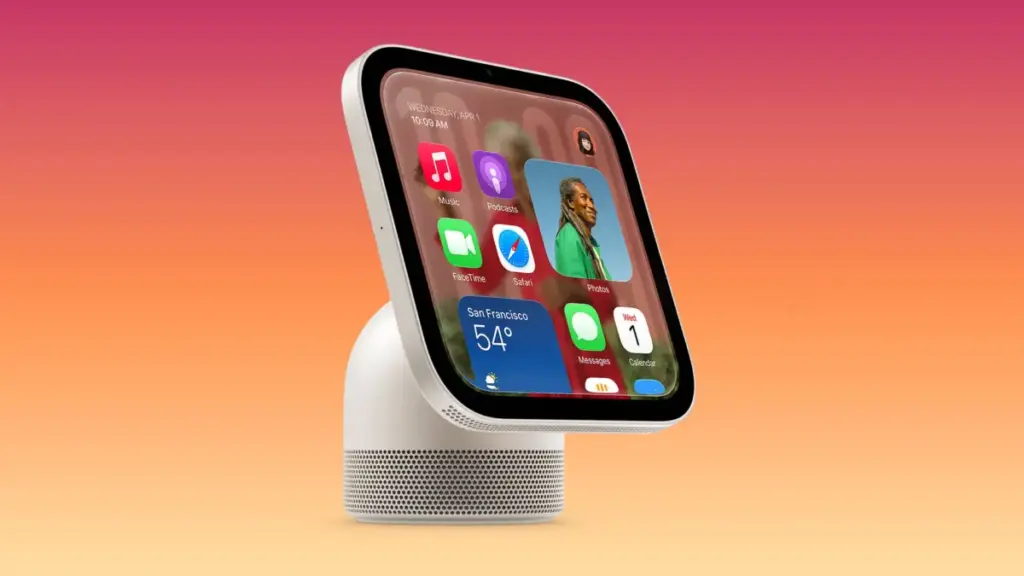
Apple has officially released HomeView Software 27.2, providing an unexpected early look at the operating system built to power the company’s upcoming smart home display. While the physical HomeView hardware is not scheduled to hit retail shelves until November 13, the advance deployment of its underlying software update has allowed developers and code analysts to dissect the system files. The discoveries reveal key user interface components, wallpaper options, unique system architecture, and hidden graphics that point to an extended development timeline driven by Apple’s artificial intelligence strategy.
The early availability of HomeView Software 27.2 serves as a precursor to Apple’s broader hardware launch, offering concrete details about how the central smart display will function in daily use. From customized lock screen faces to a completely reworked launcher architecture designed specifically for home environments, the build confirms several unannounced features while shedding light on the internal testing process Apple used to bring the product to market.
Background and the Road to HomeView
The release of HomeView Software 27.2 comes shortly after Apple’s official announcement of the HomeView hardware earlier in October. The device represents Apple’s long-rumored entry into dedicated tabletop smart displays, featuring a 7-inch Liquid Retina display designed to act as a centralized hub for home automation, media playback, and household communication.
Before the official unveiling, details surrounding the hardware and software were closely guarded. Early leaks indicated that Apple was preparing a home-focused display hub, with Bloomberg’s Mark Gurman outlining key specifications just days ahead of Apple’s media event in New York. Around the same time, regulatory trademark filings under shell companies revealed the "HomeView" name, which Apple ultimately adopted instead of the widely speculated "homeOS" branding. In line with the naming conventions used for the HomePod—where the operating system is simply categorized as HomePod Software—Apple opted to officially brand the display’s system as HomeView Software.
At the hardware’s announcement, Greg Joswiak, Apple’s senior vice president of Worldwide Marketing, highlighted the product’s dual nature as both a shared family device and a personalized assistant.
"Apple HomeView is designed to be shared by everyone in the home yet feel completely personal to each user," Joswiak noted during the product reveal. "It recognizes your face to shift from a household screen to your own experience."
With HomeView Software 27.2 now available for technical analysis, the specific mechanics behind that user experience are coming into sharper focus.
Wallpapers and Display Customization
Analysis of the HomeView Software 27.2 update reveals that the system includes a varied selection of built-in display customization options. At launch, users will have access to 20 default wallpapers featuring a broad spectrum of colors, gradients, and subtle visual textures.
The software structure indicates that these wallpapers will serve as the backdrop for the primary Home Screen interface. In addition to the default options preloaded onto the device, code references suggest that users will have the ability to select personal photos from their library to use as custom wallpapers, bringing a familiar level of iOS-style personalization to the smart home display.
The visual assets inside the update demonstrate how Apple is adapting its design language for an ambient, always-on tabletop screen. Rather than relying on static images, the software manages wallpapers alongside dynamic "faces"—customizable ambient screens that display time, widgets, and home status updates when the device is idle or viewed from a distance.
Face Editing and Personalization
One of the prominent interface features uncovered in the 27.2 software update is the dedicated face editing interface. Developer Guilherme Rambo shared findings after virtualizing the HomeView software build, offering an initial look at how users will configure and edit the display options for the device’s Lock Screen.
The face editing interface allows users to cycle through different layout templates, select color palettes, and configure ambient widgets. This interface operates in tandem with the device’s front-facing sensors. Because the HomeView is built to recognize individual family members as they approach, the display can automatically swap between shared household screens and individual user faces based on who is interacting with the device.
The software teardown indicates that users will be able to customize multiple faces for different scenarios—such as a simplified clock display for evening hours, a photo-heavy display for general ambient use, or a control-centric layout featuring active HomeKit security camera feeds and media controls.
Startup Experience and Control Center
The HomeView 27.2 software build also sheds light on the initial setup process and fundamental navigation elements of the operating system. Upon powering up the device for the first time, users will be greeted by the classic Apple "Hello" screen, animated in script across the 7-inch Liquid Retina display in multiple languages, matching the onboarding flow found across iOS, iPadOS, and macOS.
Beyond the setup screen, assets within the firmware detail the structure of the system’s quick-access controls. Setup animations uncovered by code researcher Aaron (@aaronp613) demonstrate how Control Center functions on the HomeView. Swiping from the edge of the display invokes a dedicated Control Center overlay tailored for smart home management.
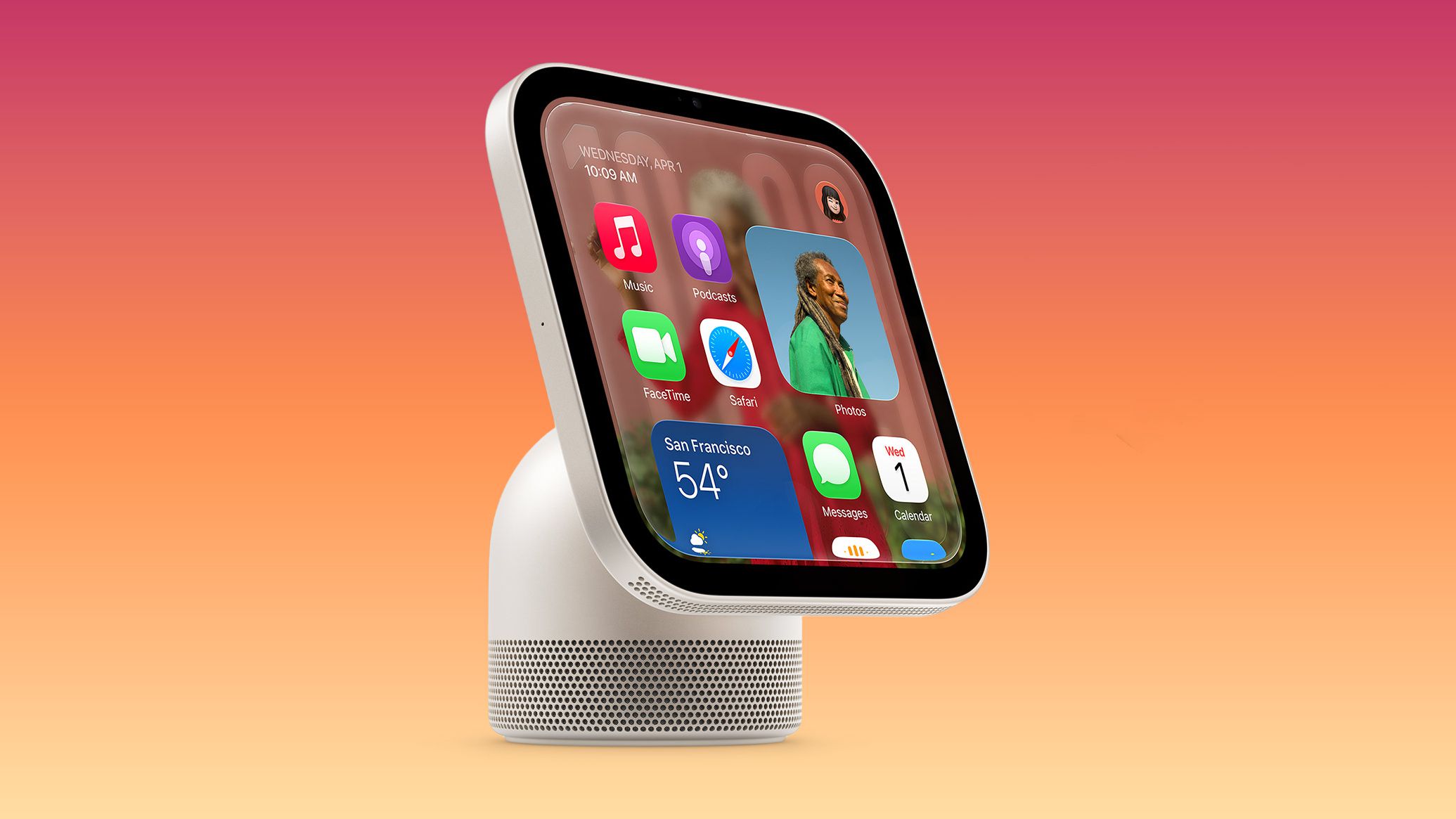
Unlike the Control Center on iOS, which focuses heavily on connectivity toggles and device settings, the HomeView Control Center prioritizes immediate access to home scenes, lighting adjustments, security system toggles, audio routing, and intercom controls for communicating with other HomePod and Apple devices in the household.
Light and Dark Modes
Following the visual design established across Apple’s ecosystem, HomeView Software 27.2 includes comprehensive support for both Light Mode and Dark Mode. The interface elements, including widget backgrounds, control cards, and system menus, dynamically adapt their contrast and color temperature to match the selected appearance.
The software includes an automated toggle that uses the device’s ambient light sensors and local time of day to seamlessly transition between Light Mode during daylight hours and Dark Mode at night. This ensures that the display remains legible in direct sunlight while reducing glare in low-light indoor environments, preventing the screen from casting excessive light into a room during the evening.
Snoopy Character Animations
Among the visual options included in HomeView Software 27.2 is the addition of the Snoopy and Woodstock interactive screen faces. Originally introduced on watchOS, the Peanuts characters have been rendered for the larger display of the HomeView.
Video assets extracted from the update show a wide variety of dedicated animations featuring Snoopy. When the Snoopy face is active, the character reacts to local weather conditions, active home events, music playback, and time of day. The animations play out dynamically when the display wakes or when a user interacts with the touchscreen, bringing a lighthearted, playful design option to the desktop display.
Under the Hood: BreadBoard and CupBoard Architecture
While the front-end user experience shares visual elements with iOS and iPadOS, the internal architecture of HomeView Software reveals that Apple built a new system framework specifically for this form factor.
In standard iOS and iPadOS environments, the system shell and home screen management process are handled by SpringBoard. However, technical analysis by Guilherme Rambo reveals that HomeView Software 27.2 does not utilize SpringBoard. Instead, Apple has engineered an entirely new launcher software named BreadBoard.
Complementing the BreadBoard launcher is a specialized system process called CupBoard, which explicitly handles the rendering and execution of the Control Center interface. This architectural shift indicates that Apple designed HomeView Software from the ground up to operate as a lean, low-latency display engine. By stripping away phone-centric processes and replacing SpringBoard with BreadBoard, the system is optimized to run continuously on low power, quickly process real-time sensor inputs, and launch home management overlays without the background overhead required by a smartphone operating system.
Evidence of Development Delays and Siri AI Integration
Perhaps the most notable revelation uncovered within HomeView Software 27.2 is evidence pointing to an extended internal delay in bringing the HomeView hardware to market.
Hidden within the system resources of the update, code researchers discovered a legacy graphic referencing "HomeView Software 26." The presence of version 26 assets within a version 27 build strongly suggests that Apple originally planned to release the HomeView during the previous software cycle, aligning with the release timeframe of iOS 26 in late 2025.
Industry context and software references indicate that the delay was largely tied to the development of Apple’s next-generation Siri AI capabilities. Because the HomeView relies heavily on voice interactions, context-aware artificial intelligence, and proactive home automation suggestions, Apple chose to hold back the hardware launch until its underlying AI infrastructure reached full operational stability.
Additionally, code paths inside the firmware reveal that during early development and software validation, Apple engineers prototyped and tested the HomeView user interface using modified sixth-generation iPad mini hardware. The 8.3-inch display profile of the iPad mini 6 served as a practical testbed for refining touch targets, widget densities, and facial recognition responses before final hardware production began for the dedicated 7-inch HomeView display.
Pricing, Hardware Specifications, and Launch Timeline
With the early release of HomeView Software 27.2 providing a comprehensive look at the software foundation, attention now shifts toward the physical release of the device.
The HomeView is priced at $299 and is currently available for pre-order through Apple’s online store and retail channels. Featuring a 7-inch Liquid Retina touchscreen, front-facing sensors for facial recognition and user identification, and high-fidelity micro-speakers for voice response and room audio, the device is positioned to serve as the centerpiece of Apple’s updated smart home ecosystem.
Apple has confirmed that the HomeView will officially launch on Friday, November 13, 2026. The smart home display will arrive alongside the fourth-generation Apple TV 4K, signaling a coordinated expansion of Apple’s connected home lineup as the holiday shopping season begins.
 macOS & Apple IT Support
Apple Engineering Leadership Restructure Triggers Executive Transitions, Layoffs, and Display Team Shift
In a major organizational shift across Apple’s hardware and software engineering divisions,...
 macOS & Apple IT Support
Walmart Launches 2026 Black Friday Savings Event With Phased Online and In-Store Rollout
Walmart has officially launched its 2026 Black Friday shopping event, kicking off...
 macOS & Apple IT Support
Apple Prepares Comprehensive iPad Overhaul for First Half of 2027 Featuring OLED iPad Air, Vapor-Cooled M6 iPad Pro, and Upgraded Entry-Level Model
Following the recent announcement of a redesigned iPad mini equipped with an...







