Contextual Sensing and Multi-User Recognition
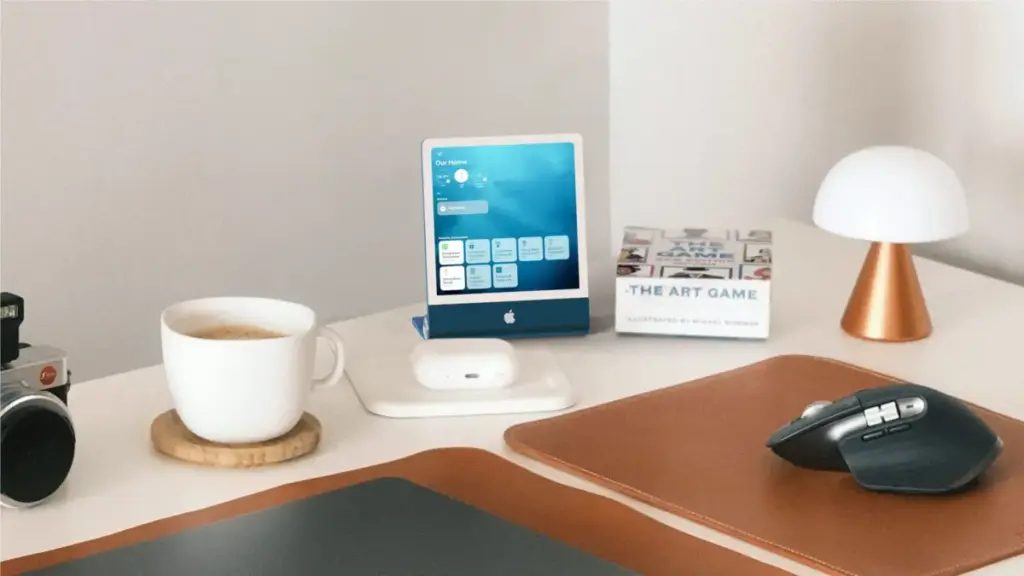
A central element of the home hub’s feature set is its situational awareness. Equipped with advanced proximity and ambient sensors, the device dynamically alters its user interface based on a person’s distance from the display.
When no one is in immediate proximity, the screen maintains a low-friction ambient state, displaying passive information such as the current room temperature, a clock, or a photo slideshow. As a user approaches the device, the display automatically transitions to an active control panel, exposing interactive elements such as smart thermostat controls, lighting scenes, or detailed schedule overviews.
Identity recognition plays an equally vital role in how the hub operates:

- Facial and Voice Identification: Using the front-facing 1080p camera alongside voice recognition algorithms similar to those found in the HomePod, the hub identifies specific members of a household. Upon recognizing a user, the device automatically loads that individual’s personalized profile, interface layout, and private data.
- Proximity Automation and Gesture Control: The sensor array supports room-occupancy detection to trigger HomeKit automations, such as illuminating lights when someone enters a space. Beyond physical touch input, the camera system is designed to recognize hand gestures, enabling touchless controls from across a room.
- Security and Privacy: While the camera system provides identity tracking, it operates with lower fidelity than hardware-bound Face ID to balance power and thermal demands, using voice recognition as a secondary verification layer. Users can establish secondary authentication prompts via an paired iPhone for high-security actions. For guests, a dedicated visitor mode hides personal calendars, messages, and private media.
Operating System and Software Interface
Internally referred to during development under the codename "Charismatic," the software powering the accessory is expected to launch publicly as homeOS. International trademark filings in jurisdictions including Liechtenstein, the United States, Argentina, and Peru confirm Apple’s moves to secure the homeOS branding.
The operating system fuses core elements from tvOS, watchOS, and iOS, delivering a lightweight, widget-centric experience optimized for quick interactions and voice control. Initial setup is handled seamlessly by pairing the display with an iPhone.
Rather than featuring a standalone App Store at launch, homeOS comes preloaded with a curated suite of core Apple applications. The user interface draws heavy inspiration from the iPhone’s StandBy mode and watchOS:
- Idle Displays and Watch Faces: When idle, the hub functions as an ambient smart clock or digital frame, utilizing a customizable Face Gallery and photo collection views.
- Home Screen and App Layout: The home screen features Apple Watch-style circular app icons. When opened, applications utilize an iPad-inspired two-panel layout tailored for display clarity at a distance. Users can customize icon arrangements via standard tap-and-hold gestures.
- Widget Gallery and Smart Stacks: Users can select and arrange widgets via an integrated Widget Gallery that imports widget choices from an adjacent iPhone. To protect user privacy, personal widget content linked from an iPhone is only rendered on the display when the primary account holder is physically detected in the home. System widgets can also rotate dynamically throughout the day using Smart Stack logic.
- Siri AI Integration: The interface heavily integrates the visual aesthetics of the redesigned Siri AI platform, incorporating darker visual elements and fluid lighting effects. Siri acts as the primary navigational input for managing home automations, querying personal data, and initiating media playback.
Apps, Intercom, and Media Features
Despite the absence of a dedicated third-party App Store, the device includes preinstalled system applications tailored for common home utility tasks. These include FaceTime, Home, Calendar, Weather, Photos, Notes, Reminders, Music, Podcasts, Clock, and News.
 macOS & Apple IT Support
Apple TV and HomePod Mini Face Extended Shipping Delays as Code Leaks and Software Betas Signal Incoming 2026 Models
Customers looking to purchase an Apple TV or a HomePod mini through...
 macOS & Apple IT Support
Apple Releases watchOS 27: A Comprehensive Look at New AI Features, Interface Changes, and Health Updates Across Apple Watch Generations
Apple officially launched watchOS 27 on September 14, introducing a sweeping array...
 macOS & Apple IT Support
Official EU Energy Label Confirms 4,883 mAh Battery Capacity for Apple’s Upcoming iPhone Duo
Apple has officially published a new European Union energy label regulatory filing...