
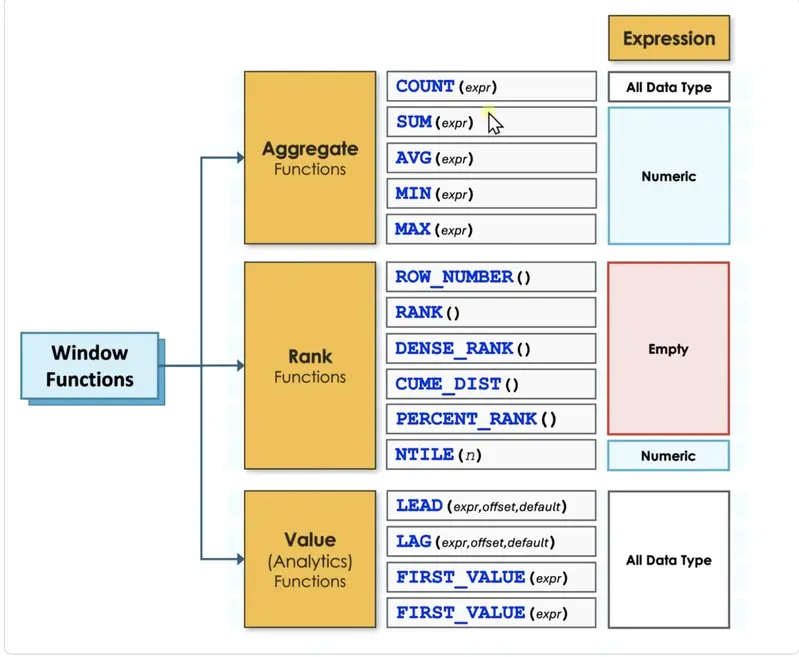
In the modern landscape of data-driven decision-making, Structured Query Language (SQL) remains the undisputed foundational tool for analysts and engineers alike. For many professionals, the journey into data reporting begins with a standard set of aggregate functions: the ubiquitous SUM, AVG, and COUNT. These commands serve as the industry’s bread and butter, providing the essential summaries required for high-level business intelligence. However, as reporting requirements become more sophisticated, many developers encounter a technical threshold where traditional aggregation no longer suffices. This is the point where the "window function" enters the conversation, often introduced by a senior colleague or discovered in a complex query containing the "OVER (PARTITION BY…)" clause.
The transition from basic aggregate functions to window functions represents a significant leap in a developer’s ability to manipulate data. While standard aggregates are designed to summarize and collapse information, window functions offer a more surgical approach, allowing for complex calculations across sets of rows while preserving the integrity of every individual record. Understanding the distinction between these two methodologies is not merely an academic exercise; it is a prerequisite for performing advanced analytics, such as calculating running totals, moving averages, and period-over-period growth.
The Fundamental Shift in Data Granularity
To understand the power of window functions, one must first grasp the concept of granularity—the level of detail represented by a single row of data. The primary difference between aggregate functions and window functions can be distilled into a single, transformative principle: aggregate functions collapse many rows into one summary, whereas window functions calculate across many rows but keep every original row intact.
In a traditional aggregate query, the use of a "GROUP BY" clause fundamentally alters the granularity of the result set. For instance, if a database contains four individual sales records—two for "Caps" and two for "Gloves"—an aggregate SUM function grouped by product will return only two rows. The individual identity of each sale is lost, replaced by a single total for each category. Four rows go into the process, and two rows come out. The data has been squashed to provide a high-level summary.
Conversely, a window function performs the same mathematical calculation—the total sales per product—but attaches that result to every original row. In this scenario, four rows go into the process, and four rows come out. The granularity remains unchanged. Each row still represents an individual sale, but it now carries an additional column containing the group total. This allows a developer to see the individual "trees" without losing sight of the "forest."

Bridging the Gap Between Detail and Summary
The limitations of traditional aggregate functions become apparent when a report requires both individual details and group-level summaries simultaneously. In a standard SQL environment, once rows are collapsed by a "GROUP BY" clause, individual identifiers like a unique ID or a specific transaction timestamp can no longer appear next to the totals. There is no single ID that represents a group of four different sales, making it impossible to compare an individual record against its group average within a single, simple query.
This is the specific problem that window functions were designed to solve. By using the "OVER" clause, a developer instructs the SQL engine to calculate a value over a set of related rows—defined as a "window"—and then append that value to each record. This eliminates the need for complex subqueries or self-joins that were historically required to achieve the same result.
 Software Development & Scripting for IT
The Museum of Almost: Redefining Digital Narrative through Speculative Design and Technical Rigor
In the evolving landscape of digital art and web development, the boundary...
 Software Development & Scripting for IT
Bridging the Context Gap: TokenCap Introduces Schema Intelligence to Eliminate AI Coding Errors
In the rapidly evolving landscape of software development, the integration of Artificial...
 Software Development & Scripting for IT
Bridging the Linguistic Divide: How Word Embeddings Revolutionized Machine Understanding of Human Language
In the rapidly evolving landscape of artificial intelligence, one of the most...







