
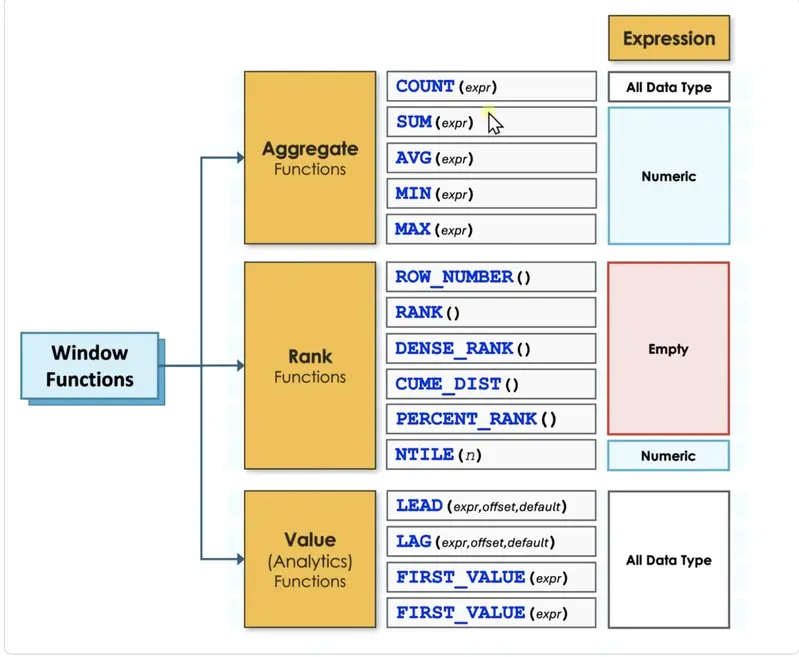
Finally, the value (or analytics) family allows a query to fetch data from other rows and bring it onto the current row. The "LAG" function looks backward to a previous row, while "LEAD" looks forward. This is transformative for period-over-period analysis. Rather than performing a performance-heavy self-join to compare this month’s sales to last month’s, a developer can use "LAG" to pull the previous month’s revenue into a new column, allowing for an instant calculation of growth or decline. Other functions in this family, such as "FIRST_VALUE" and "LAST_VALUE," can identify the absolute highest or lowest earners in a department and display those names next to every employee record for easy comparison.
Navigating Technical Constraints and Execution Order
Despite their power, window functions come with specific logical constraints that can trip up even experienced developers. One of the most common "gotchas" involves the attempt to filter a query based on the result of a window function. For instance, a developer might try to use a "WHERE" clause to find only the top-ranked employee in each department. However, this will result in a system error.
The reason lies in the SQL order of execution. The SQL engine evaluates the "WHERE" clause very early in the process, long before it calculates window functions. By the time the database engine is looking for "Rank = 1," the ranking hasn’t actually happened yet. To bypass this, developers must use a Common Table Expression (CTE) or a subquery. This allows the database to compute the window function first in an inner layer, making the resulting values available for filtering in the outer layer.

The general lifecycle of a SQL query follows a strict path: it begins with "FROM," moves to "WHERE," then "GROUP BY," followed by traditional aggregates and "HAVING." Only after these steps are complete does the engine calculate window functions. Finally, it processes the "SELECT" and "ORDER BY" commands. Because of this sequence, window functions are restricted to appearing only in the "SELECT" or "ORDER BY" portions of a query.
Choosing the Right Tool for the Task
The choice between using a standard aggregate function or a window function ultimately depends on the desired output. They are not rivals, but rather complementary tools suited for different objectives. If the goal is a high-level summary where individual details are irrelevant—such as a total count of users per country—the traditional "GROUP BY" remains the most efficient and readable choice.
However, if the individual rows must remain in the result set for further comparison or detailed reporting, the window function is the correct path. It provides the context necessary for deep analysis, allowing for the coexistence of the micro and the macro. In the real world of professional data analysis, most complex queries do not choose one over the other; they utilize both to build a comprehensive narrative of the data.
By mastering the "OVER" clause and understanding the nuances of partitions and frames, data professionals can move beyond simple reporting and into the realm of advanced analytics. Window functions don’t just change how the code looks; they change what the data is capable of telling us. Whether it’s identifying trends over time, ranking performance, or comparing individuals to their peers, these functions provide the clarity and precision required in today’s information-heavy environments.
 Software Development & Scripting for IT
The Architecture of Thought: Why Modern Software Engineering Mentorship is Moving Beyond Syntax
In the modern landscape of software development, a stark divide has emerged...
 Software Development & Scripting for IT
"Outside in 20" Redefines Digital Wellness with Local AI-Driven Outdoor Encouragement
In an era where digital connectivity often feels inescapable, a new open-source...
 Software Development & Scripting for IT
The Museum of Almost: Redefining Digital Narrative through Speculative Design and Technical Rigor
In the evolving landscape of digital art and web development, the boundary...







