
Consider the practical application within a corporate HR department. If a manager needs to know how each employee’s salary compares to the average salary of their specific department, a window function can provide the answer in a single line of code. By partitioning the data by department, the function calculates the average for each group and presents it alongside every employee’s name and individual pay rate. The result is a highly readable report where the "difference from average" can be calculated instantly, providing immediate context that a collapsed summary could never offer.
The Anatomy and Logic of the Window
Every window function follows a consistent structural pattern that defines how the calculation is performed. At its core is the "function_name" followed by the "OVER" clause. The contents of the parentheses following "OVER" determine the scope and behavior of the window.
The "PARTITION BY" clause is the first major component, acting as a virtual "GROUP BY" that organizes rows into independent groups without collapsing them. If this clause is omitted, the SQL engine treats the entire result set as one single partition. The "ORDER BY" clause inside the window defines the sequence of rows within each partition, which is critical for calculations that depend on a specific progression, such as time-based data.
The most advanced component is the "frame clause," often written as "ROWS BETWEEN." This allows a developer to narrow the window even further, limiting the calculation to a specific range of rows relative to the current one. A helpful mental model for this structure is that "PARTITION BY" decides which rows belong together, "ORDER BY" decides their sequence, and the frame clause determines how far each row can "see" in either direction.

Exploring the Three Families of Window Functions
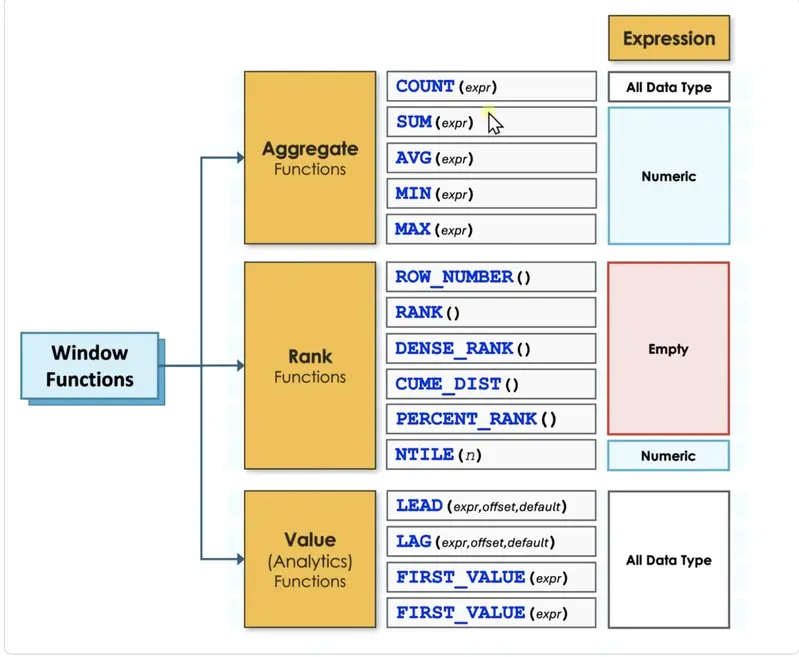
The versatility of window functions stems from the fact that they support three distinct families of operations: aggregate, rank, and value functions. While traditional "GROUP BY" queries are limited to the five basic aggregates—COUNT, SUM, AVG, MIN, and MAX—window functions expand the toolkit significantly.
The aggregate family, when used with an "OVER" clause, enables sophisticated temporal analysis. A classic example is the "running total," where the "ORDER BY" clause instructs the engine to sum values from the very first row up to the current row. This is a staple of financial reporting, allowing businesses to track cumulative revenue throughout a fiscal year. Similarly, moving averages can be calculated by using the frame clause to average the current month’s revenue with the two preceding months, smoothing out seasonal fluctuations to reveal underlying trends.
The rank family introduces the ability to order rows based on specific criteria. This includes functions like "ROW_NUMBER," which provides a unique sequential integer to each row, and "RANK" or "DENSE_RANK," which handle ties in the data. For example, if two employees in the sales department earn the exact same salary, "RANK" will assign them the same number but skip the next number in the sequence, whereas "DENSE_RANK" will assign the same number and continue with the next immediate integer. These functions are essential for "Top N" reporting, such as identifying the three highest-paid individuals in every department of a global corporation.
 Software Development & Scripting for IT
The Crisis of the "Almost Right" Illusion: How AI-Driven Developer Burnout is Reshaping Software Engineering
The initial promise of Artificial Intelligence in software development was centered on...
 Software Development & Scripting for IT
UNC6240 Exploits Critical Oracle PeopleSoft Vulnerability Through Sophisticated WAF Bypass Techniques
A sophisticated cyber-espionage and data theft campaign has been identified targeting organizations...
 Software Development & Scripting for IT
Navigating the "Lakh and Crore" Divide: New AI Benchmark Exposes Significant Errors in Indian Real Estate Mathematics
The dream of homeownership in India is often a complex journey through...







