
In the modern landscape of data-driven decision-making, Structured Query Language (SQL) remains the undisputed foundational tool for analysts and engineers alike. For many professionals, the journey into data reporting begins with a standard set of aggregate functions: the ubiquitous SUM, AVG, and COUNT. These commands serve as the industry’s bread and butter, providing the essential summaries required for high-level business intelligence. However, as reporting requirements become more sophisticated, many developers encounter a technical threshold where traditional aggregation no longer suffices. This is the point where the "window function" enters the conversation, often introduced by a senior colleague or discovered in a complex query containing the "OVER (PARTITION BY…)" clause.
The transition from basic aggregate functions to window functions represents a significant leap in a developer’s ability to manipulate data. While standard aggregates are designed to summarize and collapse information, window functions offer a more surgical approach, allowing for complex calculations across sets of rows while preserving the integrity of every individual record. Understanding the distinction between these two methodologies is not merely an academic exercise; it is a prerequisite for performing advanced analytics, such as calculating running totals, moving averages, and period-over-period growth.
The Fundamental Shift in Data Granularity
To understand the power of window functions, one must first grasp the concept of granularity—the level of detail represented by a single row of data. The primary difference between aggregate functions and window functions can be distilled into a single, transformative principle: aggregate functions collapse many rows into one summary, whereas window functions calculate across many rows but keep every original row intact.
In a traditional aggregate query, the use of a "GROUP BY" clause fundamentally alters the granularity of the result set. For instance, if a database contains four individual sales records—two for "Caps" and two for "Gloves"—an aggregate SUM function grouped by product will return only two rows. The individual identity of each sale is lost, replaced by a single total for each category. Four rows go into the process, and two rows come out. The data has been squashed to provide a high-level summary.
Conversely, a window function performs the same mathematical calculation—the total sales per product—but attaches that result to every original row. In this scenario, four rows go into the process, and four rows come out. The granularity remains unchanged. Each row still represents an individual sale, but it now carries an additional column containing the group total. This allows a developer to see the individual "trees" without losing sight of the "forest."

Bridging the Gap Between Detail and Summary
The limitations of traditional aggregate functions become apparent when a report requires both individual details and group-level summaries simultaneously. In a standard SQL environment, once rows are collapsed by a "GROUP BY" clause, individual identifiers like a unique ID or a specific transaction timestamp can no longer appear next to the totals. There is no single ID that represents a group of four different sales, making it impossible to compare an individual record against its group average within a single, simple query.
This is the specific problem that window functions were designed to solve. By using the "OVER" clause, a developer instructs the SQL engine to calculate a value over a set of related rows—defined as a "window"—and then append that value to each record. This eliminates the need for complex subqueries or self-joins that were historically required to achieve the same result.
Consider the practical application within a corporate HR department. If a manager needs to know how each employee’s salary compares to the average salary of their specific department, a window function can provide the answer in a single line of code. By partitioning the data by department, the function calculates the average for each group and presents it alongside every employee’s name and individual pay rate. The result is a highly readable report where the "difference from average" can be calculated instantly, providing immediate context that a collapsed summary could never offer.
The Anatomy and Logic of the Window
Every window function follows a consistent structural pattern that defines how the calculation is performed. At its core is the "function_name" followed by the "OVER" clause. The contents of the parentheses following "OVER" determine the scope and behavior of the window.
The "PARTITION BY" clause is the first major component, acting as a virtual "GROUP BY" that organizes rows into independent groups without collapsing them. If this clause is omitted, the SQL engine treats the entire result set as one single partition. The "ORDER BY" clause inside the window defines the sequence of rows within each partition, which is critical for calculations that depend on a specific progression, such as time-based data.
The most advanced component is the "frame clause," often written as "ROWS BETWEEN." This allows a developer to narrow the window even further, limiting the calculation to a specific range of rows relative to the current one. A helpful mental model for this structure is that "PARTITION BY" decides which rows belong together, "ORDER BY" decides their sequence, and the frame clause determines how far each row can "see" in either direction.

Exploring the Three Families of Window Functions
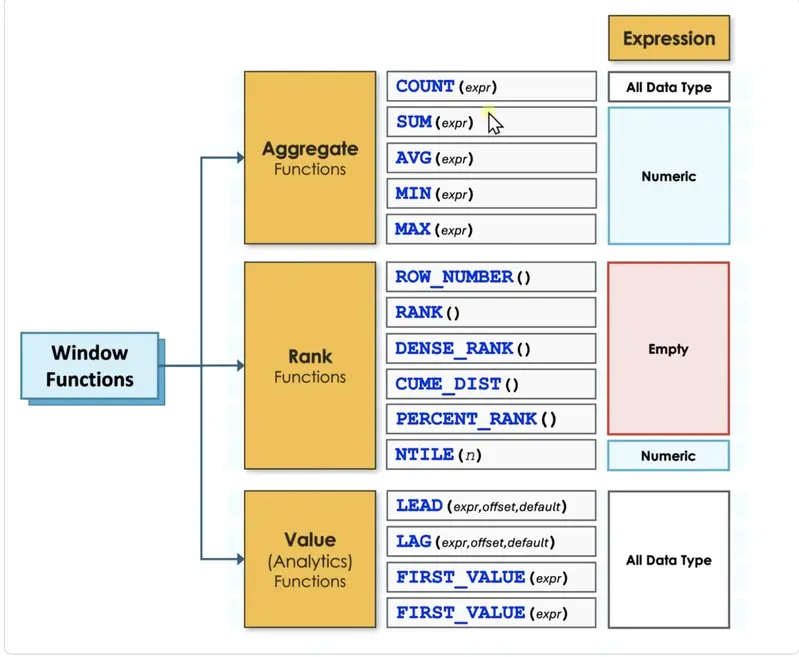
The versatility of window functions stems from the fact that they support three distinct families of operations: aggregate, rank, and value functions. While traditional "GROUP BY" queries are limited to the five basic aggregates—COUNT, SUM, AVG, MIN, and MAX—window functions expand the toolkit significantly.
The aggregate family, when used with an "OVER" clause, enables sophisticated temporal analysis. A classic example is the "running total," where the "ORDER BY" clause instructs the engine to sum values from the very first row up to the current row. This is a staple of financial reporting, allowing businesses to track cumulative revenue throughout a fiscal year. Similarly, moving averages can be calculated by using the frame clause to average the current month’s revenue with the two preceding months, smoothing out seasonal fluctuations to reveal underlying trends.
The rank family introduces the ability to order rows based on specific criteria. This includes functions like "ROW_NUMBER," which provides a unique sequential integer to each row, and "RANK" or "DENSE_RANK," which handle ties in the data. For example, if two employees in the sales department earn the exact same salary, "RANK" will assign them the same number but skip the next number in the sequence, whereas "DENSE_RANK" will assign the same number and continue with the next immediate integer. These functions are essential for "Top N" reporting, such as identifying the three highest-paid individuals in every department of a global corporation.
Finally, the value (or analytics) family allows a query to fetch data from other rows and bring it onto the current row. The "LAG" function looks backward to a previous row, while "LEAD" looks forward. This is transformative for period-over-period analysis. Rather than performing a performance-heavy self-join to compare this month’s sales to last month’s, a developer can use "LAG" to pull the previous month’s revenue into a new column, allowing for an instant calculation of growth or decline. Other functions in this family, such as "FIRST_VALUE" and "LAST_VALUE," can identify the absolute highest or lowest earners in a department and display those names next to every employee record for easy comparison.
Navigating Technical Constraints and Execution Order
Despite their power, window functions come with specific logical constraints that can trip up even experienced developers. One of the most common "gotchas" involves the attempt to filter a query based on the result of a window function. For instance, a developer might try to use a "WHERE" clause to find only the top-ranked employee in each department. However, this will result in a system error.
The reason lies in the SQL order of execution. The SQL engine evaluates the "WHERE" clause very early in the process, long before it calculates window functions. By the time the database engine is looking for "Rank = 1," the ranking hasn’t actually happened yet. To bypass this, developers must use a Common Table Expression (CTE) or a subquery. This allows the database to compute the window function first in an inner layer, making the resulting values available for filtering in the outer layer.

The general lifecycle of a SQL query follows a strict path: it begins with "FROM," moves to "WHERE," then "GROUP BY," followed by traditional aggregates and "HAVING." Only after these steps are complete does the engine calculate window functions. Finally, it processes the "SELECT" and "ORDER BY" commands. Because of this sequence, window functions are restricted to appearing only in the "SELECT" or "ORDER BY" portions of a query.
Choosing the Right Tool for the Task
The choice between using a standard aggregate function or a window function ultimately depends on the desired output. They are not rivals, but rather complementary tools suited for different objectives. If the goal is a high-level summary where individual details are irrelevant—such as a total count of users per country—the traditional "GROUP BY" remains the most efficient and readable choice.
However, if the individual rows must remain in the result set for further comparison or detailed reporting, the window function is the correct path. It provides the context necessary for deep analysis, allowing for the coexistence of the micro and the macro. In the real world of professional data analysis, most complex queries do not choose one over the other; they utilize both to build a comprehensive narrative of the data.
By mastering the "OVER" clause and understanding the nuances of partitions and frames, data professionals can move beyond simple reporting and into the realm of advanced analytics. Window functions don’t just change how the code looks; they change what the data is capable of telling us. Whether it’s identifying trends over time, ranking performance, or comparing individuals to their peers, these functions provide the clarity and precision required in today’s information-heavy environments.
 Software Development & Scripting for IT
Bridging the Context Gap: TokenCap Introduces Schema Intelligence to Eliminate AI Coding Errors
In the rapidly evolving landscape of software development, the integration of Artificial...
 Software Development & Scripting for IT
Bridging the Gap Between Logic and Instruction: An In-Depth Look at the Runbook Repair Lab
In the rapidly evolving landscape of software engineering, the "runbook"—a routine set...
 Software Development & Scripting for IT
Bridging the Linguistic Divide: How Word Embeddings Revolutionized Machine Understanding of Human Language
In the rapidly evolving landscape of artificial intelligence, one of the most...







