
For years, the Linux desktop has maintained a complicated relationship with the traditional email client. While power users have historically gravitated toward heavyweight, feature-dense workhorses such as Mozilla Thunderbird and GNOME’s veteran Evolution suite, users seeking a modern, streamlined experience have faced a narrower set of options. Projects such as Geary demonstrated that a focused, conversation-first interface could thrive on the Linux desktop, yet modernizing that vision to keep pace with rapid shifts in toolkit design and platform libraries has remained an ongoing challenge.
A newly released email client named Hylki is attempting to carve out its own place within this shifting landscape. Built from the ground up in Rust and tailored specifically for the GNOME desktop environment, Hylki arrives as part of an emergent cohort of Linux mail applications—alongside recent efforts such as Postcard, Convey, and Letters—seeking to deliver a modern, Geary-inspired workflow without the technical debt or visual legacy of older software suites.
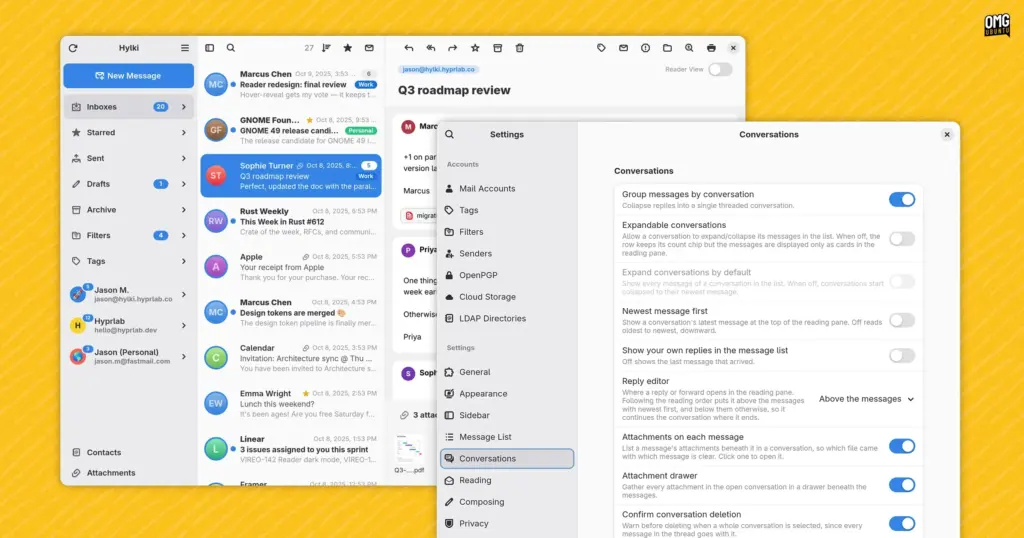
Engineered with GTK4 and the modern libadwaita styling libraries, Hylki adheres strictly to GNOME design standards. It presents the familiar, ergonomic three-column vertical layout that has become standard across contemporary mail clients: a left-hand navigation pane for accounts and folders, a central index of message threads, and a spacious reading pane on the right. Rather than treating messages as isolated dispatches, the application is fundamentally constructed around conversation threading, grouping related exchanges into coherent, unified views in the manner popularized by modern webmail interfaces.
On its project site, Hylki’s developers summarize the application’s core mission with three straightforward tenets: the software aims to be fast to open, effortless to read, and private by default. While many software projects make similar claims, Hylki attempts to deliver on them by marrying low-level performance considerations with an unusually deep layer of user interface customization, catering to users who want a clean desktop aesthetic without sacrificing control over their daily mail workflow.
First Impressions and Everyday Mail Handling
Setting up an email client is historically one of the more tedious rituals of desktop computing, often requiring manual port numbers, security protocols, and host addresses. Hylki eases this friction by providing native compatibility with GNOME Online Accounts. Users who have already authenticated their personal or enterprise email providers within GNOME’s central system settings can connect Hylki directly, pulling down accounts without re-entering credentials. For users relying on independent mail servers, private domains, or niche hosting providers, the client also includes comprehensive support for manual IMAP and POP3 account setup.
The application natively accommodates multiple accounts. Users can isolate their communications into distinct operational silos or view everything in aggregate using a unified inbox, an increasingly essential feature for those balancing personal and professional correspondence within a single window.
Hylki stands out early through its first-run onboarding sequence. While setup wizards in productivity software are frequently dismissed by users clicking through default prompts as quickly as possible, Hylki’s initial launch experience is carefully structured. It introduces a thoughtful mix of functional toggles, organizational settings, and layout preferences before the user ever encounters an empty message list, allowing fundamental behaviors to be tailored to personal habits right from the start.
In day-to-day use, the application covers the baseline management tasks expected of any modern mail utility. Conversation threading ensures long exchanges remain legible, displaying replies sequentially within a single scrollable view rather than scattering fragments across an inbox.
When composing messages, Hylki offers a versatile set of tools. Users can choose to draft replies inline directly beneath a thread or launch a dedicated pop-out window to compose in a separate workspace. The composer supports rich text, raw HTML, Markdown, and plain text formats, catering equally to users who favor visual text formatting and those who insist on lightweight, markup-driven drafting. For users managing communications across multiple time zones or striving to manage personal work-life boundaries, the client incorporates a message queueing mechanism that allows outgoing mail to be scheduled for later delivery rather than dispatched immediately.
 Linux & Open Source Solutions
NexPhone Multi-OS Smartphone Delayed to March 2027 as Hardware Challenges and Price Adjustments Emerge
The NexPhone, an ambitious multi-operating system smartphone designed to bridge the divide...
 Linux & Open Source Solutions
Ubuntu 26.10 Introduces Restricted Media Codec Installation to App Center’s Add-Ons Hub
Ubuntu 26.10 has expanded the functionality of its modern App Center by...
 Linux & Open Source Solutions
Canonical Hardens Ubuntu 26.10 Boot Security by Stripping Advanced Filesystem Parsers from Signed GRUB
Canonical has implemented a significant architectural shift in how Ubuntu 26.10 boots...







