
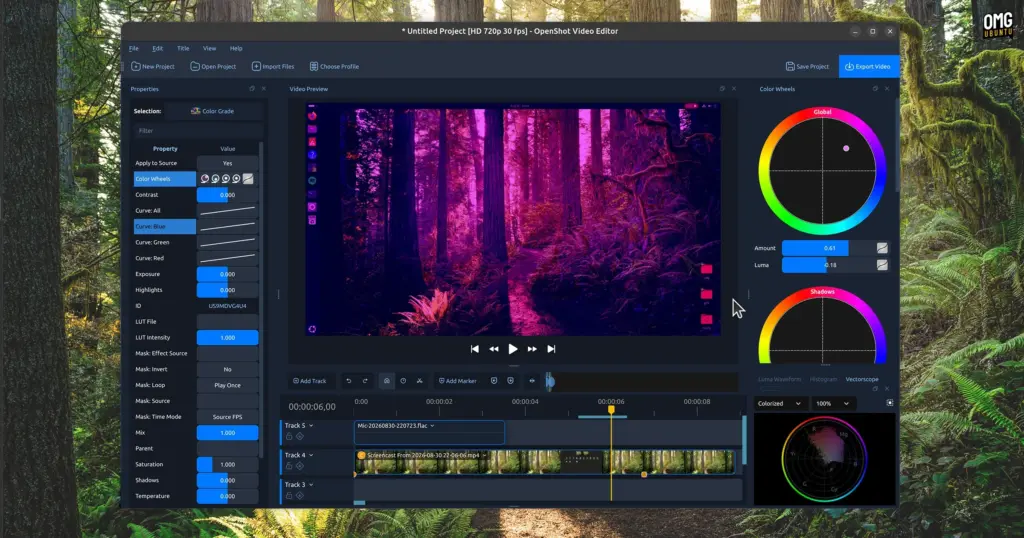
In a major milestone for open-source desktop multimedia production, the popular Qt-based non-linear video editor OpenShot has officially debuted on the Canonical Snap Store. The deployment, packaged as an official snap release under the identifier openshot-qt, went live on 22 September. Its arrival marks a notable evolution in how Ubuntu users access the video creation suite, making the software immediately installable across all currently supported Ubuntu distributions directly through the native graphical App Center.
The launch offers creators on Ubuntu a modern, self-contained way to run the software, though it also introduces a familiar quirk within Canonical’s package discovery ecosystem: because the traditional Debian archive format continues to be hosted alongside modern delivery mechanisms, searches for OpenShot within Ubuntu’s App Center present users with two distinct installation options. Beneath the surface, however, the newly introduced snap package addresses longstanding dependency hurdles, modernizes security permissions, and simplifies deployment across multiple generations of Linux desktop operating systems.
Resolving Desktop Dependencies and Expanding LTS Compatibility
For years, users running Ubuntu have relied on traditional Debian packages (.deb) distributed either through the core Ubuntu archive repositories or via the project’s long-standing Personal Package Archive (PPA) on Launchpad. While these native packaging formats have served the Linux community effectively, they inherently bind an application’s underlying dependencies to the specific library versions bundled with the host operating system.
Because OpenShot is built upon the Qt application framework, updates to its graphical interface, rendering pipeline, and core audio-visual components frequently demand newer versions of Qt libraries than those maintained in older operating system releases. On Ubuntu Long Term Support (LTS) releases—which are engineered primarily for predictability, stability, and enterprise longevity rather than fast-paced framework turnover—the system Qt versions can quickly fall behind upstream requirements. Consequently, users running older but actively supported LTS installations often encountered dependency conflicts or were outright prevented from installing new application builds through the official PPA.
Snap packaging directly eliminates these packaging frictions. By encapsulating OpenShot alongside its required runtime dependencies, libraries, and Qt components within an isolated squashfs image, the snap build ensures that the editor runs identically regardless of the underlying operating system version. For desktop editors working on enterprise-grade LTS installations, this decoupling allows immediate access to modern software iterations without necessitating an upgrade of the host system’s entire base platform.
OpenShot 4.0: Modern Editing Tools Under the Hood
The arrival of the official snap package follows closely on the heels of the major OpenShot 4.0 milestone, which debuted in August. That update introduced a comprehensive slate of architectural improvements, visual refinements, and creative additions aimed at elevating the suite’s capabilities for both casual creators and experienced editors.
Central to the 4.0 release was the long-awaited introduction of integrated colour grading tools. Featuring dedicated colour wheels and refined adjustment controls, the upgraded toolset permits editors to manage balance, saturation, exposure, and tone with much higher visual fidelity directly within the primary workspace. Prior iterations of the software offered more rudimentary colour manipulation; the addition of dedicated grading wheels brought OpenShot closer in line with contemporary post-production conventions.
In addition to colour manipulation, OpenShot 4.0 revamped multitrack recording, providing smoother capture workflows for desktop producers assembling multi-layered audio and video compositions. The release also deepened software integration with ComfyUI, a cloud-based generative artificial intelligence service. Through this capability, users can incorporate advanced image and video workflows directly into their timeline projects, bridging traditional timeline editing with modern external processing tools. Bringing these upgraded capabilities into an easily installable snap format allows Ubuntu creators to leverage these features with minimal manual setup.
 Linux & Open Source Solutions
KDE Plasma 6.8 Released on Project’s 30th Anniversary, Dropping X11 Sessions and Expanding Core Features
The KDE community has officially released KDE Plasma 6.8, marking a historic...
 Linux & Open Source Solutions
Hylki Brings Modern Rust Engineering and Deep Customization to the GNOME Desktop
For years, the Linux desktop has maintained a complicated relationship with the...
 Linux & Open Source Solutions
Canonical Releases Official Ubuntu Desktop Images for RISC-V Hardware Ahead of Ubuntu 26.10
Installing Ubuntu on RISC-V hardware is poised to become significantly more straightforward...







