
Alongside the general availability of the primary distribution, the release of Ubuntu 26.10 has introduced a coordinated wave of updates across the broader family of official community flavours. The updated roster highlights the diversity of the Ubuntu ecosystem, bringing new releases for long-standing editions including Kubuntu, Xubuntu, Lubuntu, Ubuntu Kylin, Ubuntu Unity, and Ubuntu Studio, alongside a notable return for Ubuntu MATE under a reconstituted maintenance team.
As with previous development cycles, the official flavours share a unified core system foundation with the flagship edition. Every spin benefits from the base architectural advancements introduced in this milestone, chief among them the Linux 7.3 kernel and Mesa 26.2 graphics drivers. In addition to refreshed base toolchains, compiler updates, and system-level performance enhancements, all flavours retain native access to Snap packaging and the Snap Store, ensuring that users across all desktop environments have access to the same containerized software distribution mechanisms.
Beyond these shared underlying technologies, each flavour adapts the underlying base to serve distinct user bases, system resource profiles, and desktop paradigms. The 26.10 cycle emphasizes stability, selective utility improvements, and ongoing preparations for modernized display server protocols.
Ubuntu 26.10 Flavour Recap
The latest release cycle captures the desktop Linux landscape in a period of technical transition. Across lightweight, traditional, and cutting-edge desktop environments, flavour maintainers have balanced the integration of upstream component updates with the practical challenges of hardware support, display server shifts, and application lifecycle management.
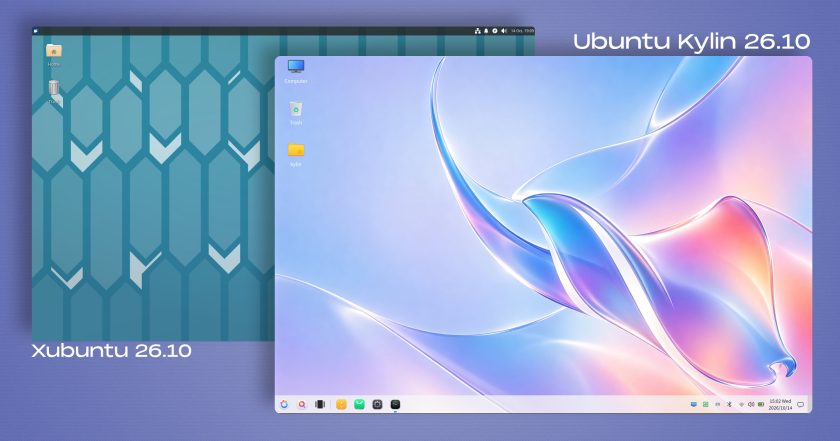
Xubuntu 26.10
Targeted at users seeking a lightweight, traditional desktop interface that remains modest in its hardware demands, Xubuntu 26.10 arrives powered by the Xfce 4.20 desktop environment. This release focuses on stability and bug fixes across the desktop stack while continuing to refine early support for Wayland, an option the development team candidly describes as being available for users adventurous enough to experiment with it.
Several default Xfce applications and utilities have received targeted enhancements in this cycle:
- Ristretto: The default image viewer gains a shuffle mode for automated viewing sequences, features an overhauled printing pipeline, and adds the capability to fetch and open images directly from web URLs.
- Xfce Terminal: The core command-line utility has been optimized to reduce overall CPU utilization during active output, and it now provides a dedicated setting allowing users to disable automatic URL highlighting.
- Screenshooter: The native desktop screen capture utility has been adapted to handle region-based and full-screen captures when operating within a Wayland session. Additionally, the integrated direct upload mechanism to Imgur has been removed.
- Catfish: The desktop search utility has modified its default query behavior, ensuring that searches now automatically initiate within whichever directory is currently active.
In addition to core desktop utilities, default application packages have been refreshed, including the incorporation of GIMP 3.2.6 for advanced image editing workflows.
Ubuntu Kylin 26.10
Ubuntu Kylin 26.10 delivers a routine maintenance update focused largely on underlying package increments and targeted bug fixes, rather than major architectural or interface overhauls. The distribution retains the Windows 7-style UKUI desktop environment, remaining on the same upstream version that debuted in the previous 26.04 release earlier in the year.
The release’s most immediate user-facing element is its default desktop artwork. Following a design direction established in prior releases, Ubuntu Kylin 26.10 incorporates an artificial-intelligence-generated wallpaper that reinterprets Ubuntu’s official release mascot—in this cycle, the stingray. The design executes the aquatic creature in a fluid glassmorphism visual style, highlighted by pastel colour gradients and translucent layers. This visual approach mirrors the stylistic departure seen in Ubuntu Kylin 26.04, which featured an image of a raccoon-shaped island surrounded by water beneath inverted seagulls, solidifying a unique visual identity for the Chinese-market-focused flavour.

Lubuntu 26.10
Lubuntu continues its role as a resource-conscious distribution centered on minimal memory overhead and rapid responsiveness. Lubuntu 26.10 ships with the LXQt 2.4.0 desktop environment, a release characterized upstream as primarily consisting of code cleanups, technical debt reduction, and general bug fixes.
Despite the focus on stabilization, LXQt 2.4.0 introduces several quality-of-life adjustments:
- Sound Applet: The system audio panel control now supports a horizontal orientation, improving usability on diverse panel layouts and smaller screen aspect ratios.
- Notifications: The notification framework has been revised so that transient desktop alerts clear automatically rather than lingering indefinitely on the screen.
On the display server front, Lubuntu 26.10 continues to deploy traditional X11 as its default session for standard installations. However, maintainers have expanded display server testing by integrating an optional Wayland session. Accessible directly from the display manager login screen, this alternative session relies on the Miriway compositor, providing early adopters with a mechanism to evaluate LXQt’s performance under Wayland without altering default system stability.
Ubuntu Unity 26.10
Ubuntu Unity 26.10 acts as a maintenance milestone designed to preserve the classic Unity experience while maintaining compatibility with modern distribution dependencies. The desktop remains on Unity 7.7, receiving a targeted batch of code cleanups and bug corrections designed to detach the desktop from unmaintained or deprecated libraries.
These maintenance efforts serve to stabilize the existing interface while developers advance work toward an eventual architectural migration to Lomiri, the modern convergence-oriented desktop shell. Reflecting this forward-looking strategy, Ubuntu Unity 26.10 includes several core Lomiri applications pre-installed alongside the classic desktop shell, specifically the Lomiri Calculator, Files file manager, and Terminal applications. This hybrid setup permits testing of Lomiri core tools directly within a conventional desktop environment.
Kubuntu 26.10
Kubuntu 26.10 serves users who prefer KDE’s feature-dense, highly configurable desktop ecosystem. Although promotional release notices advertise the distribution as delivering the latest KDE Plasma, the release specifically deploys KDE Plasma 6.7 rather than the recently introduced Plasma 6.8 series. Nevertheless, this represents an upgrade over the desktop stack featured in Kubuntu 26.04.
Plasma 6.7 introduces significant operational refinements, particularly for multi-monitor workstations:
- Virtual Desktop Management: Users can now assign dedicated virtual desktops to specific individual displays, supplemented by dedicated keyboard shortcuts for switching between assigned workspaces.
- Visual Transitions: Desktop notifications gain a fluid glide effect when appearing and dismissing.
- Panel Widgets: The Digital Clock widget now displays explicit timezone offset labels, clarifying time differences across localized clocks.
- Search and Layout: The desktop surface gains an option to toggle type-ahead searching directly on the desktop background.
- System Theming: The release resolves longstanding edge-case bugs associated with global theme application and automated dark mode transitions.
Kubuntu 26.10 continues the policy established in the 26.04 release by excluding the Plasma X11 session from the default ISO image, running Wayland out of the box. While users can still manually install the plasma-session-x11 package from the repository archives, the development team notes that 26.10 represents the final release cycle where this will be possible. Upstream KDE development has eliminated the standalone X11 session package in Plasma 6.8, cementing a complete migration to Wayland in forthcoming releases.
Ubuntu MATE 26.10
Marking a major milestone for the project, Ubuntu MATE returns to the official release lineup with version 26.10 following a hiatus during the 26.04 LTS cycle. The release represents the first official build completed under the stewardship of a reorganized maintenance team.
Rather than aggressively integrating the absolute latest upstream component versions, the maintainers have focused on assembling a cohesive, stable release based on proven MATE desktop packages. System plumbing updates are prominent:
- Initramfs Generation: Ubuntu MATE 26.10 incorporates Ubuntu’s broader shift to Dracut for generating initial ramdisk images.
- Network Management: The distribution has retired legacy
ifupdownnetworking configuration scripts in favor of Canonical’s unifiednetplanarchitecture. - Package Management Utilities: The standalone
gdebigraphical package installation utility has been removed from the default configuration.
The newly formed maintenance team explicitly acknowledges that the re-establishment of the distribution involves ongoing triage. The release documentation outlines several known issues, such as functional bugs affecting the RedShift night-light utility, sporadic missing iconography in selected context menus, and minor quirks encountered when running within specific virtual machine environments. Despite these documented rough edges, the release restores a functional baseline for the traditional desktop environment within the Ubuntu distribution family.
Ubuntu Studio 26.10
Configured specifically for creative professionals across audio, video, graphics, and desktop publishing disciplines, Ubuntu Studio 26.10 expands its pre-installed suite of production utilities.
Musicians and algorithmic composers benefit from substantial additions to the audio stack:
- Sonic Pi: The educational and live-performance live-coding music synthesis environment is now included out of the box.
- SuperCollider: The algorithmic composition engine and sound synthesis platform has been added to support complex audio programming.
- Utility Tools: A low-overhead command-line white noise generation utility,
jnoise, is included for acoustic testing and audio line calibration.
These additions accompany version upgrades for the distribution’s core creative applications, including fresh builds of OBS Studio for streaming, GIMP for image editing, Ardour for digital audio workstation tasks, Krita for digital illustration, and Kdenlive for non-linear video editing.
To improve initial system deployment, the Ubuntu Studio installer now allows users to selectively pick and exclude specific software components from the broader installation meta-packages. Complementing this change, the graphical user interface for the distribution’s low-latency audio configuration wizard has been streamlined, reducing setup friction for hardware audio interfaces.
Additional Official Flavours
The Ubuntu 26.10 release encompasses specialized updates across several other community editions:
- Edubuntu 26.10: Designed for primary, secondary, and tertiary educational institutions, Edubuntu’s installation system now permits system administrators to selectively install software packages broken down by target age group. Additionally, the Paperboy application—an RSS-based reading tool used in media literacy and critical analysis courses—has been updated.
- Ubuntu Budgie 26.10: The Budgie desktop edition introduces an integrated panel applet dedicated to locating and streaming internet radio stations. The environment also introduces system-level support for dynamic day-and-night wallpaper transitions that adapt based on the local time.
- Ubuntu Cinnamon 26.10: Continuing its deployment of the Cinnamon desktop environment originally developed by the Linux Mint project, this release updates the user interface to Cinnamon version 6.6.9, delivering upstream interface tweaks, panel optimizations, and base code fixes.
 Linux & Open Source Solutions
Canonical Releases Official Ubuntu Desktop Images for RISC-V Hardware Ahead of Ubuntu 26.10
Installing Ubuntu on RISC-V hardware is poised to become significantly more straightforward...
 Linux & Open Source Solutions
Ubuntu 26.10 Arrives with Rust Coreutils, Passkey Authentication, and Smarter Window Snapping
Canonical has officially announced the release of Ubuntu 26.10, codenamed "Stonking Stingray."...
 Linux & Open Source Solutions
The Document Foundation Unveils New Visual Identity to Establish Distinct Institutional Profile Apart from LibreOffice
The Document Foundation, the charitable non-profit entity responsible for overseeing the development...