

Ubuntu 26.10 has expanded the functionality of its modern App Center by introducing the capability to install restricted media codecs directly through a newly established Add-ons section. This interface update brings essential multimedia format support alongside proprietary hardware driver management, providing a unified graphical gateway for components that fall outside the operating system’s strictly open-source core.
The enhancement addresses an enduring friction point in the desktop Linux user experience. For years, non-free media playback libraries and proprietary device drivers have occupied an awkward middle ground between system-level dependencies and end-user software. By bringing these restricted packages into the App Center’s visual catalog, Canonical aims to provide a more discoverable and intuitive post-installation workflow for both newcomers and seasoned users.
Bridging the Post-Installation Setup Gap
The introduction of codec management within the App Center is designed to resolve issues stemming from the initial operating system setup process. During a clean installation of Ubuntu, users are presented with an option to download and install third-party software for graphics, wireless hardware, and media formats. While this toggle exists to facilitate immediate out-of-the-box playback for patent-encumbered formats such as proprietary audio and video streams, it is frequently bypassed.
Many users moving through the installer choose to skip the opt-in checkbox simply because they do not anticipate needing additional media playback software, or because they prefer to keep their initial deployment as minimal and lightweight as possible. In other circumstances, the choice is entirely out of their hands. Users who perform offline installations—whether due to lack of immediate network access, corporate network isolation, or hardware that requires specialized networking firmware to connect in the first place—find the restricted software checkbox completely disabled and greyed out.
Once the system is fully booted and online, these users historically faced an unintuitive path to restore that missing multimedia functionality. Without an obvious graphical pathway to retroactively enable those restricted codecs, machines could easily be left incapable of handling standard media files out of the box, leading to frustration when playing local libraries or streaming media.
The new Add-ons page within Ubuntu 26.10 bridges this post-install divide. By offering a clearly defined location within the default application store, users who missed or could not access the installer toggle can easily rectify the omission with a single graphical interaction, without needing to perform fresh reconfigurations or dive into advanced administration menus.
Overcoming the Discovery Hurdle in Package Management
The need for a dedicated graphical entry point is accentuated by the architectural design of modern Linux software catalogs. On standard Ubuntu installations, the underlying advanced package tool, apt, provides complete access to every available package in the system repositories. An experienced user comfortable with the terminal can easily resolve media playback deficiencies by issuing installation commands for specific gstreamer plugin collections, such as the standard and restricted plugin sets that power the desktop’s multimedia backends.

However, relying on terminal package management creates an imposing barrier to entry for mainstream users. Expecting someone to recognize and query specific library packages such as gstreamer1.0-plugins-ugly or other low-level modular frameworks is unrealistic.
Compounding the issue is the way Ubuntu’s modern App Center handles search queries. To maintain a clean, organized, and user-friendly software catalog, the App Center deliberately omits lower-level system packages, developer libraries, and background framework dependencies from its standard search index. It is tailored specifically around standalone applications. Because of this deliberate curation, searching for generic phrases like "media codecs" or "audio plugins" inside the App Center previously produced empty or irrelevant search results.
While the search catalog excluded these packages for good reason—preventing the store from being flooded with thousands of obscure system libraries—it left users who were hunting for essential playback components without a viable graphical recourse. Placing an explicit Add-ons management section into the store resolves this conflict: the primary application catalog remains uncluttered and app-centric, while crucial system-level media enhancements are given a prominent, recognizable home.
Limitations of Legacy Playback Triggers
Before this integrated solution, Ubuntu desktop users often encountered missing media codecs reactively through fallback mechanisms built into individual software packages. The default music player, Rhythmbox, has long included a background query service that detects when a user attempts to open an unsupported media container or audio stream. When playback fails, the application automatically launches a diagnostic dialog box, prompting the user to search for and retrieve the appropriate decoding package.
While functional in theory, this reactive mechanism has notable practical limitations. The dialog presented by Rhythmbox relies on an older interface model that provides minimal context to the user. Rather than presenting a clean, informative explanation of why a particular file cannot be rendered, the prompt typically shows technical package names and obscure plugin designations that offer little reassurance to non-technical users.
Furthermore, this automatic trigger is far from universal. It operates primarily as a localized fallback for the audio player itself rather than serving as a cohesive system-wide multimedia setup tool. Relying on an application-by-application basis means that missing video codecs, specialized web formats, or alternative players might simply fail silently, display generic error messages, or crash without ever presenting the user with an option to install the missing libraries. By centralizing codec management directly inside the App Center’s Add-ons panel, Ubuntu 26.10 moves away from fragmented, player-specific prompts toward a proactive system environment where users can ensure comprehensive media readiness beforehand.
App Center is expanding
The inclusion of restricted media codecs is part of a broader expansion of the App Center’s Add-ons section in Ubuntu 26.10. Alongside multimedia playback libraries, the Add-ons page serves as the home for hardware management, incorporating the dedicated Additional Drivers interface on supported systems.
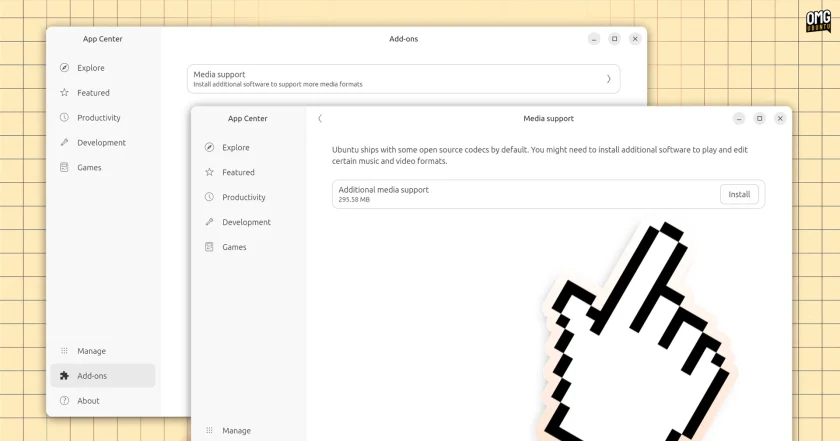
This integrated driver management view simplifies the discovery, installation, and ongoing configuration of proprietary hardware components. On machines equipped with specialized hardware—such as NVIDIA graphics processing units or certain proprietary Wi-Fi adapters and network dongles—the Add-ons area displays the recommended closed-source modules and allows users to switch between open-source alternatives and vendor-supplied binaries with minimal friction.
This consolidation follows architectural changes that began in prior releases. Ubuntu 26.04 LTS removed the legacy standalone Software & Updates utility from its default installation image. Historically, Software & Updates had been the traditional destination for hardware configuration, featuring a dedicated tab and an independent application launcher specifically meant for handling closed-source drivers.
With the removal of that legacy tool from the default deployment, driver management temporarily lacked a prominent, dedicated graphical surface tailored to modern desktop conventions. Integrating Additional Drivers directly alongside media codecs within the App Center’s Add-ons ecosystem provides a unified destination for all essential post-installation configuration that requires proprietary or restricted software.
By consolidating hardware drivers and multimedia format packs into a single central hub, the App Center is evolving from a straightforward software storefront into a comprehensive platform maintenance tool. The shift provides a more consistent visual hierarchy across the desktop, ensuring that users do not need to navigate divergent legacy utilities to accomplish baseline system enablement.
As the App Center continues to mature in Ubuntu 26.10, the infrastructure established by the Add-ons page provides a framework for potential future expansions, centralizing the components necessary to make desktop hardware and personal media function seamlessly out of the box.
 Linux & Open Source Solutions
Canonical Hardens Ubuntu 26.10 Boot Security by Stripping Advanced Filesystem Parsers from Signed GRUB
Canonical has implemented a significant architectural shift in how Ubuntu 26.10 boots...
 Linux & Open Source Solutions
Ex-Microsoft dev builds a new task manager for Linux
For millions of personal computer users over the past three decades, Plummer’s...
 Linux & Open Source Solutions
Ubuntu 26.10 Beta Rescheduled to October 1 Following Unforeseen Infrastructure Issues
Canonical has officially postponed the public beta release of its upcoming operating...







