
Alongside the debut of the primary distribution, the wider Ubuntu ecosystem has formally rolled out the full family of official community flavours for the Ubuntu 26.10 release cycle. The milestone brings refreshed desktop environments and software selections across long-standing community mainstays such as Kubuntu and Xubuntu, introduces incremental architectural steps across lightweight distributions, and marks a much-anticipated return for Ubuntu MATE under a reconstituted maintenance team.
Every official Ubuntu flavour continues to inherit the architectural foundation established by the core distribution. Beneath their distinct user interfaces and application stacks, each spin is powered by the Linux 7.3 kernel and the Mesa 26.2 graphics stack, alongside updated compilers, system libraries, and core developer toolchains. Central system services and distribution mechanics remain unified across the board, including full access to Snap package deployments via the Snap Store alongside traditional Debian package management.
While the core distribution showcases Canonical’s default GNOME-based desktop experience, the flavours represent the diverse computing philosophies within the Ubuntu umbrella. The 26.10 interim cycle serves as a critical testbed for broader transitions, ranging from experimental display server migrations to the ongoing modernization of long-running desktop codebases.
Ubuntu 26.10 Flavour Recap
Xubuntu 26.10
Xubuntu 26.10 arrives with the Xfce 4.20 desktop environment, delivering a balanced combination of incremental bug fixes, refined user utilities, and early display server experimentation. While Xfce has long maintained a reputation for traditionalism and dependable stability on top of the X11 windowing system, this release continues the incremental development of Wayland support. The development team has embraced a pragmatic posture regarding the newer display protocol, characterizing Wayland availability within Xfce 4.20 as an option primarily targeted at adventurous users willing to evaluate ongoing work.
A substantial portion of the day-to-day user improvements in Xubuntu 26.10 is centered in its default utility suite. The default image viewer, Ristretto, receives functional enhancements that expand its media handling capabilities: users can now shuffle image presentations randomly, take advantage of an overhauled printing pipeline, and open graphic files directly from web URLs without needing to save them locally first.
The Xfce Terminal emulator has undergone performance optimizations aimed at reducing unnecessary background CPU consumption, and it now offers a configuration toggle enabling users to disable automatic URL highlighting when working in text-heavy console sessions.
The distribution’s native screenshot utility, Screenshooter, reaches parity with modern desktop expectations by supporting both regional and full-screen screen captures under Wayland sessions. As part of an ongoing cleanup of legacy network integrations, Screenshooter has also dropped its built-in Imgur upload feature.
File searching through the Catfish utility has been adjusted so that queries default directly to searching within the currently active folder rather than initiating broad filesystem traversals. On the creative side, Xubuntu updates its graphics workstation offerings with the inclusion of GIMP 3.2.6, delivering current image manipulation tools out of the box.
Kubuntu 26.10
Kubuntu 26.10 serves as the flagship showcase for the KDE community’s software within the Ubuntu family. Although official launch communications referenced access to the newest KDE Plasma environment, the release formally incorporates KDE Plasma 6.7 rather than the very recently tagged Plasma 6.8 release. Despite trailing the latest upstream branch by one version, Plasma 6.7 represents a step forward compared to the Plasma implementation provided in Kubuntu 26.04.
The desktop environment introduces refined workflow options for multi-monitor setups. Users operating workstations with multiple physical displays can now explicitly bind specific virtual desktops to individual monitors, breaking away from historical limitations where desktop switching was forced globally across all connected panels. These multi-display virtual desktop configurations are further complemented by dedicated keyboard shortcuts designed to expedite rapid workspace navigation.

A variety of visual and behavioral polish passes have also been integrated into Kubuntu 26.10. The user interface benefits from targeted bug fixes resolving long-standing glitches encountered when toggling visual themes and system-wide dark modes. Desktop notifications feature a smooth glide animation upon appearance and dismissal, the Digital Clock panel widget can now display timezone offset labels directly alongside the time, and desktop folder views incorporate an optional type-ahead search feature to help users locate files quickly through direct keyboard input.
From an architectural standpoint, Kubuntu 26.10 marks the end of an era for legacy display server architecture. As with the preceding 26.04 cycle, a standard Plasma Wayland session serves as the default operational environment, while the traditional Plasma X11 session is omitted from the base installation image. Although users can still install the X11 session manually from the package repositories in this release, Kubuntu 26.10 stands as the final version where this manual workaround is viable, as upstream KDE has fully removed the plasma-session-x11 package in Plasma 6.8.
Ubuntu MATE 26.10
The arrival of Ubuntu MATE 26.10 represents a major operational milestone for the distribution, marking its formal return to the release roster after having sat out the Ubuntu 26.04 Long-Term Support release earlier in the year. The release is the first to be assembled and published under a newly organized maintenance team that took over stewardship of the project to ensure its long-term viability.
Because the new leadership focused primarily on stabilizing the project’s build pipeline and modernizing low-level system plumbing, Ubuntu MATE 26.10 does not attempt to upgrade every individual desktop component to the latest upstream release. Instead, the maintainers have deployed a curated selection of thoroughly tested, stable MATE desktop packages focused heavily on bug fixes and day-to-day dependability.
The underlying technical plumbing includes significant system-level transitions. Ubuntu MATE 26.10 is the first edition of the flavour to adopt Ubuntu’s modern Dracut-based initramfs generation infrastructure. In addition, the distribution has retired the legacy ifupdown networking framework in favor of the canonical netplan backend, and it has removed the outdated gdebi package installation helper.
The engineering transition has not been entirely without hurdles, and the release notes transparently document a catalog of known issues that the newly formed team is tracking. These include operational hiccups with the RedShift color temperature utility, minor missing icon assets across certain desktop themes, and specific graphical quirks when running inside virtual machine hypervisors. Nevertheless, the release successfully restores Ubuntu MATE as an active member of the flavour roster.
Lubuntu 26.10
Targeting energy efficiency, older hardware configurations, and minimal resource footprints, Lubuntu 26.10 delivers the upstream LXQt 2.4.0 desktop environment. Upstream maintainers have characterized this branch of LXQt primarily as a cycle dedicated to stabilization, performance tuning, and architectural code cleanups, though several immediate usability improvements are visible across the interface.
Among the user-facing refinements, the LXQt sound applet has been updated with a functional horizontal layout option, offering greater flexibility when configuring narrow or horizontally constrained system trays. The desktop notification daemon has also received attention, resolving an issue where transient notifications would linger on the screen longer than their specified timeouts.
Lubuntu 26.10 continues to rely on a proven X11-based session by default, ensuring immediate compatibility across older graphics hardware and legacy display pipelines. However, in keeping with the broader ecosystem’s forward trajectory, the release includes an optional Wayland session that users can select directly from the SDDM display manager login screen. The Wayland implementation is constructed using the Miriway compositor, offering users a functional testing ground for modern display architecture within an ultra-lightweight environment.
Ubuntu Unity 26.10
Ubuntu Unity 26.10 serves as a targeted maintenance release centered on the Unity 7.7 desktop environment. The primary development mandate for this cycle has been the preservation of the classic desktop’s dependability through code audits, bug repairs, and the phased retirement of unmaintained system dependencies.
The deliberate maintenance of the Unity 7.7 codebase is designed to provide users with an uninterrupted, traditional desktop workflow while engineering efforts advance toward the project’s ultimate goal: the complete migration to the Lomiri desktop environment. As concrete evidence of this ongoing transition, Ubuntu Unity 26.10 integrates several core Lomiri applications into the base system by default. Users will find Lomiri Calculator, Lomiri Files, and Lomiri Terminal preinstalled alongside the legacy Unity desktop shell, allowing the team to test Lomiri’s underlying application frameworks under real-world usage conditions.
Ubuntu Studio 26.10
Ubuntu Studio 26.10 continues its mandate as a comprehensive, pre-configured workstation distribution tailored specifically for digital audio, video, graphics, and publishing professionals. The 26.10 release places a strong emphasis on music composition and synthesis, introducing advanced tools tailored to live performers and experimental sound designers.
Central to the audio expansion is the inclusion of the Sonic Pi live-coding music synthesizer environment and SuperCollider, an established platform for algorithmic composition and acoustic research. For audio engineers requiring signal generation utilities, a new command-line white-noise tool named jnoise has been integrated into the system audio suite.
These new additions join extensive version bumps across the distribution’s core creative toolkit. Ubuntu Studio 26.10 packages refreshed editions of OBS Studio for live streaming and screen recording, the GIMP image editor, the Ardour digital audio workstation, the Krita digital painting studio, and the Kdenlive non-linear video editing suite.
The system configuration experience has also been streamlined. The Ubuntu Studio installer now allows administrators and creators to unbundle large meta-packages during the initial system setup, granting users the freedom to select individual software packages rather than forcing the installation of monolithic suites. Complementing this change, the graphical configuration wizard for configuring real-time audio subsystems has been redesigned with a cleaner interface to simplify workstation tuning.
Ubuntu Kylin 26.10
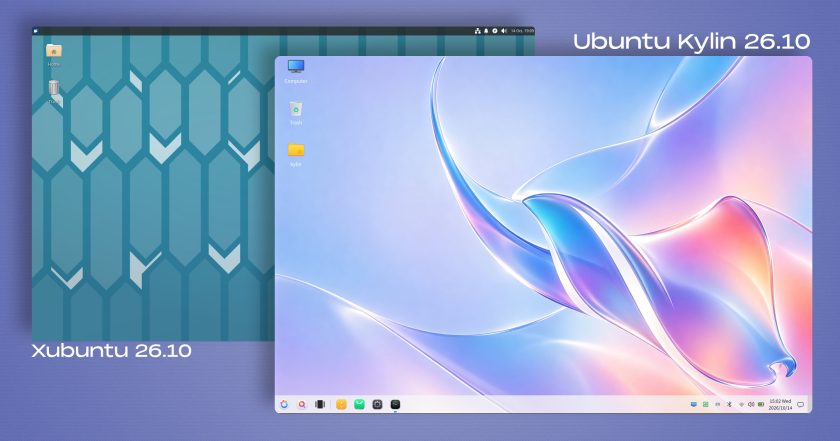
Ubuntu Kylin 26.10, the official flavour customized primarily for Chinese-speaking users and international enthusiasts of the UKUI desktop environment, is largely focused on maintenance and software package bumps. The release does not introduce structural overhauls to user interactions; the Windows 7-inspired UKUI desktop environment remains on the same generation that shipped in Ubuntu Kylin 26.04.
Visual design remains a defining element of the release, highlighted by an eye-catching desktop wallpaper produced via generative artificial intelligence techniques. The artwork reinterprets Ubuntu 26.10’s official release mascot—a stingray—through an aesthetic characterized by fluid glassmorphism geometry and iridescent pastel color gradients. The design choice continues a creative precedent established in Ubuntu Kylin 26.04, which reinterpreted the previous release mascot through a surreal composite photograph depicting a raccoon-shaped island surrounded by ocean waters and inverted seagulls.
Edubuntu, Ubuntu Budgie, and Ubuntu Cinnamon
The remaining members of the official flavour lineup have similarly delivered targeted updates tailored to their specialized user bases:
- Edubuntu 26.10: Designed for primary, secondary, and tertiary educational institutions, Edubuntu introduces greater modularity into its installation architecture. System administrators can now selectively pick specific packages from predefined, age-tiered software bundles during installation, reducing storage overhead. The release also updates the bundled Paperboy news aggregation application, which is tailored for teaching media literacy and current events analysis in academic classrooms.
- Ubuntu Budgie 26.10: The Budgie desktop experience gains a newly designed panel applet specifically engineered for searching, browsing, and streaming internet radio stations. In addition, the desktop now natively supports dynamic day-and-night wallpaper transitions that adapt automatically based on local time.
- Ubuntu Cinnamon 26.10: The distribution provides an updated iteration of the Cinnamon desktop environment, bumping the software stack to Cinnamon version 6.6.9 to deliver upstream stability fixes and performance optimizations.
Installation ISO images for all official Ubuntu 26.10 community flavours are available for download through the Ubuntu release infrastructure and each respective project’s distribution mirrors.
 Linux & Open Source Solutions
KDE Plasma 6.8 Released on Project’s 30th Anniversary, Dropping X11 Sessions and Expanding Core Features
The KDE community has officially released KDE Plasma 6.8, marking a historic...
 Linux & Open Source Solutions
GNOME Shell Weather Extensions Bring Dynamic Visuals to the Desktop Panel
While dedicated desktop applications for checking the weather have long enjoyed a...
 Linux & Open Source Solutions
Banshee Music Player Returns to Modern Linux Desktops as a Snap Package
A familiar name from the golden era of the Linux desktop has...