
The deliberate maintenance of the Unity 7.7 codebase is designed to provide users with an uninterrupted, traditional desktop workflow while engineering efforts advance toward the project’s ultimate goal: the complete migration to the Lomiri desktop environment. As concrete evidence of this ongoing transition, Ubuntu Unity 26.10 integrates several core Lomiri applications into the base system by default. Users will find Lomiri Calculator, Lomiri Files, and Lomiri Terminal preinstalled alongside the legacy Unity desktop shell, allowing the team to test Lomiri’s underlying application frameworks under real-world usage conditions.
Ubuntu Studio 26.10
Ubuntu Studio 26.10 continues its mandate as a comprehensive, pre-configured workstation distribution tailored specifically for digital audio, video, graphics, and publishing professionals. The 26.10 release places a strong emphasis on music composition and synthesis, introducing advanced tools tailored to live performers and experimental sound designers.
Central to the audio expansion is the inclusion of the Sonic Pi live-coding music synthesizer environment and SuperCollider, an established platform for algorithmic composition and acoustic research. For audio engineers requiring signal generation utilities, a new command-line white-noise tool named jnoise has been integrated into the system audio suite.
These new additions join extensive version bumps across the distribution’s core creative toolkit. Ubuntu Studio 26.10 packages refreshed editions of OBS Studio for live streaming and screen recording, the GIMP image editor, the Ardour digital audio workstation, the Krita digital painting studio, and the Kdenlive non-linear video editing suite.
The system configuration experience has also been streamlined. The Ubuntu Studio installer now allows administrators and creators to unbundle large meta-packages during the initial system setup, granting users the freedom to select individual software packages rather than forcing the installation of monolithic suites. Complementing this change, the graphical configuration wizard for configuring real-time audio subsystems has been redesigned with a cleaner interface to simplify workstation tuning.
Ubuntu Kylin 26.10
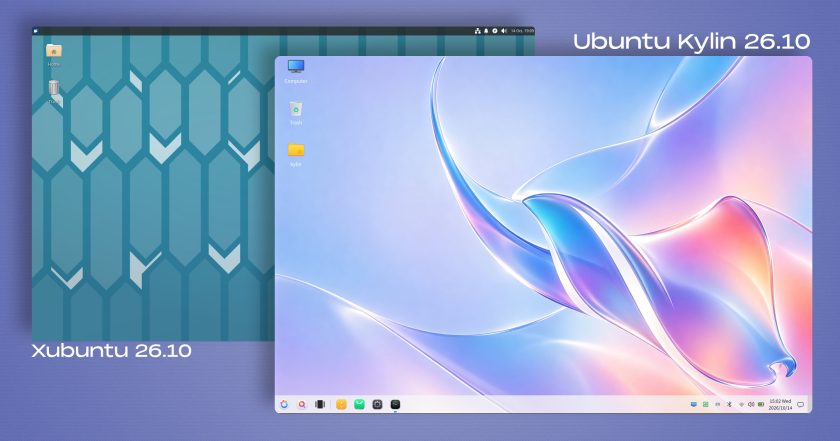
Ubuntu Kylin 26.10, the official flavour customized primarily for Chinese-speaking users and international enthusiasts of the UKUI desktop environment, is largely focused on maintenance and software package bumps. The release does not introduce structural overhauls to user interactions; the Windows 7-inspired UKUI desktop environment remains on the same generation that shipped in Ubuntu Kylin 26.04.
Visual design remains a defining element of the release, highlighted by an eye-catching desktop wallpaper produced via generative artificial intelligence techniques. The artwork reinterprets Ubuntu 26.10’s official release mascot—a stingray—through an aesthetic characterized by fluid glassmorphism geometry and iridescent pastel color gradients. The design choice continues a creative precedent established in Ubuntu Kylin 26.04, which reinterpreted the previous release mascot through a surreal composite photograph depicting a raccoon-shaped island surrounded by ocean waters and inverted seagulls.
Edubuntu, Ubuntu Budgie, and Ubuntu Cinnamon
The remaining members of the official flavour lineup have similarly delivered targeted updates tailored to their specialized user bases:
- Edubuntu 26.10: Designed for primary, secondary, and tertiary educational institutions, Edubuntu introduces greater modularity into its installation architecture. System administrators can now selectively pick specific packages from predefined, age-tiered software bundles during installation, reducing storage overhead. The release also updates the bundled Paperboy news aggregation application, which is tailored for teaching media literacy and current events analysis in academic classrooms.
- Ubuntu Budgie 26.10: The Budgie desktop experience gains a newly designed panel applet specifically engineered for searching, browsing, and streaming internet radio stations. In addition, the desktop now natively supports dynamic day-and-night wallpaper transitions that adapt automatically based on local time.
- Ubuntu Cinnamon 26.10: The distribution provides an updated iteration of the Cinnamon desktop environment, bumping the software stack to Cinnamon version 6.6.9 to deliver upstream stability fixes and performance optimizations.
Installation ISO images for all official Ubuntu 26.10 community flavours are available for download through the Ubuntu release infrastructure and each respective project’s distribution mirrors.
 Linux & Open Source Solutions
Canonical Releases Official Ubuntu Desktop Images for RISC-V Hardware Ahead of Ubuntu 26.10
Installing Ubuntu on RISC-V hardware is poised to become significantly more straightforward...
 Linux & Open Source Solutions
Ubuntu 26.10 Introduces Restricted Media Codec Installation to App Center’s Add-Ons Hub
Ubuntu 26.10 has expanded the functionality of its modern App Center by...
 Linux & Open Source Solutions
OpenShot Video Editor Arrives on the Canonical Snap Store, Bringing Version 4.0 to Ubuntu Users
In a major milestone for open-source desktop multimedia production, the popular Qt-based...