
Nautilus File Manager Enhancements
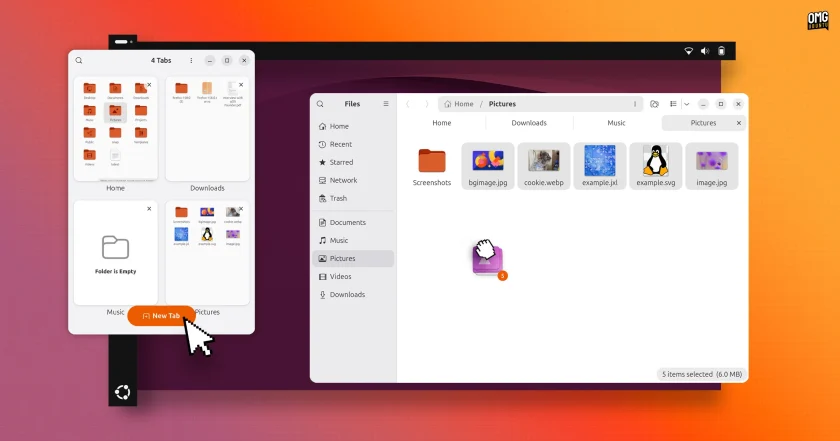
Ubuntu’s native file manager, Nautilus, introduces helpful visual and organizational feedback. When users click and drag multiple files between directories, the cursor dynamically displays an accurate real-time file count.
Underlying architectural optimizations accelerate directory loading and refresh times when browsing exceptionally large folders. Additionally, when a Nautilus window is resized to narrower widths or constrained within tiled window configurations, an overview button appears in the tab strip, letting users browse and switch between active folder tabs without excessive interface clutter.
Desktop Icons Migrate to GTK4
The desktop experience receives greater visual consistency via a substantial backend update to Desktop Icons NG (DING), the extension tasked with rendering desktop folders and files. The extension has now been fully ported to the GTK4 toolkit.
As a result of the transition, right-click desktop context menus and secondary system dialogs visually harmonize with modern GNOME applications. Performance is also noticeably crisper: desktop menus now render immediately without the micro-pause previously caused by synchronous clipboard inspection, as the clipboard check is now handled asynchronously in the background. Desktop icon stacks can now be expanded and collapsed directly from the keyboard, and the contextual "Open With" dialog has eliminated the non-functional "Find new apps" option, which previously attempted to launch the uninstalled GNOME Software store.
Passkey Authentication and Microsoft Entra ID Integration
Security and identity infrastructure receive enterprise-grade enhancements at the GDM login and lock screens. Users can now authenticate locally using FIDO2-compliant physical passkeys or through web-based federated sign-in flows, sitting alongside existing smart card provisions. The authentication overhaul relies on a modernized, unified system framework designed to accommodate emerging credential methods over future release cycles.
For professional and academic networks, Ubuntu 26.10 integrates support for Microsoft Entra ID. Users tied to corporate environments can sign into Ubuntu using their standard Entra directory credentials, with Multi-Factor Authentication (MFA) prompts verified directly through the Microsoft Authenticator mobile app or secondary one-time passcodes. This unified authentication mechanism applies consistently across local graphical desktop sessions, virtual console terminals, and remote SSH connections.
App Center Expansion and Software Handling
Ubuntu’s default App Center gains expanded maintenance roles through a newly introduced Add-ons section. This area incorporates dedicated panels for Additional Drivers, enabling users to inspect and toggle proprietary hardware drivers—such as proprietary NVIDIA graphics packages—on machines where specific firmware dependencies are detected. A companion Media Support panel provides simplified installation pathways for third-party audio and video codecs.
The App Center also resolves package confusion by cleanly unifying Snap and Debian package references for applications distributed across both formats. Users viewing dual-format software encounter a consolidated profile displaying comparative download footprints, maintainer publishers, system permissions, and exact version markers, allowing for an informed installation choice. Package maintenance routines have similarly been stabilized; updated applications no longer linger incorrectly in the pending software queue, and the installer now permits users to directly upgrade pre-existing third-party Deb packages with newer revision files.
Architectural Additions: amd64-v3 and RISC-V
Canonical is expanding the reach and performance characteristics of its installation media in 26.10. Alongside the standard Intel and AMD desktop installation image, an optimized amd64v3 image is now available via Canonical’s CD image mirror servers.
Tailored specifically for modern processors supporting the x86-64-v3 microarchitecture level—which includes most Intel and AMD processors manufactured since roughly 2015—the specialized packages make deeper use of advanced vector extensions and modern instruction sets. While low-power, older, or embedded chips cannot boot this targeted build, supported systems gain tangible performance advantages across computational workloads and virtualization tasks.
Simultaneously, Ubuntu 26.10 marks the official introduction of experimental desktop images built for the emerging RISC-V computing architecture. Offered in both standard GNOME and lightweight Xubuntu flavors, these initial images target developers utilizing hardware platforms like the SpacemiT K3 alongside virtualized environments like QEMU. Although regular repository updates are provided, Canonical treats these initial RISC-V desktop distributions as strictly experimental installations that currently omit select default desktop snaps, including the standard App Center.
Granular Display, Input, and Accessibility Settings
The system Settings control panel introduces numerous fine-tuned controls to manage workspace preferences:
 Linux & Open Source Solutions
ONLYOFFICE Desktop Editors 10.0 Released as Fully Rebuilt App With Decoupled AI Tools and Over 1,000 Bug Fixes
The developers behind ONLYOFFICE have officially released version 10.0 of ONLYOFFICE Desktop...
 Linux & Open Source Solutions
Canonical Releases Official Ubuntu Desktop Images for RISC-V Hardware Ahead of Ubuntu 26.10
Installing Ubuntu on RISC-V hardware is poised to become significantly more straightforward...
 Linux & Open Source Solutions
Ubuntu 26.10 Beta Rescheduled to October 1 Following Unforeseen Infrastructure Issues
Canonical has officially postponed the public beta release of its upcoming operating...







