
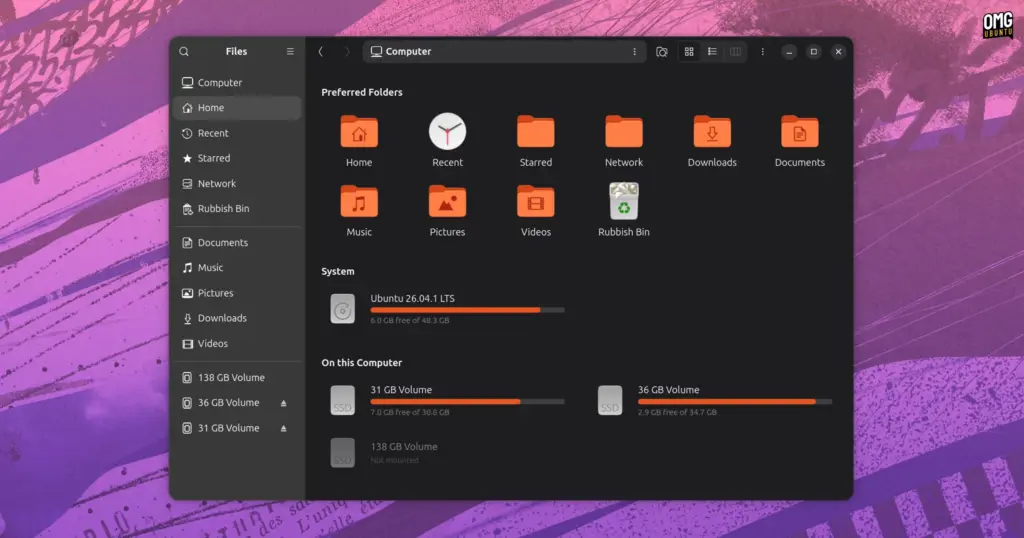
Visual styling options are similarly present. The usage indicators situated beneath individual drive labels typically inherit the active system accent color configured within the GNOME desktop. However, for users whose visual preferences diverge from the operating system defaults, the tool provides manual controls to customize the color coding of these storage capacity indicators. Furthermore, recognizing that different users prioritize different entry points, the settings suite includes a toggle that instructs Nautilus to launch directly into the My Computer drive overview upon startup, bypassing the standard default landing directory of the user’s personal Home folder.
Alongside the primary drive canvas, Nautilus My Computer exposes deeper configuration controls for the GNOME Files sidebar itself. Standard GNOME configurations offer limited control over the fixed sidebar shortcuts, often cementing links that not every user requires. With this add-on active, users can manually prune standard entries, such as the built-in "Recent" or "Starred" directories, if those features do not align with their daily habits. The extension also introduces mechanisms to customize the glyphs and icons assigned to user-defined bookmarks and system locations, facilitating distinct visual recognition for custom workspaces, external storage enclosures, or specialized partitions.
Miller Columns in Nautilus? Oh yes
While the restoration of a drive-centric overview serves as the project’s foundational objective, Nautilus My Computer includes an additional, highly sought-after component: an optional implementation of Miller column navigation.
Often celebrated for its prominent deployment in platforms like macOS Finder, Miller column navigation organizes hierarchical folder structures across adjacent vertical panels. Under this navigation model, clicking on a folder within one column instantly opens its internal contents in a newly spawned column directly to the right. As the user navigates deeper into nested file hierarchies, the parent directories remain permanently pinned and visible across the previous horizontal panes. This multi-column cascading layout gives users persistent spatial awareness regarding their precise position within deep folder trees, eliminating the disorientation that can occasionally accompany standard single-pane folder navigation.
The implementation packaged within the add-on is described as beta-grade, but it already supports foundational file management operations. Users are able to initiate drag-and-drop file operations horizontally between the active columns, enabling intuitive movement of assets across different branches of a file hierarchy without opening secondary windows or tabbed sessions.
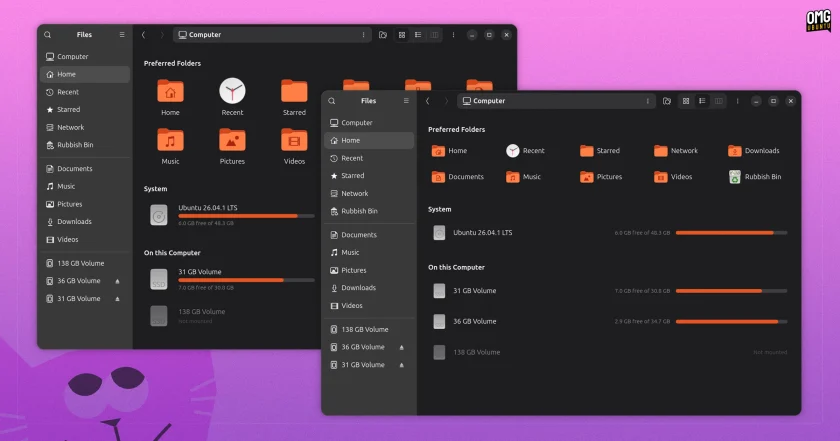
The column interface also alters file selection mechanics. When an individual file is highlighted rather than an interior folder, the adjacent pane transforms into a dedicated preview column that reveals foundational file attributes and metrics. Furthermore, selecting multiple distinct items collapses the selection into a unified graphical stack reminiscent of macOS Finder mechanics, accompanied by a dynamic calculation that displays the aggregate disk footprint of the selected batch.
Install Nautilus My Computer on Ubuntu
Because the software represents an independent community effort rather than an upstream GNOME or Canonical product, running it necessitates incorporating third-party package sources. Deploying Nautilus My Computer on Ubuntu systems requires users to pull software packages originating outside the operating system’s default, officially maintained repositories.
The project’s author maintains an official personal package archive (PPA) on Launchpad to handle packaging and automated distribution. Pre-built software packages are actively provided for installations running the Ubuntu 26.04 LTS (Resolute) release cycle paired with GNOME 50 desktop packages. The developer has likewise indicated ongoing development work to extend functional compatibility to Ubuntu 26.10 (Stonking).
On supported systems, adding the developer’s Launchpad archive involves standard command-line repository management:
 Linux & Open Source Solutions
Canonical Hardens Ubuntu 26.10 Boot Security by Stripping Advanced Filesystem Parsers from Signed GRUB
Canonical has implemented a significant architectural shift in how Ubuntu 26.10 boots...
 Linux & Open Source Solutions
Combating Counterfeit Storage: How the Open-Source Tool F3 Exposes Fake Flash Drives on Linux
Surging hardware prices across the consumer electronics sector have created fertile ground...
 Linux & Open Source Solutions
Banshee Music Player Returns to Modern Linux Desktops as a Snap Package
A familiar name from the golden era of the Linux desktop has...







