Modern computer usage rarely involves listening to a single continuous stream of audio in isolation. A typical desktop workflow often sees a user running a dedicated music client such as Spotify or a local music player, streaming a podcast in a secondary application, and periodically switching to a web browser to watch a video clip, webinar, or tutorial. Under GNOME’s default desktop paradigm, managing these competing media streams can become clumsy. GNOME provides a built-in media controller located within the calendar and notification pop-over tray, but its single-focused presentation is designed primarily around whichever application is currently active. When an audio stream is paused so the user can listen to another source, the paused stream frequently drops out of view or becomes awkward to retrieve, forcing the user to track down the specific window or browser tab to resume playback.
Now Playing Card approaches this challenge from a structural perspective by ensuring that pausing one media stream does not cause it to disappear from the user interface. Built upon the standard Media Player Remote Interfacing Specification (MPRIS) protocol used across the Linux desktop, the extension creates an aggregated environment where every open media-producing application or browser tab retains its own persistent presence. If a user pauses an album or a long-form podcast to check out a video on YouTube or listen to a brief voice note, the paused player does not vanish into the background. Instead, it remains immediately accessible within the extension’s interface, waiting to be resumed with a single click as soon as the competing audio finishes.
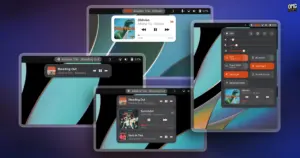
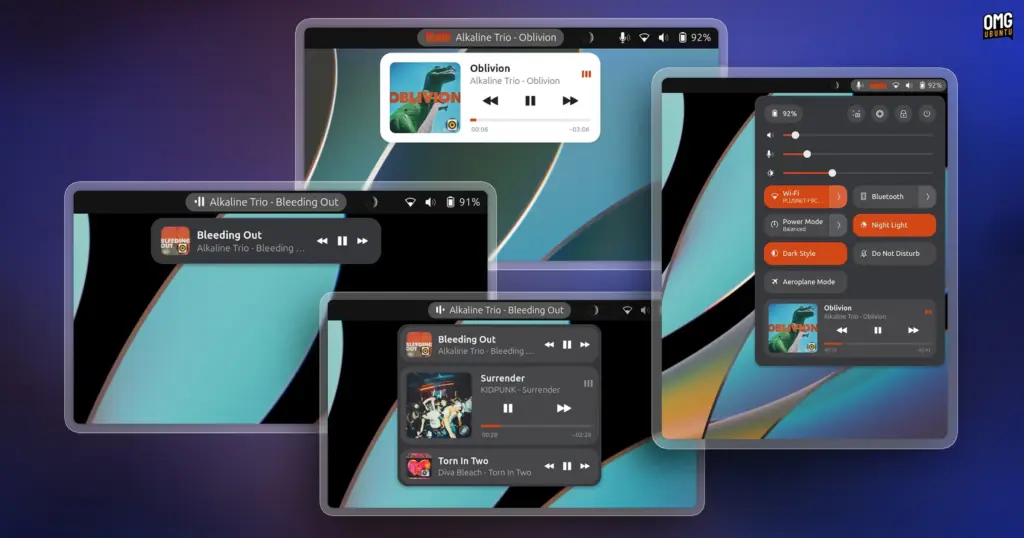
To present multiple playback sources cleanly without overwhelming the user interface, Now Playing Card organizes media sessions into distinct visual cards. Each card acts as an individualized command center for a specific audio or video source. Within each card, users are presented with the album or track artwork, an identifiable application icon indicating the source client, and a functional progress timeline. On media players that expose the appropriate position-tracking controls over MPRIS, this progress bar is fully interactive, allowing users to scrub or seek directly through a track without needing to bring the parent window into focus. The cards also incorporate standard playback navigation buttons, including play, pause, previous, and next controls, alongside contextual options such as shuffle and loop toggles whenever the underlying media player supports those features.
Displaying full playback controls for multiple active and paused applications simultaneously creates an obvious design problem: interface bloat. If several media players were to display large album art and seeking controls simultaneously, a menu pop-over would quickly consume the entire height of the screen. To resolve this spatial dilemma, Now Playing Card incorporates an interactive accordion layout. Under this mechanism, the extension restricts full expansion to only one media card at any given moment. The active card displays its complete interface, including enlarged artwork, full title and artist details, the interactive progress bar, and comprehensive playback buttons. Concurrently running or paused players are collapsed into compact summary strips beneath or alongside the active card.
When a user wishes to switch focus to a different player, clicking on any of the collapsed entries smoothly expands that player’s card into full view while automatically collapsing the previously active player into a compact format. This dynamic accordion behavior ensures that whether a user has two, three, or more audio players open at the same time, the interface retains a predictable, tidy footprint that fits comfortably within GNOME Shell’s pop-over dimensions.
Beyond the pop-over menu and the Quick Settings area, the extension provides deep integration directly within the GNOME top panel. For many desktop users, having glanceable track information readily visible at the top of the screen is an essential workflow convenience. Rather than requiring users to manually open a menu to check the name of an unfamiliar song, Now Playing Card can project the currently active track title, artist name, and a set of mini playback buttons directly onto the panel bar itself.
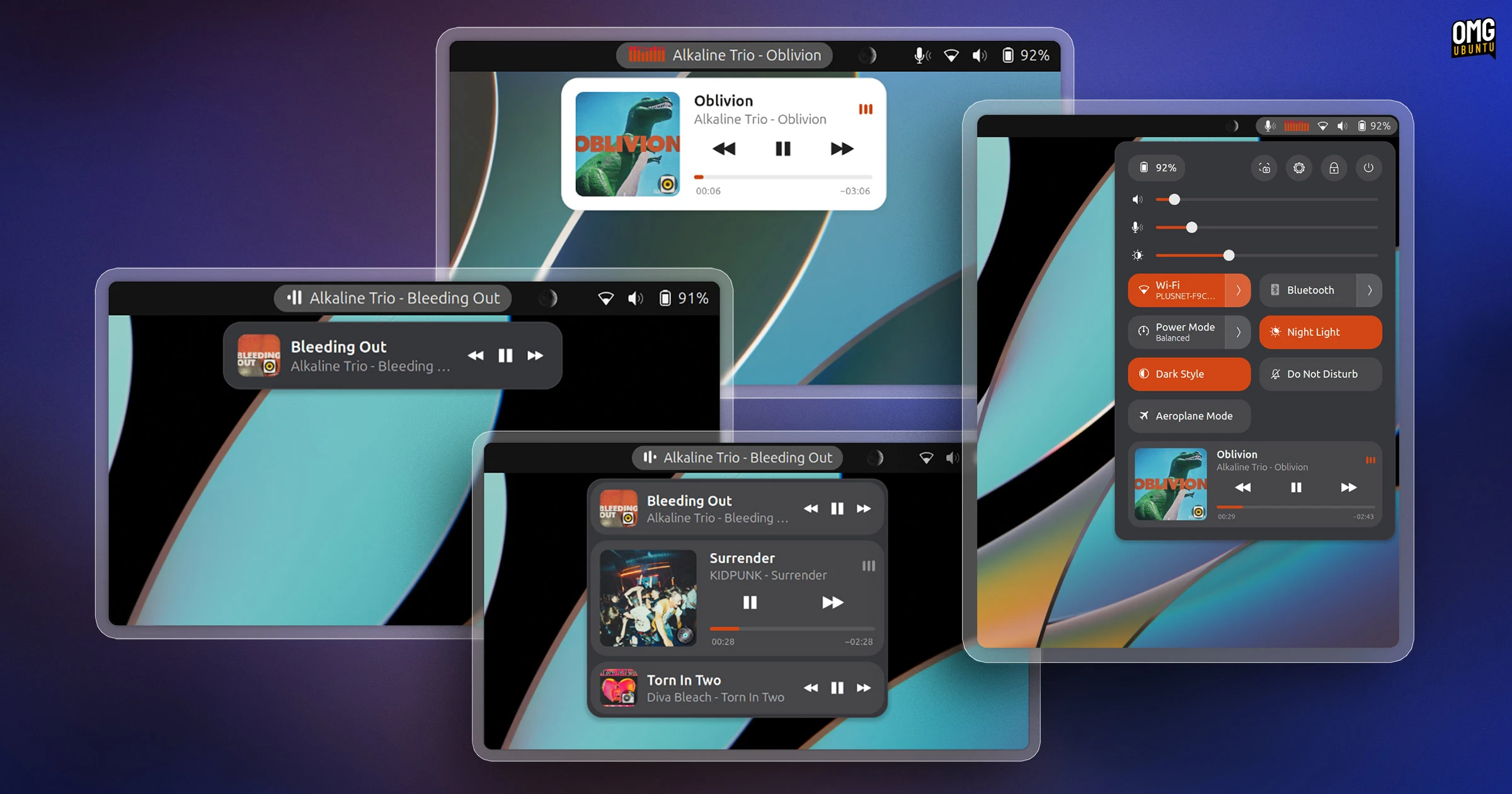
Users who rely on the panel display can extensively customize how these elements appear. Through the extension’s preferences panel, users can modify the exact positioning of the panel items, choosing whether the track information appears aligned to the left, pinned in the center, or situated near the right-hand status icons. Customization options also extend to the size of the elements, the maximum width of the text labels, and the overall behavioral response of the panel display when media starts or stops playing.
For users seeking additional visual feedback, Now Playing Card includes customizable graphical flourishes. The panel label can be configured to display an animated sound wave icon that pulses in tandem with active playback. Users looking for an even more expressive desktop aesthetic can activate a real-time spectrum analyzer, which renders dynamic visualizer bars that bounce and react to the audio output as it plays. Recognizing that not every user appreciates extraneous motion on their screen—and that animated interface elements can be undesirable on battery-powered laptops—the developer has also made these visual flourishes entirely optional, allowing the interface to remain static and minimalist if preferred.
In adding its own comprehensive media architecture to the desktop, the extension takes deliberate steps to avoid interface redundancy. By default, GNOME Shell displays its own native media controls inside the notification and calendar pop-over whenever MPRIS-compatible media is detected. To prevent the desktop from presenting conflicting or duplicate control panels, Now Playing Card automatically hides the stock GNOME media widget while the extension is active, routing all media management exclusively through its own card system.
The layout of the extension does carry a few subtle design trade-offs. The text scaling within the applet pop-over appears slightly smaller and formatted differently when compared against native GNOME system menus and standard third-party applets. This compact typographic approach appears to be an intentional design compromise: because Now Playing Card is capable of tracking and listing up to ten simultaneous media players at once, using standard system font sizing would quickly push elements beyond the boundaries of the screen. Shrinking the text slightly ensures that multi-player lists remain readable and fully contained within the menu boundaries even during heavy multitasking sessions.
Another common challenge with MPRIS-based media aggregation on Linux is the sheer volume of non-essential audio sources that modern software generates. Nearly all major web browsers, including Chromium, Google Chrome, Mozilla Firefox, and their derivatives, register any active media element as an independent MPRIS player. In everyday browsing, this means that random video advertisements, social media auto-play snippets, and transient web previews can suddenly spawn media sessions alongside deliberate music listening. To prevent the interface from becoming cluttered with unwanted web noise, Now Playing Card includes a built-in application ignore list within its settings. Users can designate specific applications or browser instances to be disregarded by the extension, ensuring that only trusted, primary media applications populate the card stack.
From a compatibility standpoint, Now Playing Card offers broad support across several generations of the desktop environment. The extension is built to run on GNOME 45 through GNOME 51. This wide compatibility window covers current Long Term Support platforms such as Ubuntu 24.04 LTS, intermediate point releases, and future operating system updates reaching through Ubuntu 26.10, ensuring that users across both stable enterprise-focused distributions and fast-moving bleeding-edge systems can deploy the tool without version incompatibilities.
The project is hosted as an open-source development initiative on GitHub under the repository maintained by epogonii, with packaged releases distributed directly through the official GNOME Extensions directory. For Linux users who find themselves constantly balancing music playlists, remote meetings, podcasts, and browser-based video content, the utility presents a well-rounded and thoughtfully structured alternative to the stock GNOME playback experience.
 Linux & Open Source Solutions
KDE Plasma 6.8 Released on Project’s 30th Anniversary, Dropping X11 Sessions and Expanding Core Features
The KDE community has officially released KDE Plasma 6.8, marking a historic...
 Linux & Open Source Solutions
Ex-Microsoft dev builds a new task manager for Linux
For millions of personal computer users over the past three decades, Plummer’s...
 Linux & Open Source Solutions
Ubuntu 26.10 Introduces Top-Screen Layout Picker to Streamline Window Tiling
Ubuntu 26.10 is introducing a new way for users to organize their...