
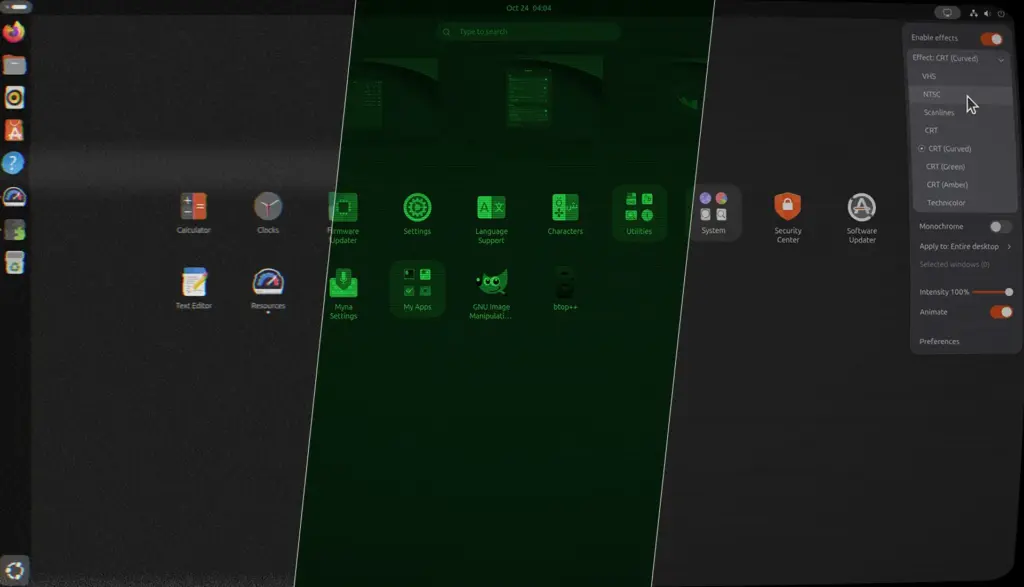
Ever wondered what a modern Ubuntu desktop environment would look like if it were being played back on a degraded, chewed-up VHS tape or rendered across the curved, phosphor-coated glass of an aged monochrome cathode-ray tube (CRT) monitor?
For the vast majority of Linux users focused on day-to-day productivity, the thought has likely never crossed their minds. Yet for those who appreciate retro computing nostalgia or distinctive visual aesthetics, an intriguing new utility has emerged in the Linux personalization ecosystem.
A recently released GNOME Shell extension titled Shader Effects, created by developer Murat Çileli, allows users to deliberately transform their pristine graphical displays into textured relics of past computing eras. By utilizing real-time, GPU-accelerated graphic filters, the tool accurately replicates the distinct visual artifacts of twentieth-century visual hardware, introducing features such as dynamic scan lines, classic NTSC composite color blooming, and the unmistakable, atmospheric flicker of monochrome green phosphor displays.
Rather than functioning as a mere novelty filter that sits on top of a static wallpaper, the extension alters the rendering of the active desktop environment itself. Users have the flexibility to apply these visual modifications across their entire graphical interface or restrict the effect exclusively to individual application windows.
A Granular Look at GPU-Driven Nostalgia
The Shader Effects extension operates by applying post-processing shaders directly to the desktop rendering pipeline managed by GNOME’s Mutter compositor. The software includes several dedicated presets designed to mimic distinct hardware quirks and historical display technologies.
Among the primary options integrated into the software are classic CRT emulations—including curved screen geometries that accurately reproduce the barrel distortion of vintage rounded glass panels—alongside phosphor variations such as classic CRT green. Additionally, the software features specialized filters simulating NTSC television signals, complete with characteristic color-bleed artifacts, as well as degraded VHS tracking effects that recreate horizontal tearing, rippling distortion, and magnetic tape degradation.
To enhance these filters further, the extension provides an independent monochrome toggle. This control switch can be overlaid across all included presets, allowing users to strip color information entirely regardless of the specific shader profile active at the time.
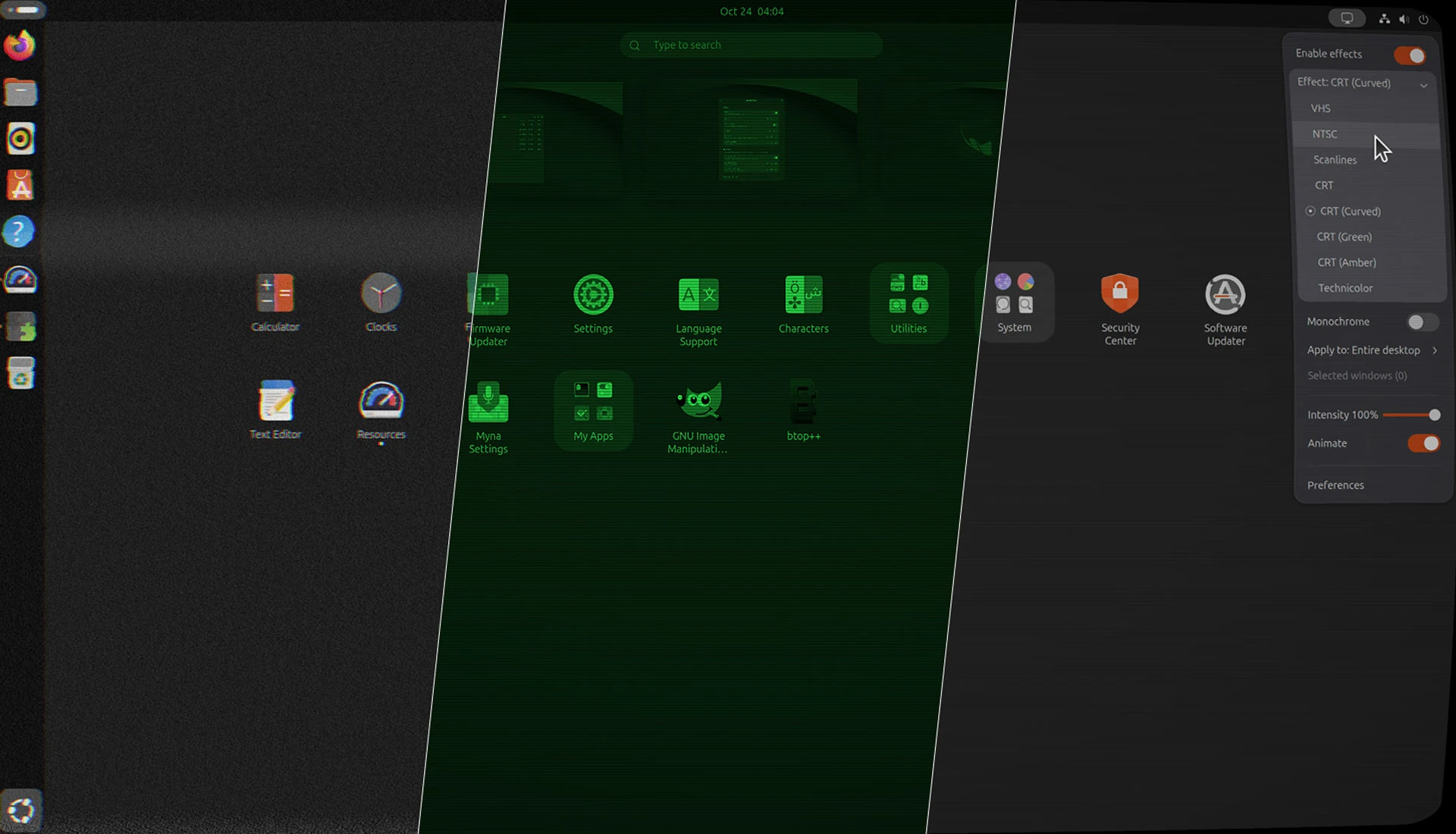
While the extension offers a compelling set of distinct presets, it currently lacks multi-shader compositing. Users wondering whether they can chain multiple shaders together to generate intricate, stacked visual layers will find that the tool only permits one active profile at a time. The ability to directly combine an authentic curved CRT geometry with a monochrome green tint and the dynamic tracking noise of a worn magnetic tape would have provided an exact visual recreation of early computing experiences—reminiscent of hours spent gazing into classic systems like the green-screen Amstrad CPC 464. However, the current release maintains a streamlined design where each shader operates as an independent post-processing layer.
Fine-Tuning Performance and Visual Intensity
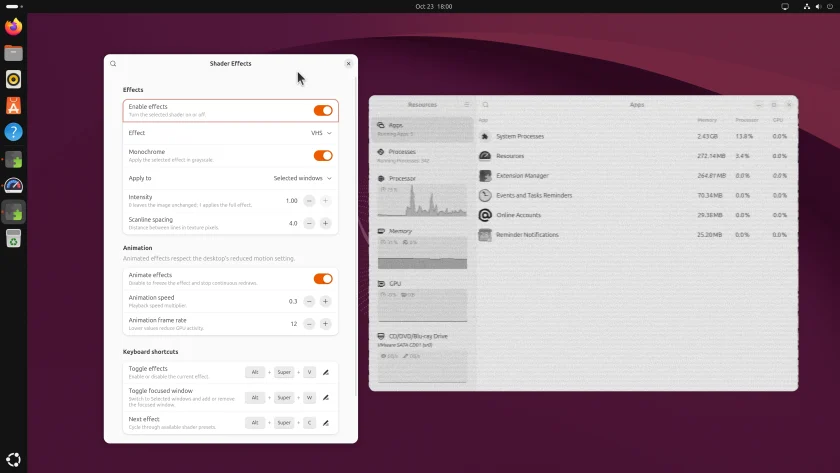
Despite its outwardly nostalgic presentation, the extension incorporates modern configuration capabilities through its dedicated preferences panel. Users are not locked into rigid presets; instead, the extension provides granular controls to adjust the exact intensity of every applied effect.
Within the settings dialogue, users can fine-tune visual parameters to ensure the distortions suit their specific visual tastes. The interface includes sliders to govern the animation speed and frame rate of dynamic noise, flickering, and tape roll effects. These adjustments can also be dialed down completely or disabled, allowing users to keep the textural qualities of a filter, such as scan lines or screen curvature, while freezing distracting movements.
Because these graphical manipulations rely on real-time hardware shaders, hardware requirements scale alongside configuration intensity. The higher the resolution, frame rate, and animation fidelity selected within the preference interface, the more GPU power the extension demands from the underlying system. Consequently, while dedicated desktop graphics cards will handle the load with minimal thermal impact, users running the extension on portable laptops or power-constrained hardware will need to remain mindful of increased power draw and potential impacts on battery longevity.
To facilitate everyday usability, the software places quick-access controls directly in the top GNOME panel. From this system tray indicator, users can swiftly toggle the entire visual engine on or off without navigating deep configuration menus. The panel menu also provides direct switching between different shader presets, as well as an option to designate whether the active effect applies globally to the entire desktop or isolates itself strictly to a focused target window.
The capability to isolate effects to a single window is particularly appealing for software developers, system administrators, and command-line enthusiasts. While reading small web typography through heavy chromatic aberration or jittery scanlines can quickly strain the eyes, targeting a standalone terminal emulator running text-based user interface (TUI) utilities creates a remarkably authentic retro-terminal workstation environment without disrupting background web browsers or text editors.
What is the point of this?
When evaluating the extension through the lens of pure utility, one might reasonably question the underlying purpose of deliberately degrading a crisp, high-density display.
From an orthodox operational perspective, the extension is decidedly unconventional. It does not introduce automated window tiling, streamline system workflows, expedite application launching, or provide any measurable boost to functional productivity. For standard office tasks, enterprise computing, or extended development sessions, running heavy visual distortion filters is distinctly counterproductive. Attempting to draft long-form text or parse dense spreadsheets while an active VHS tracking ripple rolls across the screen is an exercise in visual fatigue that can easily induce motion sickness in sensitive users. The software is fundamentally not designed as a continuous, permanent operational overlay.
Yet dismissing the tool as useless overlooks the vibrant subcultures surrounding modern desktop customization, creative digital media production, and retro-tech preservation.
For tech enthusiasts, vintage computing hobbyists, and retro gamers using Linux-based emulation software, having access to fully adjustable, hardware-accelerated CRT scanlines and authentic NTSC color blooming offers genuine utility. It restores the original visual context for legacy software designed specifically for the unique bleeding, softness, and blending characteristics of analog hardware displays.
Beyond emulation, the extension serves as a creative tool for content creators, digital artists, and open-source advocates. In short bursts, activating these post-processing filters provides an efficient, native method to generate eye-catching desktop captures, creative screencasts, and visually engaging promotional recordings. Screen captures treated with genuine CRT curvature or retro tape artifacts inherently stand out across media feeds, making standard desktop demonstrations look far more stylistically captivating than conventional, flat graphical output.
Compatibility and Availability
The Shader Effects extension has been engineered to support modern iterations of the GNOME desktop environment, providing compatibility across GNOME versions 48 through 51. For users operating on contemporary Linux distributions, such as Ubuntu 26.04 LTS or subsequent operating system releases incorporating these GNOME shell branches, the software integrates directly into the desktop stack without requiring external patch sets or complex compilation routines.
The software is accessible for download directly through the official GNOME Extensions directory, where users can install and manage it utilizing their standard extension management tools. As an open-source project hosted on GitHub, the extension invites ongoing feedback and configuration experimentation from the Linux community, providing an entertaining reminder that desktop customization does not always have to be about sterile optimization—sometimes, it can simply be about having fun with retro computing history.
 Linux & Open Source Solutions
Orbit Global Menu Brings Pragmatic Global Application Menus Back to the GNOME Shell Desktop
For more than a decade, the global menu bar has remained one...
 Linux & Open Source Solutions
Now Playing Card shows media info for multiple apps at a time
Modern computer usage rarely involves listening to a single continuous stream of...
 Linux & Open Source Solutions
Linux Booting Returns to PlayStation 5 on Newer Firmware via pLinux5-NG Project
Efforts to transform home video game consoles into open computing platforms have...







