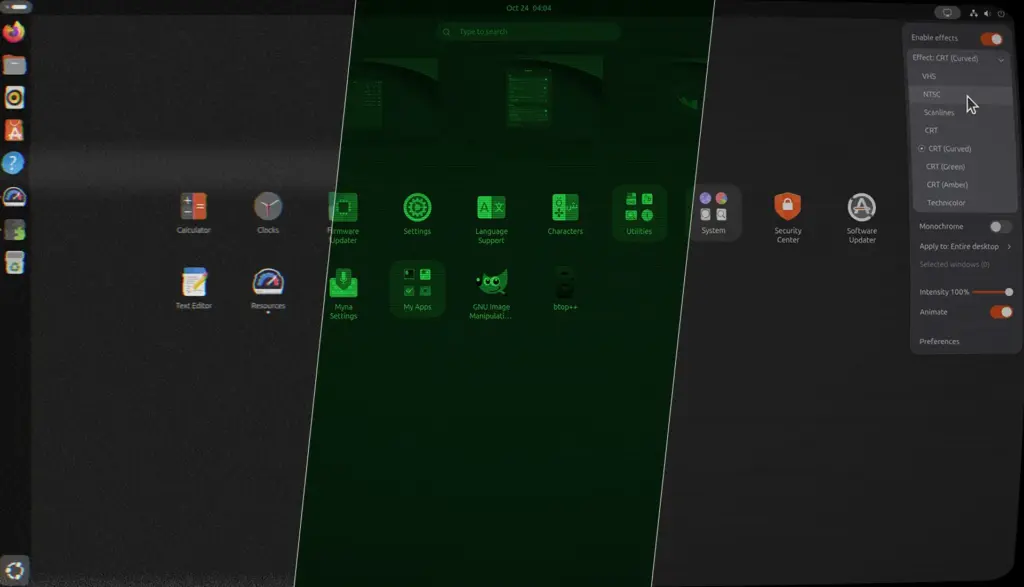
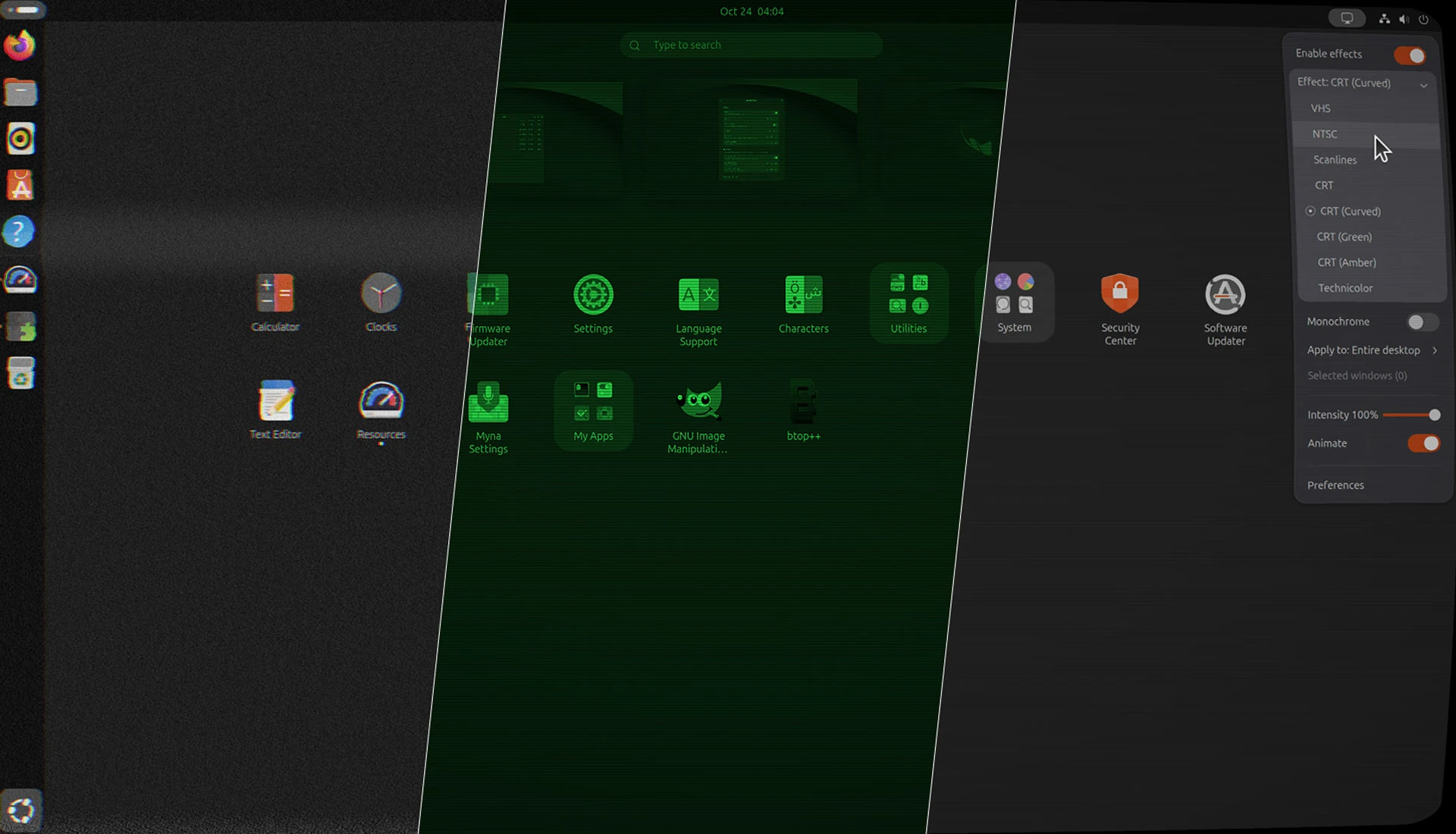
While the extension offers a compelling set of distinct presets, it currently lacks multi-shader compositing. Users wondering whether they can chain multiple shaders together to generate intricate, stacked visual layers will find that the tool only permits one active profile at a time. The ability to directly combine an authentic curved CRT geometry with a monochrome green tint and the dynamic tracking noise of a worn magnetic tape would have provided an exact visual recreation of early computing experiences—reminiscent of hours spent gazing into classic systems like the green-screen Amstrad CPC 464. However, the current release maintains a streamlined design where each shader operates as an independent post-processing layer.
Fine-Tuning Performance and Visual Intensity
Despite its outwardly nostalgic presentation, the extension incorporates modern configuration capabilities through its dedicated preferences panel. Users are not locked into rigid presets; instead, the extension provides granular controls to adjust the exact intensity of every applied effect.
Within the settings dialogue, users can fine-tune visual parameters to ensure the distortions suit their specific visual tastes. The interface includes sliders to govern the animation speed and frame rate of dynamic noise, flickering, and tape roll effects. These adjustments can also be dialed down completely or disabled, allowing users to keep the textural qualities of a filter, such as scan lines or screen curvature, while freezing distracting movements.
Because these graphical manipulations rely on real-time hardware shaders, hardware requirements scale alongside configuration intensity. The higher the resolution, frame rate, and animation fidelity selected within the preference interface, the more GPU power the extension demands from the underlying system. Consequently, while dedicated desktop graphics cards will handle the load with minimal thermal impact, users running the extension on portable laptops or power-constrained hardware will need to remain mindful of increased power draw and potential impacts on battery longevity.
To facilitate everyday usability, the software places quick-access controls directly in the top GNOME panel. From this system tray indicator, users can swiftly toggle the entire visual engine on or off without navigating deep configuration menus. The panel menu also provides direct switching between different shader presets, as well as an option to designate whether the active effect applies globally to the entire desktop or isolates itself strictly to a focused target window.
The capability to isolate effects to a single window is particularly appealing for software developers, system administrators, and command-line enthusiasts. While reading small web typography through heavy chromatic aberration or jittery scanlines can quickly strain the eyes, targeting a standalone terminal emulator running text-based user interface (TUI) utilities creates a remarkably authentic retro-terminal workstation environment without disrupting background web browsers or text editors.
What is the point of this?
When evaluating the extension through the lens of pure utility, one might reasonably question the underlying purpose of deliberately degrading a crisp, high-density display.
 Linux & Open Source Solutions
Ubuntu 26.10 Arrives with Rust Coreutils, Passkey Authentication, and Smarter Window Snapping
Canonical has officially announced the release of Ubuntu 26.10, codenamed "Stonking Stingray."...
 Linux & Open Source Solutions
The Document Foundation Unveils New Visual Identity to Establish Distinct Institutional Profile Apart from LibreOffice
The Document Foundation, the charitable non-profit entity responsible for overseeing the development...
 Linux & Open Source Solutions
Kagi Halts Development of Orion Browser for Linux and Windows, Plans to Open Source Codebase
Kagi has officially announced that it is ending the internal development of...