
In a significant move to redefine the landscape of digital labor, Microsoft has announced a comprehensive reimagining of its Copilot platform. The tech giant is transitioning from a traditional assistant-based model to what it describes as the "new Copilot," an integrated ecosystem designed to align more closely with the "flow of human ambition." This evolution marks a shift from reactive AI—where users must initiate every interaction—to a more proactive, agentic framework capable of managing complex workflows, building custom software solutions, and operating autonomously even when the user is offline.
The update introduces a trio of core pillars within the Copilot application: Home, Code, and Autopilot. By connecting the tools that modern professionals rely on with next-generation agentic capabilities, Microsoft aims to enable organizations to scale artificial intelligence across their entire operations. The announcement also addresses the practicalities of large-scale AI adoption, introducing new "FinOps for AI" capabilities to help businesses manage the costs and value associated with these advanced models.
A Unified Starting Point: Home and the Integration of Office
At the center of this update is "Home," a new centralized starting point within the Copilot app. Microsoft’s goal with Home is to provide a grounded environment where users can get their bearings amidst the constant flux of meetings, emails, and documents. This interface serves as a bridge between two distinct modes of operation: Chat and Cowork.
The Chat function remains the familiar conversational interface, optimized for rapid inquiries, data lookups, and the creation of initial drafts. However, it is the introduction of "Cowork" that signals a shift in how work is delegated. Unlike simple chat interactions, Cowork is designed for end-to-end task management. Users can define a complex objective—such as generating a formal Request for Proposal (RFP) response, a comprehensive product launch kit, or a financial close package—and Copilot will execute the task to completion, iterating on the result until it meets the required standard.
Perhaps the most significant enhancement to the Home experience is the launch of "Office in Copilot." Microsoft has integrated the full functionality of Word, Excel, and PowerPoint directly into the Copilot environment. This integration is intended to eliminate the friction of switching between applications, which often leads to broken formatting or version control issues. From the Home screen, users can ask Copilot to model a budget or build a presentation deck; the AI then creates or updates a live, editable document that is shared with the entire team. This collaborative aspect allows for side-by-side refinement, where teammate @mentions and edits are synced in real-time between the Copilot interface and the traditional Office applications.

The capabilities within the individual Office apps have also been refined. PowerPoint now features automated brand alignment, ensuring that AI-generated slides adhere to corporate templates. Excel has gained the ability to track edits made by collaborators or AI, providing a clear audit trail of what changed and why, while also suggesting optimal data visualizations. Furthermore, specialized "Skills" are being introduced to bring role-specific expertise—such as legal analysis in Word or financial modeling in Excel—directly into the workflow.
Democratizing Solution Building Through "Code"
Recognizing that the "unit of work" is evolving beyond simple documents and spreadsheets, Microsoft is introducing "Code." This feature is designed to move solution-building out of the exclusive domain of professional developers, making it accessible to any knowledge worker. Powered by the same underlying technology as GitHub Copilot, Code allows users to describe an application, automation, or dashboard in natural language.
Copilot then determines the best technical approach and builds the solution. These can range from persistent desktop widgets for quick data reference to cloud-hosted internal apps designed for team-wide use. To ensure security, Code runs in a sandboxed environment and is hosted within the organization’s own tenant.
To support this new era of user-generated software, the company is also launching the Microsoft Copilot Managed Runtime. This hosting infrastructure allows code to run safely within the Microsoft 365 environment under IT governance. It simplifies the process of connecting apps to live data and sharing them across a team, providing a unified foundation for apps built in Cowork, Code, and Copilot Studio. While designed for ease of use by non-developers, the Managed Runtime is also being opened to third-party and professional developers.
The Rise of the Digital Teammate: Autopilot
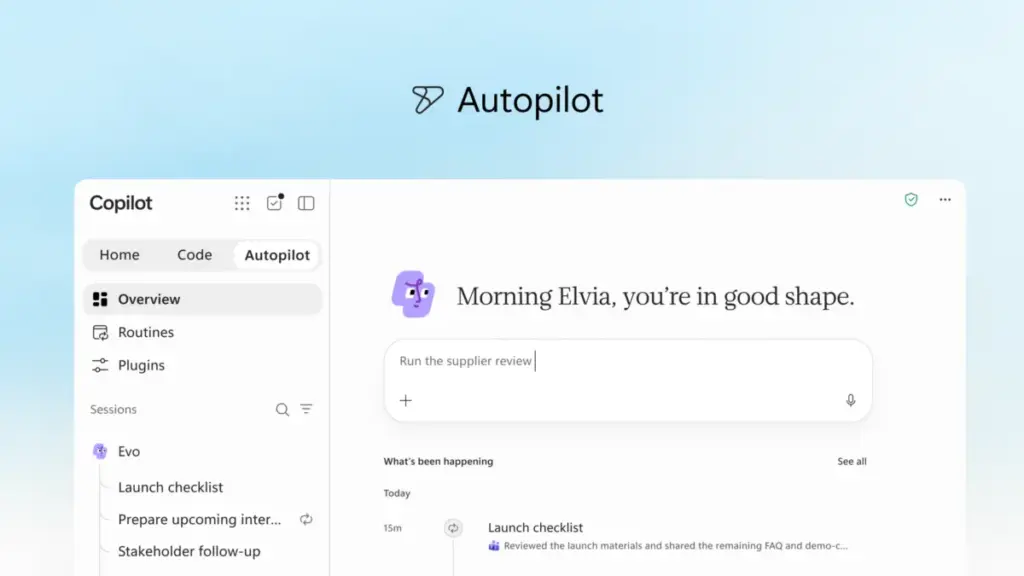
The most ambitious component of the new Copilot is "Autopilot," a persistent and proactive digital agent formerly known as Scout. Unlike standard AI tools that wait for a prompt, Autopilot is designed to function as a digital teammate with its own identity, memory, and workspace.
Users can assign Autopilot a specific role and goal—such as managing a complex supplier review process. Once tasked, the agent can independently build a schedule, monitor communication channels, follow up on threads, and reach out to stakeholders for updates. Because Autopilot is cloud-hosted, it continues to work while the user is away, ensuring that projects maintain momentum without constant human supervision.

Built on the "Microsoft IQ" intelligence platform, Autopilot possesses an understanding of how an organization operates. It is integrated into the existing communication infrastructure, appearing in Teams, Outlook, and various chat channels. This allows human colleagues to @mention the agent just as they would any other team member, all while remaining within the organization’s established security and audit frameworks.
Expanding Business Context and Data Grounding
For AI to be effective in a corporate setting, it must be grounded in the specific data and context of that business. Microsoft is addressing this through "Fabric IQ," which connects Copilot to more than 20 million semantic models in Power BI. This allows the AI to draw on trusted organizational data when performing tasks in Chat or Cowork.
Additionally, Copilot is now gaining deeper integration with Dynamics 365 and Power Platform data. This means that a sales professional working on a proposal can have Copilot automatically incorporate deal histories or active support tickets directly into their document without needing to perform manual lookups in a CRM system.
To manage the various tools and extensions that enhance these capabilities, Microsoft is rolling out a new plugin registry. This unified catalog allows IT departments to centrally approve and manage plugins from Microsoft, third-party partners, and internal developers. This centralized governance is intended to help organizations introduce new AI capabilities at scale while maintaining strict control over data access.
FinOps for AI: Managing the Economics of Intelligence
As AI moves from a novelty to a core business expense, Microsoft is introducing a dual-tier pricing and management structure under the umbrella of "FinOps for AI." This discipline is intended to help organizations optimize their AI spend for maximum business value.
For "everyday AI" tasks like drafting emails or summarizing meetings, Microsoft offers a User Subscription License (USL). This model provides a fixed cost for standard Copilot features. A core component of this is "Auto," a routing system that evaluates each request to determine the most cost-effective model that can provide the necessary accuracy and speed.

For more complex, "agentic" work—such as the long-running tasks handled by Autopilot or Cowork—Microsoft is utilizing Usage-Based Billing (UBB). This model is designed for advanced workflows that require frontier models like "Astra" and "Fable," allowing businesses to match their costs directly to the value generated by these high-end capabilities.
New tools within Agent 365 and Insights will allow administrators to manage these costs. Admins can set spending policies, route credit requests through automated approval workflows, and restrict which model families are available to specific groups of users. For the end user, transparency is provided through a credit usage dashboard within the Copilot app, showing remaining balances and usage history to ensure work remains within organizational guardrails.
The Future Roadmap: "Today" and Teams Integration
Looking ahead, Microsoft provided a preview of upcoming features aimed at making Copilot even more personalized. Scheduled for private preview in October, a new command center called "Today" will act as a proactive hub across mail, calendar, and Teams. Rather than just listing tasks, "Today" is designed to prepare the work in advance—drafting responses to missed messages, proposing schedule changes, and providing context for forgotten follow-ups.
Furthermore, the "@Copilot" capability in Microsoft Teams is set to expand. When invoked in a channel or group chat, Copilot will have access to the shared context of the entire group. It will be able to explain why certain decisions were made by pulling from past conversations and can even offer to create cross-functional reviews that identify dependencies and owners across different departments.
The "new Copilot" is currently rolling out through Microsoft’s Frontier program, with broader availability expected in the coming weeks and months. These developments represent a clear trajectory for the company: moving away from a world of isolated AI tools and toward a future where persistent, intelligent agents are woven into every facet of organizational life. As Jared Spataro, Microsoft’s lead for AI at Work, noted, these innovations are intended to help every organization leverage AI to solve unique business problems and drive net-new value. Further details on these innovations are expected to be a central focus of the Microsoft Ignite conference in November.
 Productivity Software & Office Suites
The Rise of the Agentic Operating Model: How ‘Frontier Firms’ Are Using Knowledge Spines to Outpace Competitors
As the initial hype surrounding generative artificial intelligence matures into a demand...
 Productivity Software & Office Suites
Microsoft Announces Fifth Annual Power Platform Community Conference in Las Vegas to Bridge the Gap Between AI Innovation and Business Process
As the global enterprise landscape continues to evolve, the fundamental machinery of...
 Productivity Software & Office Suites
Microsoft Reimagines Copilot as a Proactive AI Ecosystem for the Enterprise
Microsoft has announced a comprehensive overhaul of its Copilot platform, signaling a...







