In a significant move to redefine the landscape of digital productivity, Microsoft has announced a comprehensive reimagining of its Copilot platform. The tech giant is introducing what it calls the "new Copilot," a consolidated ecosystem designed to bridge the gap between traditional software tools and a new generation of artificial intelligence capabilities. This update aims to integrate AI more deeply into the "flow of human ambition," allowing both individuals and large-scale organizations to build, customize, and scale AI-driven workflows with unprecedented ease.
The announcement signals a shift in Microsoft’s strategy, moving away from viewing AI as a mere chatbot and toward treating it as a foundational layer for all professional activities. By connecting the tools that workers rely on daily with advanced agentic capabilities, Microsoft hopes to enable a more proactive and personalized approach to work. The "new Copilot" is built around three primary pillars: Home, Code, and Autopilot, each targeting a different mode of professional engagement.
A Centralized Hub for Every Mode of Work
The centerpiece of this update is the introduction of "Home," a new starting point within the Copilot app designed to serve as a unified command center. In the modern workplace, employees often find themselves bouncing between disparate platforms—emails, video meetings, collaborative documents, and various specialized apps. Microsoft’s vision for Home is to provide a grounded environment where users can regain their bearings and maintain momentum.
Within the Home interface, two distinct modes of interaction coexist: Chat and Cowork. Chat remains the familiar, conversational interface optimized for rapid-fire questions, quick data lookups, and the drafting of simple messages. It is designed to keep users "in the loop" without requiring deep dives into complex menus.
Cowork, however, represents a more advanced shift toward delegation. Rather than simply asking for information, users can define complex tasks and delegate them to the AI to be executed end-to-end. Microsoft envisions Cowork handling labor-intensive projects such as generating Request for Proposal (RFP) responses, assembling comprehensive launch kits, or preparing financial close packages. The system is designed to iterate on these tasks until a polished, completed result is achieved.

Perhaps most notably, Microsoft is integrating the full suite of Office applications—Word, Excel, and PowerPoint—directly into the Copilot experience. This "Office in Copilot" feature allows users to initiate real work from within the AI interface without the friction of switching applications. For example, a user can ask Copilot to draft a brief or build a slide deck, and the AI will create an editable, live document that remains in sync across the Microsoft 365 ecosystem. This ensures that formatting remains intact and that team members can collaborate in real-time, with @mentions and edits appearing seamlessly regardless of whether a user is working in the standalone app or the Copilot interface.
Democratizing Solution Building with "Code"
Recognizing that the "unit of work" in the knowledge economy is evolving, Microsoft is introducing "Code," a feature that extends the power of solution-building to non-developers. While documents, spreadsheets, and presentations remain vital, Microsoft argues that small, purpose-built applications are becoming equally essential for getting work done.
The Code feature allows users to describe an application, automation, or dashboard using natural language. Copilot then selects the appropriate technical approach and builds the solution. These can range from persistent desktop widgets for quick data reference to cloud-hosted internal apps that can be shared across a team.
Under the hood, Code is powered by the same technology as GitHub Copilot, ensuring a robust and professional-grade foundation. However, it is designed to run in a sandboxed environment, hosted securely within an organization’s own tenant to maintain strict data privacy and security. This democratization of coding is intended to make building a custom tracker or an automated workflow as basic a professional skill as writing a memo. To support this, Microsoft is also previewing the Copilot Managed Runtime, an infrastructure that allows these custom-built solutions to run safely and be governed by IT departments while remaining easily accessible to the end-users who created them.
The Rise of Autonomous Agents: Introducing Autopilot
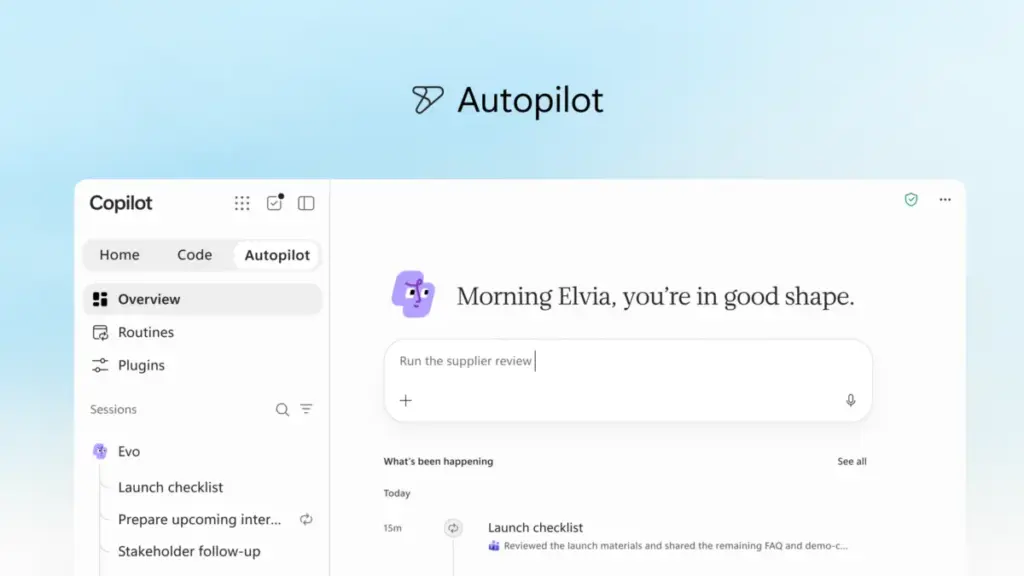
The third pillar of the new experience is "Autopilot," a persistent and proactive digital agent formerly known by the internal codename "Scout." Unlike traditional AI assistants that wait for a user to provide a prompt, Autopilot is designed to work autonomously.
Users can assign Autopilot a specific name, role, and goal. Once activated, the agent can monitor communication channels, follow up on email threads, and manage recurring workflows even when the user is offline. Microsoft provided the example of a full supplier review process: Autopilot can build a schedule, handle the preparation of materials, conduct meetings, and follow up with stakeholders for updates, all while the human user focuses on other priorities.

Because Autopilot is cloud-hosted and possesses its own identity and memory within the organization’s tenant, it functions more like a digital teammate than a tool. It is built on "Microsoft IQ," a unified intelligence platform that allows the agent to understand the specific context and cultural nuances of how a particular organization operates. Autopilot is integrated into Teams, Outlook, and other Microsoft 365 apps, allowing colleagues to @mention it just as they would any other member of the staff.
Expanding Context and Grounding AI in Business Data
For AI to be truly effective in a corporate setting, it must be "grounded" in the specific data of the business. Microsoft is expanding this context through "Fabric IQ," which brings semantic models from Power BI directly into Copilot. This allows Chat and Cowork to pull from trusted organizational data to provide more accurate and relevant insights.
Furthermore, Copilot is now being integrated with Dynamics 365 and Power Platform data. This means that a salesperson drafting a proposal can have Copilot automatically incorporate deal histories, customer support tickets, and specific account data directly into a document without having to manually look up the information in a separate CRM system.
To manage the various capabilities and third-party integrations, Microsoft is launching a new unified plugin registry. This catalog will allow IT administrators to centrally approve and manage plugins from Microsoft, partners, and custom developers, ensuring that users have access to the tools they need while maintaining organizational control and security.
Managing the Economics of AI with FinOps
As AI adoption scales, managing the associated costs has become a primary concern for enterprise leaders. Microsoft is addressing this through a new discipline called "FinOps for AI," intended to help organizations optimize their spend and maximize value.
The company is introducing a dual-track pricing and model-selection strategy. For "everyday AI" tasks—such as drafting summaries or quick analysis—Microsoft offers a User Subscription License (USL). This provides access to Copilot at a fixed cost, with an underlying "Auto" feature that automatically selects the most efficient model for the task based on speed, accuracy, and cost.

For more intensive, "agentic" work—such as the long-running tasks handled by Cowork, Code, and Autopilot—Microsoft is utilizing usage-based billing (UBB). This allows organizations to use advanced frontier models, such as Astra and Fable, while maintaining full control over their expenditure.
New administrative capabilities within "Agent 365" will allow IT managers to set spending policies, route credit requests through automated approval workflows, and monitor which AI tasks are delivering the highest return on investment. End-users will also be able to see their own credit usage and history, fostering a culture of responsible AI consumption within the workplace.
A Glimpse into the Future: "Today" and Teams Integration
Looking ahead, Microsoft teased several upcoming features designed to make Copilot even more personalized. A new command center called "Today" is set to enter private preview soon. It will act as a proactive dashboard across mail, calendar, and tasks, surfacing what needs immediate attention and even preparing drafts or schedule changes before the user even asks.
Additionally, a new "@Copilot" capability in Microsoft Teams will allow the AI to participate in group chats and channels with a full understanding of the shared context. It will be able to explain why certain decisions were made by analyzing past conversations and offer to prepare cross-functional reviews to keep projects moving forward.
These updates are currently rolling out through Microsoft’s Frontier program, with broader availability expected in the coming months. The company has invited users and developers to explore these innovations further at the upcoming Microsoft Ignite conference in November, where the focus will remain on how AI and autonomous agents can continue to reshape the future of work.
 Productivity Software & Office Suites
Microsoft Announces Fifth Annual Power Platform Community Conference in Las Vegas to Bridge the Gap Between AI Innovation and Business Process
As the global enterprise landscape continues to evolve, the fundamental machinery of...
 Productivity Software & Office Suites
Microsoft Reimagines the Future of Productivity with a New Generation of Copilot and Autonomous Agents
Microsoft has announced a significant evolution of its artificial intelligence strategy, unveiling...
 Productivity Software & Office Suites
Microsoft Announces Microsoft 365 G7 and Agent 365 to Accelerate AI Adoption and Governance Across U.S. Government Agencies
In an era where the public sector faces the dual challenge of...